
Chunck Protector
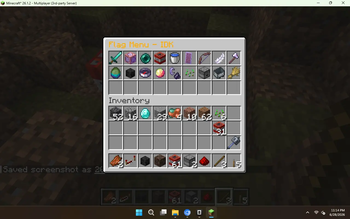
Chunk Protector is a high-performance, Server-Side ONLY administrative protection matrix. It provides granular flag-based territory control with an intuitive chest GUI—no client mods required.
Screenshots
About this Mod
Here's a Modrinth description for the chunk protector mod in the same style:
🛡️ ChunkProtector 🚀
ChunkProtector is a high-performance, Server-Side ONLY administrative protection matrix for Minecraft 1.21.x, 26.1.x, and 26.2.x. It provides granular flag-based territory control with an intuitive chest GUI—no client mods required. 🔌✨
Supported Versions
| Version | Java | Status |
|---|---|---|
| 1.21.x | 21 | ✅ Full support |
| 26.1.x | 25 | ✅ Full support |
| 26.2.x | 25 | ✅ Full support |
🛠️ Purpose & Function
The core mission of this project is to give server administrators total control over their world's protected zones through a Digital Flag System. 🌌
- Stop the Grief: Instead of relying on clunky command-based flag management, admins can now open a visual 9x3 chest menu and toggle protections with a single click. 🧹
- Instant Enforcement: Every flag is enforced server-side via Mixins—PvP, TNT, explosions, projectiles, fire spread, liquid flow, mob spawning, flight, and more are intercepted the moment they touch a protected chunk. 💨🔥
✨ Key Features
| Flag | Description | Default |
|---|---|---|
| 🗡️ PvP Enabled | Allow player vs player combat | OFF |
| 🧱 Admin Edit Only | Only admins can place/break blocks | ON |
| 💎 Ender Pearls | Allow ender pearl teleportation | OFF |
| 💥 TNT Explosions | Allow TNT explosions | OFF |
| 🌊 Liquid Flow | Allow liquids to flow into area | OFF |
| 🏹 Projectiles | Block arrows, snowballs, etc. | ON |
| 🪶 No Flight Zone | Disable flight in this area | ON |
| ⚔️ No Fight Zone | Disable ALL combat in this area | ON |
| 👾 Mob Spawning | Allow mob spawning | OFF |
| ☠️ Wither/Creeper Grief | Allow wither/creeper block damage | OFF |
| 🧭 Hostile Despawn | Despawn hostile mobs near players | 8 blocks |
| 🔥 Magma Damage | Disable sulfur cube damage | ON |
| 🔥 Fire Spread | Prevent fire from spreading | ON |
| 🌱 Crop Trample | Prevent crops being trampled | ON |
| 📦 Item Drop | Prevent item dropping | OFF |
| 🚂 Vehicle Entry | Prevent entering vehicles/boats | OFF |
| 🌾 Animal Breeding | Prevent animal breeding | OFF |
- 🚀 18 Configurable Flags — Toggle each protection live from the GUI
- 📡 100% Server-Side — No client mods required. Vanilla players are fully protected. 🍦
- 🛡️ Chest GUI Menu — Intuitive 27-slot interface with colored ON/OFF indicators and descriptions
- ⚖️ Ultra-Lightweight — Pure Fabric Mixins with zero dependencies and near-zero CPU footprint 🧠
- 🧹 No Fabric API Required — Just Fabric Loader. Drop the JAR and go.
- 🗺️ Chunk Selection Tools — Admin Stick + Claim Shovel for defining areas visually
- 🔄 Auto-Merge — Adjacent chunks merge automatically into contiguous protected regions
- 🛡️ Buffer Zone — Configurable safety border to prevent edge-case exploits
🎮 How to Use
- Step 1: Give yourself tools with
/chunkprotector tool stick(selection) and/chunkprotector tool shovel(claim). 💬 - Step 2: Right-click blocks to select chunks, then run
/chunkprotector area create myArea. 📦 - Step 3: Open the flag menu with
/chunkprotector area myArea menu. ❌ - Step 4: Click any flag item to toggle it — green glow means active. ⚡
/chunkprotector info          — Show commands
/chunkprotector menu           — Flag GUI for current chunk
/chunkprotector area <id> menu — Flag GUI for specific area
Built for administrators who demand granular territory control and lag-free protection enforcement. Every flag is enforced instantly, server-wide, with zero client overhead. 🌍💎
Available Versions
How to Install Chunck Protector on Your Server
Order Server
Order a Minecraft Java server with at least 3 GB RAM (4 GB recommended).
Set fabric Loader
In the panel under "Egg", select the fabric loader and matching Minecraft version (26.2).
Install Mod
Open the mod browser in the dashboard and search for "Chunck Protector". Click "Install" – done! Alternatively, upload the .jar via SFTP to the /mods folder.
Compatibility
Mod Loaders
Minecraft Versions
26.2, 26.1.2, 26.1.1 (+13 more)
Server-side
✓ RequiredRecommended RAM
4 GB(min. 3 GB)Frequently Asked Questions
Chunck Protector server crashes on startup – what to do?
Most common cause: wrong fabric version or insufficient RAM. Check the server log (latest.log) for "OutOfMemoryError" or "Mixin" errors. With Mado Hosting: ensure at least 3 GB RAM is allocated and the loader matches the mod version (26.2). You can switch loaders with one click in the panel.
Is Chunck Protector compatible with fabric?
Chunck Protector officially supports fabric for Minecraft 26.2, 26.1.2, 26.1.1. The Mado dashboard automatically detects incompatible loader combinations.
Server lagging with Chunck Protector – how to optimize performance?
Recommended RAM: 4 GB (per 8 players). Use /spark profiler to check if Chunck Protector consumes the most tick time. Common fixes: reduce server view-distance to 8-10, install "performant" or "starlight" as supplementary mods on Forge. With Mado Hosting, your server runs on NVMe SSDs with dedicated CPU cores for minimal latency.
Similar Mods






Rent Modded Server
Install Chunck Protector with just one click on your server.