
CList
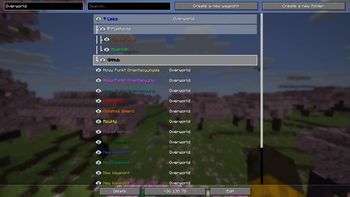
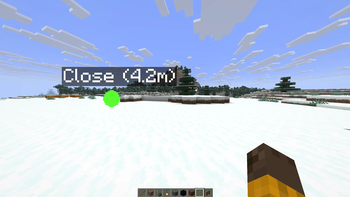
Coordinate List (CList for short) is a simple minimalistic fabric mod for saving your coordinates. No minimaps. Just a list with in-game waypoints.
Screenshots

About this Mod
CList
Coordinate List (CList for short) is a simple minimalistic Fabric mod for saving your coordinates. No minimaps. Just a list with in-game waypoints.
(If you want to help and know any other language than English you can help by translating the mod here by making a pull request)
The idea behind it
I initially created this mod just for me and my friends. I'm not too fond of these waypoint mods which always have built-in minimap which lagged my game even when it was off. So I made my own mod to fulfill the need for a lightweight, minimalistic waypoint mod.
Features
- Hotkey for placing a waypoint in the current position
- Automatic waypoints in the place where you died
- Copying the waypoint coordinates to the clipboard
- Copying a teleport command to the waypoint in its dimension
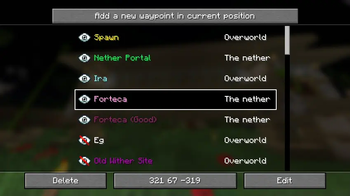
- Toggling waypoint visibility
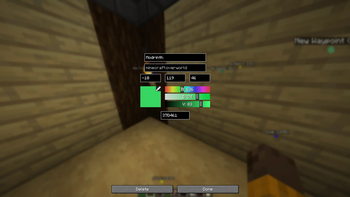
- Changing the size of the waypoint to your liking
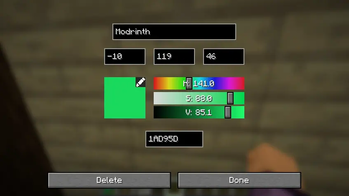
- Changing the color of the waypoint to your liking
- Setting the maximum rendering distance for waypoints
- Detecting coordinates from chat
- Convert coordinates between The Nether and Overworld
- Folders
- Migrate your waypoints from one world/server to another
- Sorting by dimension
- Searchable list of waypoints
- Highly configurable
- Available in multiple languages
- No minimap
Support
CList will always receive latest features for the latest version of the game. Porting the newest features to older Minecraft versions is not planned so before creating an issue check if the feature you want isn't already implemented in the latest version of the mod.
Forge/NeoForge is not planned, but it seems that Sinytra Connector does a pretty good job if you want to use CList on Forge/NeoForge.
You can freely include CList in any mod packs.
Available Versions
How to Install CList on Your Client
Install the Mod Loader Locally
Install fabric for your local Minecraft version.
Download the Matching File
Choose the CList file for fabric and Minecraft 26.1.2.
Install Mod
Place the .jar file in your local .minecraft/mods folder and restart Minecraft. No server-side installation is required.
Compatibility
Mod Loaders
Minecraft Versions
26.1.2, 26.1.1, 26.1 (+21 more)
Server-side
✗ UnsupportedRecommended RAM
4 GB(min. 3 GB)Frequently Asked Questions
Does CList need to be installed on the Minecraft server?
No. Modrinth marks CList as unsupported on the server side. Install it only in your local Minecraft mods folder. Your server can remain unchanged unless the mod page lists an additional dependency.
Which version and loader does CList require?
Use a file for fabric and your exact Minecraft version. Supported versions include 26.1.2, 26.1.1, 26.1. Files for different loaders are not interchangeable.
CList is not working – what should I check?
First check the Minecraft version, loader version and required dependencies. Put the .jar file in your local .minecraft/mods folder and remove older duplicates. Because this mod is client-side, adding server RAM will not fix it.
Similar Mods




Minecraft Server for Your Group
CList stays on your client. Host a compatible world for your group.