
Cobbleloots: Loot Balls and More!
A side-mod for cobblemon that adds different ways to obtain items like in the original games.
Screenshots
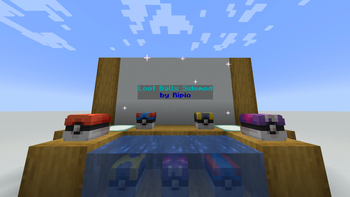
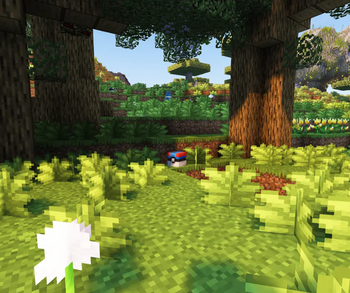
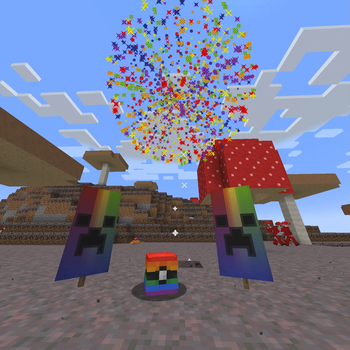
About this Mod
Cobbleloots: Loot Balls and More!
Cobbleloots is a mod for Cobblemon that adds different ways to obtain items based on the original Pokémon video games.
IMPORTANT (BETA-2.2.0+): Recent updates have introduced breaking changes, especially with the configuration. You will need to update your configurations to ensure compatibility.
Features
Loot Balls 💎
These balls contain useful items for the player. They can grant XP and items when opened, and can be used as a decorative entity in survival mode. When a loot ball has no remaining uses, it can be destroyed to drop as a decorative item (this behavior is configurable).
Obtaining Loot Balls
- Generation: Loot balls can be found in the world. Some of them are specific to biomes, while others are more common.
- Spawning: Over time, loot balls will spawn in the world around random players.
- Fishing: Players can catch loot balls when fishing with Cobblemon Poké Rods. Different rods can catch different tiers of loot balls, and using the Luck of the Sea enchantment increases the chance of finding a loot ball.
Loot balls are categorized into tiers that determine their rarity and loot quality: Common, Uncommon, Rare, and Ultra Rare.
Valuable Items 💰
Cobbleloots incorporates 10 classic valuable items from Pokémon that serve as trade goods, rewards, or server economy tokens:
- Nugget & Big Nugget (
cobbleloots:nugget,cobbleloots:big_nugget) - Pearl, Big Pearl & Pearl String (
cobbleloots:pearl,cobbleloots:big_pearl,cobbleloots:pearl_string) - Stardust, Star Piece & Comet Shard (
cobbleloots:stardust,cobbleloots:star_piece,cobbleloots:comet_shard) - Rare Bone (
cobbleloots:rare_bone) - Balm Mushroom (
cobbleloots:balm_mushroom)
Each item includes custom 16x16 pixel-art textures, immersive tooltips referencing collectors and shops who buy them at high prices, and is available in the Cobbleloots creative mode tab.
Mapmaking 🗺️
Check out the documentation to learn how to use the mod objects and features in your custom maps. If you still have questions, feel free to ask on my discord server.
Note: The documentation is a work in progress, and some features may not be fully documented yet. If you need help with a specific feature, please reach out on my Discord server.
Custom Loot Balls 🎁
Create custom loot balls with different items and properties using the new Loot Ball Data system. You can customize various aspects, including:
- The name displayed in-game.
- The loot table used when opened.
- The texture of the loot ball.
- The amount of XP granted to the player.
- Player-specific timers (cooldowns) before a player can reopen the loot ball.
- Sources for how loot balls appear (e.g.,
generation,spawning), with detailed filters:weightfor rarity.structuretags.biometags (biome keys, biome tags, or biome dicts).dimensionlists.blocktags (for spawn block or base block).fluidtags.position(x, y, z coordinates with min/max ranges).lightlevels (block and sky, for spawning).timeof day (with period options).dateranges (e.g., seasonal events).weatherconditions (clear, rain, thunder).
- Variants for a single loot ball type, each with its own optional name, texture, and loot table.
Some of these features are continuously being refined, but the data system is designed for flexibility and future additions.
Mod configuration ⚙️
The mod configuration is powered by MidnightLib and supports in-game editing:
- Fabric: Edit via ModMenu.
- NeoForge: Edit via the Mods menu.
- Command: Server OPs can use
/midnightconfig cobbleloots <key> <value>.
The config file is located in the config folder of your Minecraft instance. Check the Configuration docs for more information.
Commands 🛠️
Cobbleloots provides in-game commands to help server operators and mapmakers manage loot balls:
/cobbleloots reset loot_ball target [player] [restore_uses]: Resets the loot ball in your line of sight (within 16 blocks) for yourself or targeted player(s)./cobbleloots reset loot_ball all [player] [restore_uses]: Globally resets all loot balls in the world (with automatic persistence for unloaded chunks)./cobbleloots reset loot_ball entity <selector> [player] [restore_uses]: Resets specific loot balls matching an entity selector./cobbleloots reset loot_ball undo [player]: Reverts the last reset action performed./cobbleloots debug weights [source_type] [pos]: Displays the weighted spawn probability table for candidate loot balls at your position./cobbleloots debug check <id> [source_type] [pos]: Evaluates each filter condition for a specific loot ball ID and reports passed/failed checks.
Check out the full Commands Reference for detailed arguments, permissions, and examples.
FAQ
How do I make loot balls give loot to every player, not just the first one?
This is a common setup for servers where you want all players to be able to collect loot from the same ball.
You need two things:
- Infinite uses — Set the
usesNBT tag on the loot ball to-1. A loot ball with-1uses is infinite and works on a per-player basis: each player gets their own loot independently. - Player cooldown (optional) — Set the
PlayerTimerNBT tag to a number of ticks. This is the cooldown before a player can collect from the same ball again. If omitted (or set to0), each player can only ever collect once.
To apply this globally to all new loot balls, update the default configuration values:
- Set
loot_ball_default_usesto-1→ all newly spawned/generated loot balls will have infinite uses. - Set
loot_ball_default_player_cooldownto the desired cooldown in ticks (e.g.,72000= 1 hour) → players can reclaim after that time. Set to0to allow each player to collect exactly once, with no reclaim.
See the Configuration docs for more details.
Planned Features
Hidden Items 🔍
Inspired by the original Pokémon games, Hidden Items are invisible objects scattered across the world, waiting to be discovered.
Fake Items 🪤
Be aware that some objects may not be what they appear to be. Pokémon will sometimes disguise themselves as objects in order to trick you.
Available Versions
How to Install Cobbleloots: Loot Balls and More! on Your Server
Order Server
Order a Minecraft Java server with at least 3 GB RAM (4 GB recommended).
Set fabric Loader
In the panel under "Egg", select the fabric loader and matching Minecraft version (1.21.1).
Install Mod
Open the mod browser in the dashboard and search for "Cobbleloots: Loot Balls and More!". Click "Install" – done! Alternatively, upload the .jar via SFTP to the /mods folder.
Compatibility
Mod Loaders
Minecraft Versions
1.21.1, 1.20.1
Server-side
✓ RequiredRecommended RAM
4 GB(min. 3 GB)Frequently Asked Questions
Cobbleloots: Loot Balls and More! server crashes on startup – what to do?
Most common cause: wrong fabric version or insufficient RAM. Check the server log (latest.log) for "OutOfMemoryError" or "Mixin" errors. With Mado Hosting: ensure at least 3 GB RAM is allocated and the loader matches the mod version (1.21.1). You can switch loaders with one click in the panel.
Is Cobbleloots: Loot Balls and More! compatible with fabric and neoforge?
Cobbleloots: Loot Balls and More! officially supports fabric, neoforge for Minecraft 1.21.1, 1.20.1. The Mado dashboard automatically detects incompatible loader combinations.
Server lagging with Cobbleloots: Loot Balls and More! – how to optimize performance?
Recommended RAM: 4 GB (per 8 players). Use /spark profiler to check if Cobbleloots: Loot Balls and More! consumes the most tick time. Common fixes: reduce server view-distance to 8-10, install "performant" or "starlight" as supplementary mods on Forge. With Mado Hosting, your server runs on NVMe SSDs with dedicated CPU cores for minimal latency.
Similar Mods




Rent Modded Server
Install Cobbleloots: Loot Balls and More! with just one click on your server.