
Cobblemon additions
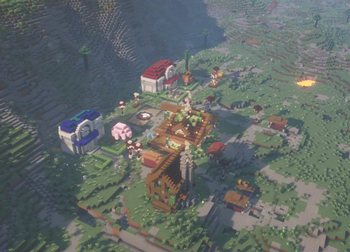
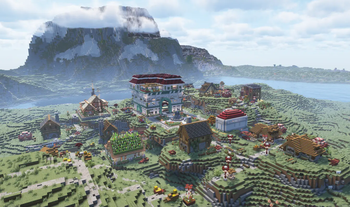
A Mod that adds villages with Pokemon Village/City variants - Originally made for the Brocraft server. This will spawn in a variety of structures within the villages as well. We are planning on adding rare structures!
Screenshots

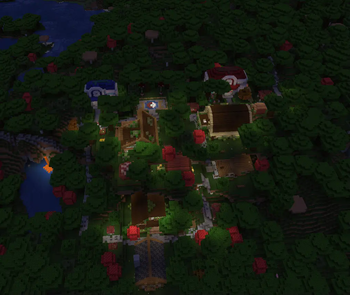
About this Mod
Brocraft Cobblemon Additions
Overview
Brocraft Cobblemon Additions is a Minecraft Mod that enhances your gameplay experience by replacing the traditional village structures with unique, custom-built structures inspired by the Cobblemon universe. This mod is designed to integrate seamlessly with existing Cobblemon features, providing a fresh take on village exploration.
SUPPORT AND COMMUNITY DISCORD: Feel free to join our discord!
Annoucements and details for the mod will be posted in our discord!
Support the Development on Patreon!
If you enjoy this project and want to help support its development, consider becoming a patron! By joining my Patreon, you’ll get access to exclusive content, early releases, and be part of a growing community of dedicated players.
Here is a quick glimpse into Cobblemon Additions
I hope you enjoy what you find in your adventures!
Features
- Custom Structures: Replaces vanilla villages with a variety of custom-designed structures, each contributing to a vibrant game world.
- Unique Town Centers: Enjoy specially crafted town centers that serve as focal points for villages, including the Battlepad and The Department store. (more to come)
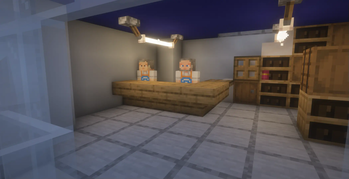
- Diverse Environment: Explore different themed buildings, including cozy cottages, bustling PokéMarts, and serene retreats.
- Varied Pathways: Navigate the world with unique pathways that enhance the aesthetic appeal and functionality of your villages.
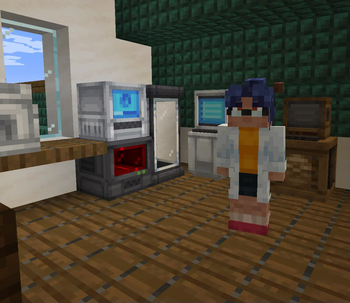
- Dynamic Villager Interaction: Integrate Cobblemon mechanics with villagers, offering unique interactions and services.
Installation (For the old datapack versions only)
- Ensure you have Minecraft with Fabric installed.
- Download the latest release of Brocraft Cobblemon Additions from the releases section.
- Place the downloaded
.zipfile into theDatapacksfolder of your Minecraft installation/world. - Launch Minecraft and enjoy!
Dependencies
Cobblemon version 1.6.1
Waystones
Sophisticated Backpacks (Optional)
Traveler's backpack (Optional)
Cobblenav (optional)
[EMF] Entity Model Features version 2.2.6(optional - only needed if you use the cobblefolk datapack)
[ETF] Entity Texture Features version 6.2.5(optional - only needed if you use the cobblefolk datapack)
it is also recommended that you use the cobblefolk datapack that comes with the cobbletowns mod for the best immersion (Look on the cobblemon discord in the cobbletowns support channel for the current functioning version)
Structure Pools
This mod features multiple structure pools, including:
- Centers: Custom town center structures.
- General Structures: A variety of themed homes and buildings.
- Paths: Unique pathways for enhanced navigation.
- Store Workers: Villager NPCs for shops and services.
- General Decor: Decorative items to enhance the village aesthetics.
- Lamp Posts: Functional light sources for your villages.
- Berries: Custom berry structures to enrich the environment.
License
This mod is licensed under the ARR License.
Do not re-upload this mod
Acknowledgements
- Special thanks to the creators of Cobblemon and the Minecraft community for their inspiration and support.
Available Versions
How to Install Cobblemon additions on Your Server
Order Server
Order a Minecraft Java server with at least 4 GB RAM (6 GB recommended).
Set datapack Loader
In the panel under "Egg", select the datapack loader and matching Minecraft version (1.21.11).
Install Mod
Open the mod browser in the dashboard and search for "Cobblemon additions". Click "Install" – done! Alternatively, upload the .jar via SFTP to the /mods folder.
Compatibility
Mod Loaders
Minecraft Versions
1.21.11, 1.21.10, 1.21.9 (+9 more)
Server-side
✓ RequiredRecommended RAM
6 GB(min. 4 GB)Frequently Asked Questions
Cobblemon additions server crashes on startup – what to do?
Most common cause: wrong datapack version or insufficient RAM. Check the server log (latest.log) for "OutOfMemoryError" or "Mixin" errors. With Mado Hosting: ensure at least 4 GB RAM is allocated and the loader matches the mod version (1.21.11). You can switch loaders with one click in the panel.
Is Cobblemon additions compatible with datapack and fabric?
Cobblemon additions officially supports datapack, fabric for Minecraft 1.21.11, 1.21.10, 1.21.9. The Mado dashboard automatically detects incompatible loader combinations.
Server lagging with Cobblemon additions – how to optimize performance?
Recommended RAM: 6 GB (per 5 players). Use /spark profiler to check if Cobblemon additions consumes the most tick time. Common fixes: reduce server view-distance to 8-10, install "performant" or "starlight" as supplementary mods on Forge. With Mado Hosting, your server runs on NVMe SSDs with dedicated CPU cores for minimal latency.
Similar Mods




Rent Modded Server
Install Cobblemon additions with just one click on your server.