
Controlify Wynn
Use in addition to Controlify and Wynntils to improve your controller experience when playing Wynncraft
Screenshots
About this Mod
Have you ever wondered what it would be like to play Wynncraft with a controller?
Controllify Wynn aims to make it easy to play Wynncraft with a controller.
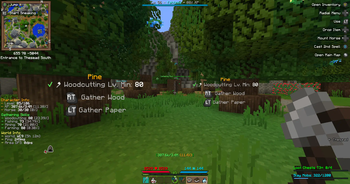
It not only adds Controlify compatability to Wynntils, but also adds some other nice-to-haves such as additional keybinds (such as a quick Blacksmith sell or Identify) and visual guides (such as the Gathering keybind guide).
Full Feature List
- Controlify/Wynntils compatability:
- Allow binding Wynntils keybinds with Controlify (Such as spell casting, horse mousing, ect)
- Enable better Wynntils GUI navigation with controllers
- New keybinds to help with controller usage:
- Identify/Sell/Scrap items (inside Identifer/Blacksmith GUI) - GUI Abstract Action 1
- Page/Scroll navigation using bumpers (inside Trade Market/Bank/Ability Tree/Default Quest Book)
- Contoller gathering button guide
- Better Wynncraft GUI navigation (dont snap the cursor to invisible GUI elements)
Mod Dependencies/Requirements
- Minecraft:
1.20.2(Required for Wynntils) - Fabric API
- Wynntils
- Controlify
Suggested Configuration
Through playing Wynncraft with an Xbox controller, this is the configuration that works for me (and is by no means a requrement, you do you!).
- Movement: Controlify defaults
- Gameplay:
- Drop Item/Stack: Unbound
- Change Perspective: Unbound
- Pick Block: Unbound
- Inventory:
- Drop Item: Unbound
- Swap Hands: Unbound
- Miscellaneous: Controlify defaults
- GUI: Controlify defaults
- Radial Menu:
- Binds:
- Drop Item
- Open Quest Book
- Toggle Gammabright
- Open Main Menu
- Open Main Map
- Cast Spells/Custom Keybinds
- Binds:
- Virtual Mouse:
- Toggle Virtual Mouse: Unbound
- Wynntils:
- Mount Horse: DPad Left
- Cast 1st Spell: X
- Open Main Map: Share Button
WIP/Upcomming Features
- Improved Wynntils GUI navigation
- Improved Wynncraft GUI navigation and usage
- Allow dialogue option selection (possibly through a radial menu)
License
Controlify Wynn is licensed under the license GNU Lesser General Public License v3.0
Available Versions
How to Install Controlify Wynn on Your Client
Install the Mod Loader Locally
Install fabric for your local Minecraft version.
Download the Matching File
Choose the Controlify Wynn file for fabric and Minecraft 1.20.2.
Install Mod
Place the .jar file in your local .minecraft/mods folder and restart Minecraft. No server-side installation is required.
Compatibility
Mod Loaders
Minecraft Versions
1.20.2
Server-side
✗ UnsupportedRecommended RAM
4 GB(min. 3 GB)Frequently Asked Questions
Does Controlify Wynn need to be installed on the Minecraft server?
No. Modrinth marks Controlify Wynn as unsupported on the server side. Install it only in your local Minecraft mods folder. Your server can remain unchanged unless the mod page lists an additional dependency.
Which version and loader does Controlify Wynn require?
Use a file for fabric and your exact Minecraft version. Supported versions include 1.20.2. Files for different loaders are not interchangeable.
Controlify Wynn is not working – what should I check?
First check the Minecraft version, loader version and required dependencies. Put the .jar file in your local .minecraft/mods folder and remove older duplicates. Because this mod is client-side, adding server RAM will not fix it.
Similar Mods




![[ETF] Entity Texture Features](https://cdn.modrinth.com/data/BVzZfTc1/af683d206d50b05258d865b0d6e4aa2f2cee12f2_96.webp)

Minecraft Server for Your Group
Controlify Wynn stays on your client. Host a compatible world for your group.