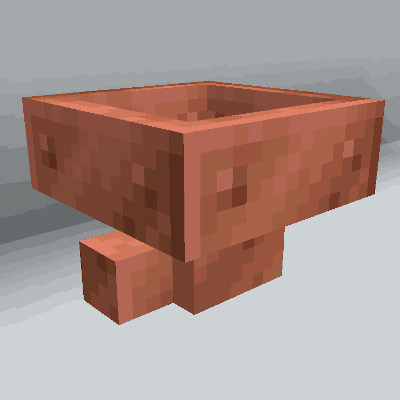
Copper Hopper
Hopper that acts as a simple item filter.
About this Mod
Copper Hopper
Copper Hopper adds a new kind of Hopper that filters the items to get pulled and pushed. They
save you the tedium of building gigantic item sorters while retaining a Vanilla Minecraft spirit.
Features
- Filter up to 5 items per Copper Hopper
- Filter both stackable and unstackable items
- Uses the Fabric modloader
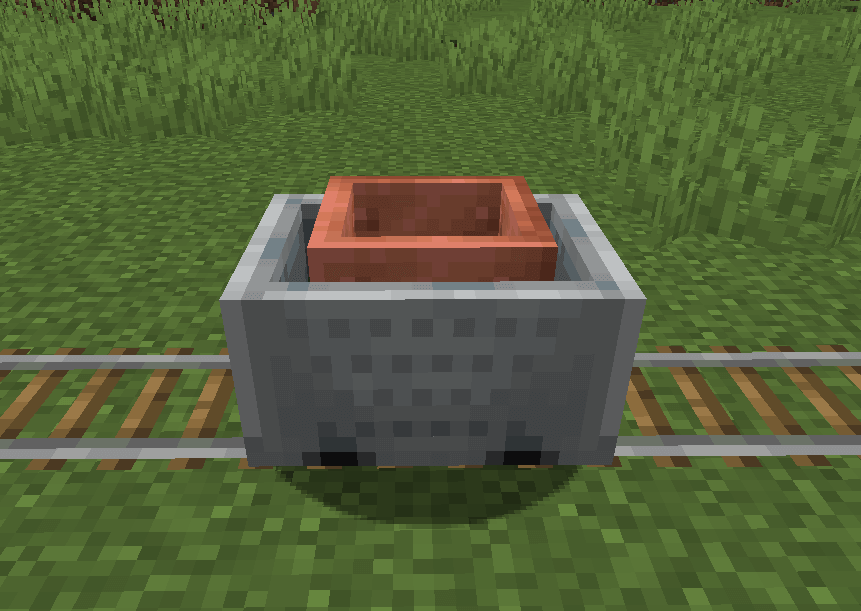
- Make Copper Hopper Minecarts!
- Made of copper!
Recipes
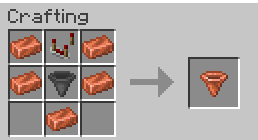
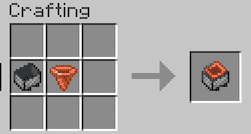
Setting Filters
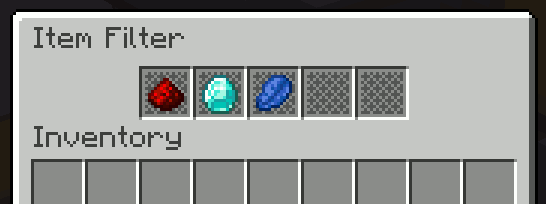
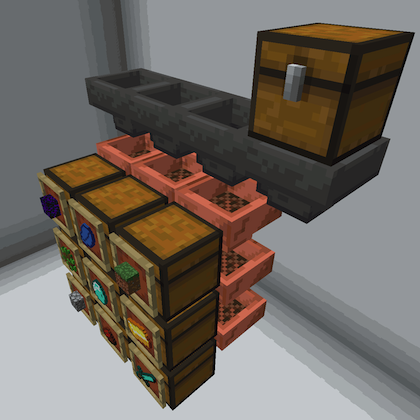
Make sorting systems like this!
How do use it?
Just put an item in one of the regular hopper slots to "set" a filter. That item will never be pulled or
pushed out of the hopper. And the hopper will now only accept items of that type.
You can do this up to five times (once per slot).
How does it work exactly?
A Copper Hopper works just like a regular hopper except:
- They never accept an item of a type that is not already held in the hopper.
- They always keep the last item of a type that is held in the hopper.
- If one Copper Hopper is below another, it will always pull matching items before the upper hopper pushes them.
- This allows you to create hopper columns that filter items into vertically-stacked chests.
Does it work with unstackable items?
Yes! But if you filter on unstackable items, be sure to keep one of the hopper slots empty or
the filtering won't work correctly.
Notes
- The item texture for Copper Hopper was contributed by Pablo Henrique. (Thanks!)
- Copper Hopper was inspired by Mr. Crayfish's excellent Golden Hopper forge mod.
- I will not be doing a Forge port of Copper Hopper. (sorry)
Legal
This mod is published under the MIT License.
You're free to include this mod in your modpack provided you attribute it to pcal.net.
Questions?
If you have questions about this mod, please join the Discord server:
Available Versions
How to Install Copper Hopper on Your Server
Order Server
Order a Minecraft Java server with at least 3 GB RAM (4 GB recommended).
Set fabric Loader
In the panel under "Egg", select the fabric loader and matching Minecraft version (26.3).
Install Mod
Open the mod browser in the dashboard and search for "Copper Hopper". Click "Install" – done! Alternatively, upload the .jar via SFTP to the /mods folder.
Compatibility
Mod Loaders
Minecraft Versions
26.3, 26.2, 26.1.2 (+23 more)
Server-side
✓ RequiredRecommended RAM
4 GB(min. 3 GB)Frequently Asked Questions
Copper Hopper server crashes on startup – what to do?
Most common cause: wrong fabric version or insufficient RAM. Check the server log (latest.log) for "OutOfMemoryError" or "Mixin" errors. With Mado Hosting: ensure at least 3 GB RAM is allocated and the loader matches the mod version (26.3). You can switch loaders with one click in the panel.
Is Copper Hopper compatible with fabric and neoforge?
Copper Hopper officially supports fabric, neoforge for Minecraft 26.3, 26.2, 26.1.2. The Mado dashboard automatically detects incompatible loader combinations.
Server lagging with Copper Hopper – how to optimize performance?
Recommended RAM: 4 GB (per 8 players). Use /spark profiler to check if Copper Hopper consumes the most tick time. Common fixes: reduce server view-distance to 8-10, install "performant" or "starlight" as supplementary mods on Forge. With Mado Hosting, your server runs on NVMe SSDs with dedicated CPU cores for minimal latency.
Similar Mods


Rent Modded Server
Install Copper Hopper with just one click on your server.