
Crop Growth Modifier
A mod to allow globally adjusting the rate of crop growth with configuration options to both increase and decrease the global rate of growth.
Screenshots
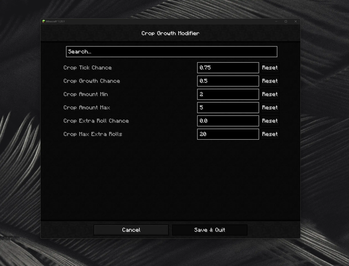
About this Mod
Check out my video essay channel some time! https://www.youtube.com/@SaintJulesDay
Allows globally adjusting the rate of crop growth. Can be configured to either decelerate or accelerate the rate at which crops receive random ticks where they have a chance to grow. Can be configured with Cloth Config from the in-game mod menu. Originally motivated by "Let Them Grow" by Lothrazar which is not available for Fabric.
🪐 Features
Crop blocks in Minecraft receive random ticks and internally roll on if the crop should grow into its next maturity state. This mod hooks into the randomTick method of CropBlock and rolls an additional time to determine if the tick should go through or be prevented. When set to a tick chance of 0.5, only half of all random ticks sent to a crop block would go through and it should grow only half as quickly.
The mod also allows separately configuring the growth stages applied to a crop block, e.g. with the use of bonemeal by a player or automation and changing the amount of growth stages applied whenever growth happens by any means. Additionally, the mod supports scheduling extra rolls for the crop to allow for more than one chance to mature.
🌵 Slower Natural Growth
To slow down crop growth in your world, configure crop tick chance (cropTickChance) to a value below the default 1.0 (unaltered/vanilla growth speed). Setting it to 0.5 will let crops grow at roughly 50% the speed of vanilla, 0.25 at 25% the speed of vanilla, and so on.
To decrease the stages a crop grows per successful event, you can lower cropGrowthAmountMin from its vanilla value to 1 and cropGrowthAmountMax from to 4 or 3. Changing these values is not required.
🌾 Faster Natural Growth
To speed up crop growth, leave crop tick chance (cropTickChance) at its default 1.0 and increase the chance for extra rolls (cropExtraRollChance). Setting it to 0.5 means that half the times a crop might grow, it gets another chance to grow again, giving you a cumulative of 75%.
To additionally increase the stages a crop grows per successful event, you can increase both crop growth minimums and maximums (cropGrowthAmountMin and cropGrowthAmountMax) from their vanilla values, though total growth is limited by the maximum number of stages supported by a crop. Changing these values is not required.
Consider configuring a limit on how many extra rolls can happen via max extra rolls (cropExtraRollMax). Setting the extra roll chance to 1.0 causes another tick to be scheduled for every single tick that occurs, so a limit is recommended to prevent infinite growth.
🦴 Reduced Bonemeal Growth
To reduce the chance of using bonemeal growing a crop, you can reduce the crop growth chance (cropGrowthChance). A value of 1.0 (the vanilla setting) means every time bonemeal is used, a random growth stage is applied to the block. This option can also be used to disable bonemeal crop growth entirely when set to 0.0.
⚖️ License
This mod was created by Saint for free use by the Minecraft community under the MIT license. It may be shared, modified, or redistributed as part of mod packs with basic attribution.
Available Versions
How to Install Crop Growth Modifier on Your Server
Order Server
Order a Minecraft Java server with at least 3 GB RAM (4 GB recommended).
Set fabric Loader
In the panel under "Egg", select the fabric loader and matching Minecraft version (1.20.1).
Install Mod
Open the mod browser in the dashboard and search for "Crop Growth Modifier". Click "Install" – done! Alternatively, upload the .jar via SFTP to the /mods folder.
Compatibility
Mod Loaders
Minecraft Versions
1.20.1
Server-side
✓ RequiredRecommended RAM
4 GB(min. 3 GB)Frequently Asked Questions
Crop Growth Modifier server crashes on startup – what to do?
Most common cause: wrong fabric version or insufficient RAM. Check the server log (latest.log) for "OutOfMemoryError" or "Mixin" errors. With Mado Hosting: ensure at least 3 GB RAM is allocated and the loader matches the mod version (1.20.1). You can switch loaders with one click in the panel.
Is Crop Growth Modifier compatible with fabric?
Crop Growth Modifier officially supports fabric for Minecraft 1.20.1. The Mado dashboard automatically detects incompatible loader combinations.
Server lagging with Crop Growth Modifier – how to optimize performance?
Recommended RAM: 4 GB (per 8 players). Use /spark profiler to check if Crop Growth Modifier consumes the most tick time. Common fixes: reduce server view-distance to 8-10, install "performant" or "starlight" as supplementary mods on Forge. With Mado Hosting, your server runs on NVMe SSDs with dedicated CPU cores for minimal latency.
Similar Mods



Rent Modded Server
Install Crop Growth Modifier with just one click on your server.