
Desired Servers
Your desired servers will always be listed.
About this Mod





Join atleast  of us on Discord right now!
From a page that is GPLv3 licensed that sounds very familiar to this.

Desired Servers
This is a mod that removes the need to ship a servers.dat file that overwrites player-added servers.
Stop shipping that file and add Desired Servers! You can add multiple servers with a simple json format.
On first run, the mod will generate a desiredservers.json with the following content if one isn't present:
[
  {
    "serverName": "Desired Server",
    "serverIP": "127.0.0.1"
  },
  {
    "serverName": "Another Desired Server!",
    "serverIP": "192.168.1.1"
  }
]
Adding a server is as simple as adding another json block with the details.
The server is added to the server list on load, if it is already there it will be ignored.
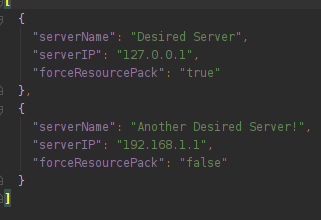
Server list JSON
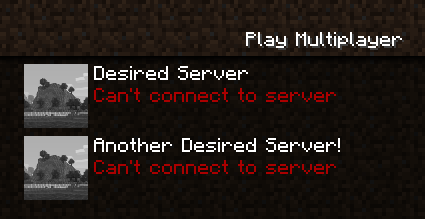
Servers in the multiplayer screen
The TidBit
The Featured Servers/ folder now lives in the config folder.
The What and How
Forge didn't like how the mod was laid out and wanted it to be more like the default example. So I added in some stuff for that. Also the mod was catching way too much stuff with reporting, so I unwrapped that added try/catch clauses where it was absolutely necessary.

Other Info
* Same license as the original GPLv3 at https://www.curseforge.com/minecraft/mc-mods/featured-serversported to 1.16.1
source now available
client only
Available Versions
How to Install Desired Servers on Your Client
Install the Mod Loader Locally
Install fabric for your local Minecraft version.
Download the Matching File
Choose the Desired Servers file for fabric and Minecraft 1.21.1.
Install Mod
Place the .jar file in your local .minecraft/mods folder and restart Minecraft. No server-side installation is required.
Compatibility
Mod Loaders
Minecraft Versions
1.21.1, 1.20.6, 1.20.4 (+12 more)
Server-side
✗ UnsupportedRecommended RAM
4 GB(min. 3 GB)Frequently Asked Questions
Does Desired Servers need to be installed on the Minecraft server?
No. Modrinth marks Desired Servers as unsupported on the server side. Install it only in your local Minecraft mods folder. Your server can remain unchanged unless the mod page lists an additional dependency.
Which version and loader does Desired Servers require?
Use a file for fabric, forge, neoforge and your exact Minecraft version. Supported versions include 1.21.1, 1.20.6, 1.20.4. Files for different loaders are not interchangeable.
Desired Servers is not working – what should I check?
First check the Minecraft version, loader version and required dependencies. Put the .jar file in your local .minecraft/mods folder and remove older duplicates. Because this mod is client-side, adding server RAM will not fix it.
Similar Mods




![[ETF] Entity Texture Features](https://cdn.modrinth.com/data/BVzZfTc1/af683d206d50b05258d865b0d6e4aa2f2cee12f2_96.webp)

Minecraft Server for Your Group
Desired Servers stays on your client. Host a compatible world for your group.