
Easier Sleeping
Only a percentage of players has to sleep.
About this Mod
Version 4.X.X
For older versions of the mod, check the wiki.
This mod adds that only a percentage of Players have to sleep.
The messages are only shown to players in the same dimension.
Since Minecraft 1.19.1 the Mod is needed on the server and client side.
For 1.19 and before, the Mod is only needed on the server side, but can also be used on the client side.
You need a server to play with friends? You don't know how to set up one? Just rent an already configured server!
Click on the picture above, select a plan (with recommended at least 6 GB),
use my code **** to get 25% off your first month and enjoy playing with your friends!
Support
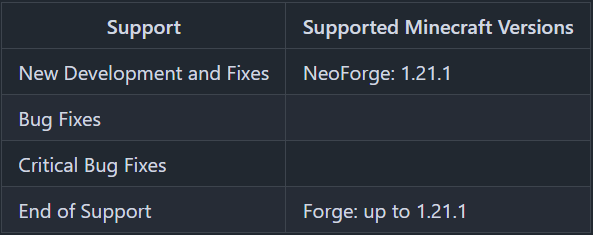
Minecraft versions, for which the mod is not released, are not supported.
You can find a text version here.
Server Config
The config can be edited with commands.
The changes done with the commands, will be saved to the config.
- sleep_percent
Percentage of players required to skip the night.
Default: 50 - sleep_messages
List of messages, from which one will be shown, when a player goes to bed
(Available parameters: %player% = Player name)
Default: ["%player% is now in bed."] - wake_messages
List of messages, from which one will be shown, when a player leaves his bed
(Available parameters: %player% = Player name)
Default: ["%player% stood up."] - morning_messages
List of messages, from which one will be shown, when the night was skipped
Default: ["Good Morning"] - all_players_rest
If true, the time since last rest is reset for all players, if enough other players are successfully sleeping. So not every player has to sleep to prevent phantom spawning for him.
Default: false - dimensions
Dimensions in which, the sleeping percentage is active or inactive, depending on the dimension_list_type option.
Default: ["minecraft:overworld"] - dimension_list_type
If dimension_list_type is set to SLEEP_ACTIVE, the dimension list is the list of dimensions in which the sleep voting is active.
If dimension_list_type is set to SLEEP_INACTIVE, the dimension list is the list of dimensions in which the sleep voting is inactive.
Default: "SLEEP_ACTIVE" - block_blacklist
Block names of beds being ignored for sleep percentage.
Examples: minecraft:white_bed, comforts:hammock_white
Commands
/sleep sleep_percent- Shows the current percentage of players required to skip the night./sleep sleep_percent <sleep_percent>- Sets the percentage of players required to skip the night./sleep messages sleep- Shows the list of messages, from which one will be shown, when a player goes to bed/sleep messages sleep add <message>- Adds a message from the list of messages, from which one will be shown, when a player goes to bed/sleep messages sleep remove <message>- Removes a message from the list of messages, from which one will be shown, when a player goes to bed/sleep messages wake- Shows the list of messages, from which one will be shown, when a player leaves his bed/sleep messages wake add <message>- Adds a message from the list of messages, from which one will be shown, when a player leaves his bed/sleep messages wake remove <message>- Removes a message from the list of messages, from which one will be shown, when a player leaves his bed/sleep messages morning- Shows the list of messages, from which one will be shown, when the night was skipped/sleep messages morning add <message>- Adds a message from the list of messages, from which one will be shown, when the night was skipped/sleep messages morning remove <message>- Removes a message from the list of messages, from which one will be shown, when the night was skipped/sleep all_players_rest- Shows, if for all players the last slept time will be reset, if players sleep successfully./sleep all_players_rest <all_players_rest>- Sets, if for all players the last slept time shall be reset, if players sleep successfully./sleep dimension- Shows dimensions in which, the sleeping percentage is active./sleep dimension add <dimension>- Adds a dimension in which, the sleeping percentage is active./sleep dimension remove <dimension>- Removes a dimension in which, the sleeping percentage is active./sleep dimension list_type- Shows the type of the dimensions list. If dimension_list_type is set to SLEEP_ACTIVE, the dimension list is the list of dimensions in which the sleep voting is active. If dimension_list_type is set to SLEEP_INACTIVE, the dimension list is the list of dimensions in which the sleep voting is inactive./sleep dimension list_type <dimension_list_type> <invert_list>- Sets the dimension_list_type. If dimension_list_type is set to SLEEP_ACTIVE, the dimension list is the list of dimensions in which the sleep voting is active. If dimension_list_type is set to SLEEP_INACTIVE, the dimension list is the list of dimensions in which the sleep voting is inactive. If the invert_list parameter is false, the dimensions list is not change. If the invert_list parameter is true, the dimensions list is inverted. All dimensions, which were not on the list before, are added to the list and all dimensions, which were on the list before, are removed.
Thanks for the logo to Muse31.
You can use this mod in non-commercial modpacks without asking.
You can find more mods from me on CurseForge and Modrinth.

Available Versions
How to Install Easier Sleeping on Your Server
Order Server
Order a Minecraft Java server with at least 3 GB RAM (4 GB recommended).
Set forge Loader
In the panel under "Egg", select the forge loader and matching Minecraft version (26.3).
Install Mod
Open the mod browser in the dashboard and search for "Easier Sleeping". Click "Install" – done! Alternatively, upload the .jar via SFTP to the /mods folder.
Compatibility
Mod Loaders
Minecraft Versions
26.3, 26.2, 26.1.2 (+22 more)
Server-side
✓ RequiredRecommended RAM
4 GB(min. 3 GB)Frequently Asked Questions
Easier Sleeping server crashes on startup – what to do?
Most common cause: wrong forge version or insufficient RAM. Check the server log (latest.log) for "OutOfMemoryError" or "Mixin" errors. With Mado Hosting: ensure at least 3 GB RAM is allocated and the loader matches the mod version (26.3). You can switch loaders with one click in the panel.
Is Easier Sleeping compatible with forge and neoforge?
Easier Sleeping officially supports forge, neoforge for Minecraft 26.3, 26.2, 26.1.2. The Mado dashboard automatically detects incompatible loader combinations.
Server lagging with Easier Sleeping – how to optimize performance?
Recommended RAM: 4 GB (per 8 players). Use /spark profiler to check if Easier Sleeping consumes the most tick time. Common fixes: reduce server view-distance to 8-10, install "performant" or "starlight" as supplementary mods on Forge. With Mado Hosting, your server runs on NVMe SSDs with dedicated CPU cores for minimal latency.
Similar Mods




![[ETF] Entity Texture Features](https://cdn.modrinth.com/data/BVzZfTc1/af683d206d50b05258d865b0d6e4aa2f2cee12f2_96.webp)

Rent Modded Server
Install Easier Sleeping with just one click on your server.