
Vanillin
Instanced rendering for entities and block entities using Flywheel
About this Mod
How it Works
Vanillin optimizes Minecraft by implementing instanced rendering for entities and block entities through Flywheel.
With Flywheel doing the heavy lifting, Vanillin is able to achieve significant performance improvements on all the game objects it affects. The end result is that ten thousand of something have the same frame time impact as one of something.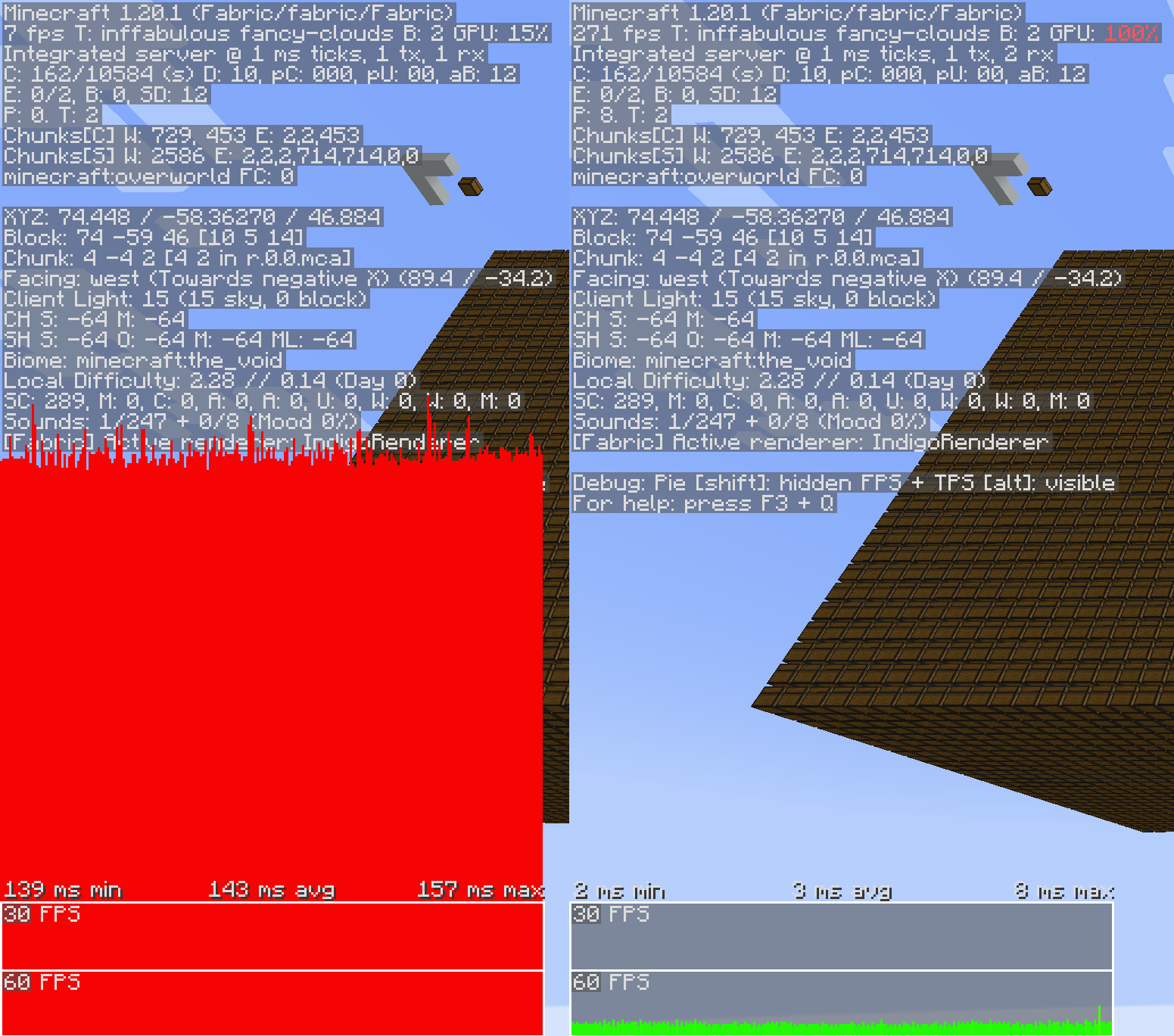
Shaders
Flywheel 1.0, and therefore Vanillin, is currently incompatible with shaders. Work is underway to make first party compat between Flywheel and shaders a reality, but no time estimates can be made.
Optimizations
Vanillin does not optimize everything by default. Special support needs to be built for each type of entity and block entity. Those that are currently optimized are listed below.
✅ = Stable, enabled by default.
🧪 = Experimental, enabled behind a config.
❌ = Temporarily disabled entirely due to crashes/compat/etc.
Block Entities
- ✅ Chests
- ✅ Shulker boxes
- ✅ Bells
- ❌ Signs
Entities
- ✅ Minecarts (and all variants)
- 🧪 Items
- 🧪 Item Displays
- 🧪 Block Displays
Config
To enable experimental optimizations, edit the config file:
Forge/NeoForge
config/vanillin.toml
[entities]
    #Allowed Values: DEFAULT, DISABLE, FORCE_ENABLE
-   "minecraft:item" = "DEFAULT"
+   "minecraft:item" = "FORCE_ENABLE"
Fabric
config/vanillin.json
{
  "entities": {
-   "minecraft:item": "default",
+   "minecraft:item": "force_enable",
  }
}
Alternatively, you can disable optimizations that you find to be causing conflict:
Forge/NeoForge
config/vanillin.toml
[entities]
    #Allowed Values: DEFAULT, DISABLE, FORCE_ENABLE
-   "minecraft:minecart" = "DEFAULT"
+   "minecraft:minecart" = "DISABLE"
Fabric
config/vanillin.json
{
  "entities": {
-   "minecraft:minecart": "default",
+   "minecraft:minecart": "disable",
  }
}
Available Versions
How to Install Vanillin on Your Client
Install the Mod Loader Locally
Install fabric for your local Minecraft version.
Download the Matching File
Choose the Vanillin file for fabric and Minecraft 1.21.1.
Install Mod
Place the .jar file in your local .minecraft/mods folder and restart Minecraft. No server-side installation is required.
Compatibility
Mod Loaders
Minecraft Versions
1.21.1, 1.20.1
Server-side
✗ UnsupportedRecommended RAM
4 GB(min. 3 GB)Frequently Asked Questions
Does Vanillin need to be installed on the Minecraft server?
No. Modrinth marks Vanillin as unsupported on the server side. Install it only in your local Minecraft mods folder. Your server can remain unchanged unless the mod page lists an additional dependency.
Which version and loader does Vanillin require?
Use a file for fabric, forge, neoforge and your exact Minecraft version. Supported versions include 1.21.1, 1.20.1. Files for different loaders are not interchangeable.
Vanillin is not working – what should I check?
First check the Minecraft version, loader version and required dependencies. Put the .jar file in your local .minecraft/mods folder and remove older duplicates. Because this mod is client-side, adding server RAM will not fix it.
Minecraft Server for Your Group
Vanillin stays on your client. Host a compatible world for your group.