
Freelook
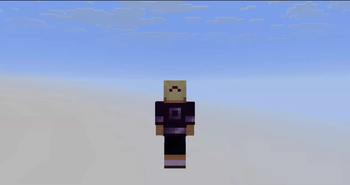
Allows you to rotate your camera freely around your character!
Screenshots

About this Mod
Freelook Mod
Allows you to rotate your camera freely around your character!
Features
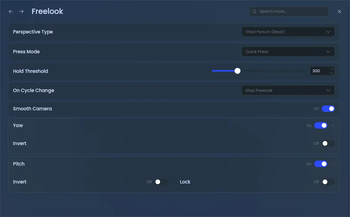
- Multiple Camera Perspectives
- Customizable Activation Style
- Camera Cycle Integration
- Smooth Transitions
Server Opt-Opt
Some servers may consider freelook a competitive advantage. As of 2.0.0, Freelook includes a simple opt‑out protocol.
How it works
- When a player joins, the client sends a
freelook:handshakepacket. - If the server wants to disable freelook, it responds with a
freelook:disablepacket. - Then the player cannot use freelook for that session.
Click to expand code example
public class Example implements ModInitializer {
    @Override
    public void onInitialize() {
        PayloadTypeRegistry.clientboundPlay().register(DisableModPayload.TYPE, DisableModPayload.CODEC);
        PayloadTypeRegistry.serverboundPlay().register(HandshakePayload.TYPE, HandshakePayload.CODEC);

        ServerPlayNetworking.registerGlobalReceiver(HandshakePayload.TYPE,
                (payload, ctx) -> ServerPlayNetworking.send(ctx.player(), new DisableModPayload())
        );
    }

    public record DisableModPayload() implements CustomPacketPayload {
        public static final Type<DisableModPayload> TYPE = new Type<>(Identifier.parse("freelook:disable"));
        public static final StreamCodec<RegistryFriendlyByteBuf,  DisableModPayload> CODEC = StreamCodec.unit(new DisableModPayload());

        @Override
        public Type<? extends CustomPacketPayload> type() {
            return TYPE;
        }
    }

    public record HandshakePayload() implements CustomPacketPayload {
        public static final Type<HandshakePayload> TYPE = new Type<>(Identifier.parse("freelook:handshake"));
        public static final StreamCodec<RegistryFriendlyByteBuf, HandshakePayload> CODEC = StreamCodec.unit(new HandshakePayload());

        @Override
        public Type<? extends CustomPacketPayload> type() {
            return TYPE;
        }
    }
}
Code licensed under LGPL 3.0.
Available Versions
How to Install Freelook on Your Client
Install the Mod Loader Locally
Install fabric for your local Minecraft version.
Download the Matching File
Choose the Freelook file for fabric and Minecraft 26.3.
Install Mod
Place the .jar file in your local .minecraft/mods folder and restart Minecraft. No server-side installation is required.
Compatibility
Mod Loaders
Minecraft Versions
26.3, 26.2, 26.1.2 (+11 more)
Server-side
✗ UnsupportedRecommended RAM
4 GB(min. 3 GB)Frequently Asked Questions
Does Freelook need to be installed on the Minecraft server?
No. Modrinth marks Freelook as unsupported on the server side. Install it only in your local Minecraft mods folder. Your server can remain unchanged unless the mod page lists an additional dependency.
Which version and loader does Freelook require?
Use a file for fabric, forge, ornithe and your exact Minecraft version. Supported versions include 26.3, 26.2, 26.1.2. Files for different loaders are not interchangeable.
Freelook is not working – what should I check?
First check the Minecraft version, loader version and required dependencies. Put the .jar file in your local .minecraft/mods folder and remove older duplicates. Because this mod is client-side, adding server RAM will not fix it.
Similar Mods




Minecraft Server for Your Group
Freelook stays on your client. Host a compatible world for your group.