
FTB Quest Translator
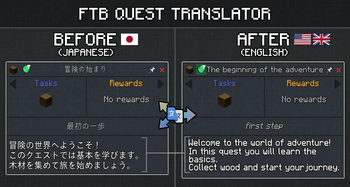
Client-side addon for FTB Quests that adds a translate button. Translates quest titles, subtitles and descriptions on-the-fly using free translation APIs (Google Translate, MyMemory).
Screenshots
About this Mod
🌐 FTB Quest Translator
A fully integrated client-side addon for FTB Quests that brings high-quality, real-time quest translations right into your game. Say goodbye to external translators—enjoy modpacks in your native language seamlessly!
⚠️ Important Notice from the Author This mod is developed and maintained by a single developer in their free time. While I strive to ensure the best possible experience, updates might take a little time.
If you encounter any bugs, have feature requests, or just want to chat about the mod, I'd love to hear from you!
Please join the official Discord Server (discord.gg/XsZ5czhpJ8) to report issues or share your feedback.
🎥 Showcase
✨ Key Features:
- One-Click Translation — A seamlessly integrated toggle button right inside the quest view panel. No bulky external menus.
- Advanced Translation Providers — Supports DeepL (highly recommended, preserves context and formatting) and Google Translate.
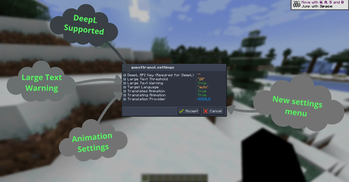
- Native UI Configuration — Forget about editing config files manually. Configure API keys, translation providers, and animations directly in-game using the gorgeous UI via FTB Library.
- Smart Language Detection — Automatically detects your Minecraft language settings and translates quests accordingly.
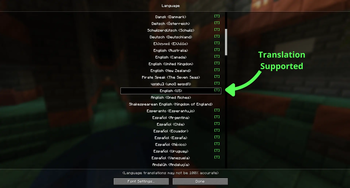
- Language Support Indicator — Look for the handy green [T] in the Minecraft Language Options screen to instantly know if your language is supported!
- Live Connection Diagnostics — Cool immersive animations around the translate button that warn you if the translation server is unreachable or if your API key is invalid.
- In-Memory Caching — Intelligent caching ensures instant translations with zero repeated API calls, saving your network and API usage.
- Client-Side Only — Zero server setup required. You can safely use it while playing on any multiplayer server!
- Text-to-Speech Voiceover — A speaker icon next to the translate
button reads quest text aloud using Google TTS. Dynamically reads
either the original or translated text depending on your current view. - Glossary (Translation Memory) — Configure words to stay untranslated
via config/tfq_glossary.json. Perfect for keeping mod names like
"Redstone", "Create", or "Mekanism" in their original form. - Batch Translation — Two new buttons in the FTB Quests sidebar let
you translate the entire questbook in the background. Uses a smart
rate-limiting queue (1.5s delay) to avoid API bans. Progress is
saved automatically — close the game and resume later anytime.
🎮 How to Use:
- Open any quest in your FTB Quests book.
- Click the Translate Button to translate the quest instantly.
- Click again to switch back to the original text.
- Use the Batch buttons in the sidebar to translate the whole questbook at once.
⚙️ Configuration:
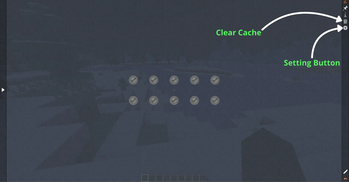
Simply open your FTB Quests book and click the Settings Gear at the top right of the main panel to open the intuitive in-game configuration menu. Here you can tweak:
- Target Language overrides
- Your DeepL API Key
- Network connection and transition animations
- Cache management and clearing
- Glossary management (config/tfq_glossary.json)
🌍 Target Language
The Target Language setting uses standard ISO language codes.
autois the default value for this setting, so in most cases you do not need to change anything manually. The mod will automatically adapt to your current Minecraft language.- Use a manual language code if you want to force a specific translation language.
- A full list of ISO language codes can be found on the Wikipedia ISO 639-1 page.
- Keep in mind that not every existing language code may be supported by Minecraft or by the selected translation provider.
📋 Requirements:
FTB Quests(Forge/NeoForge/Fabric) (Required)
FTB Library(Forge/NeoForge/Fabric) (Required)
Available Versions
How to Install FTB Quest Translator on Your Client
Install the Mod Loader Locally
Install fabric for your local Minecraft version.
Download the Matching File
Choose the FTB Quest Translator file for fabric and Minecraft 1.21.1.
Install Mod
Place the .jar file in your local .minecraft/mods folder and restart Minecraft. No server-side installation is required.
Compatibility
Mod Loaders
Minecraft Versions
1.21.1, 1.20.4, 1.20.1
Server-side
✗ UnsupportedRecommended RAM
4 GB(min. 3 GB)Frequently Asked Questions
Does FTB Quest Translator need to be installed on the Minecraft server?
No. Modrinth marks FTB Quest Translator as unsupported on the server side. Install it only in your local Minecraft mods folder. Your server can remain unchanged unless the mod page lists an additional dependency.
Which version and loader does FTB Quest Translator require?
Use a file for fabric, forge, neoforge and your exact Minecraft version. Supported versions include 1.21.1, 1.20.4, 1.20.1. Files for different loaders are not interchangeable.
FTB Quest Translator is not working – what should I check?
First check the Minecraft version, loader version and required dependencies. Put the .jar file in your local .minecraft/mods folder and remove older duplicates. Because this mod is client-side, adding server RAM will not fix it.
Similar Mods




![[ETF] Entity Texture Features](https://cdn.modrinth.com/data/BVzZfTc1/af683d206d50b05258d865b0d6e4aa2f2cee12f2_96.webp)

Minecraft Server for Your Group
FTB Quest Translator stays on your client. Host a compatible world for your group.