
Gridless
Removes the grid from storage inventories, allowing you to freely place your items anywhere, pixel by pixel. Features smart auto-merge, scaling interactions, and universal UI support!
About this Mod
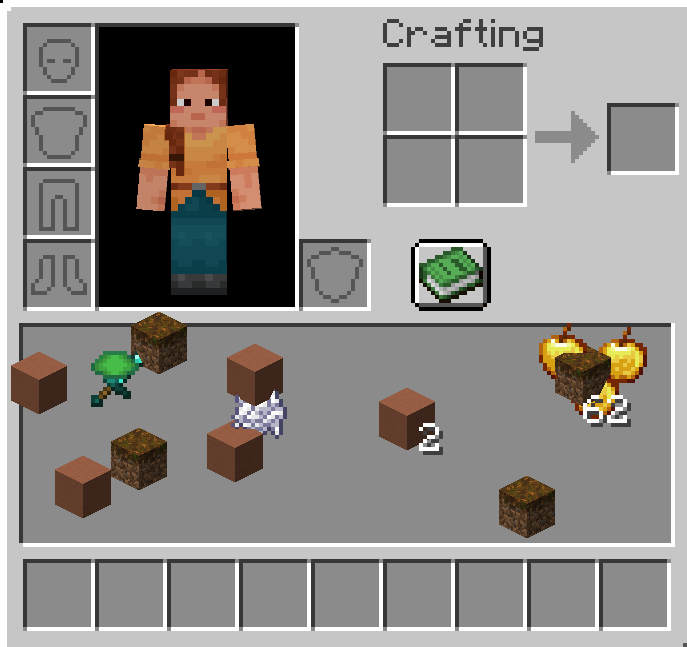
Gridless Inventory
Say goodbye to boring slots! Place your items freely, pixel by pixel.
Gridless completely removes the restrictive 9x3 grid from the player inventory, chests, and other storage screens. You can now place your items anywhere you want in a seamless, grid-free space.
✨ Features
- Free Placement: Drop your items anywhere on the screen.
- Auto-Sort & Merge (Press R): Press
Rto instantly merge partial stacks and organize your items into neat, perfect rows. Identical items stack perfectly on top of each other! - Drag & Paint: Hold Left-Click or Right-Click and drag your mouse to "paint" and place items perfectly across the screen!
- Quick Drop & Hotbar: Hover over any item and press
Qto drop it into the world, or press1-9to instantly swap it with your hotbar slots. - Smart Magnet (Double Click): Double click on an item to gather all identical items nearby into your hand.
- Shift-Click to Chest: Shift-Click items in your gridless area to instantly send them to an open chest or your hotbar.
- Universal Support: Works beautifully with player inventories, chests, shulker boxes, ender chests, barrels, and creative mode!
- ModMenu & Config Support: Easily enable or disable gridless mode for chests, ender chests, barrels, shulker boxes, and player inventories individually.
- No Data Loss: Item coordinates are saved as NBT data, so your inventory layout is always preserved.
Available Versions
How to Install Gridless on Your Server
Order Server
Order a Minecraft Java server with at least 3 GB RAM (4 GB recommended).
Set fabric Loader
In the panel under "Egg", select the fabric loader and matching Minecraft version (1.20.1).
Install Mod
Open the mod browser in the dashboard and search for "Gridless". Click "Install" – done! Alternatively, upload the .jar via SFTP to the /mods folder.
Compatibility
Mod Loaders
Minecraft Versions
1.20.1
Server-side
✓ RequiredRecommended RAM
4 GB(min. 3 GB)Frequently Asked Questions
Gridless server crashes on startup – what to do?
Most common cause: wrong fabric version or insufficient RAM. Check the server log (latest.log) for "OutOfMemoryError" or "Mixin" errors. With Mado Hosting: ensure at least 3 GB RAM is allocated and the loader matches the mod version (1.20.1). You can switch loaders with one click in the panel.
Is Gridless compatible with fabric?
Gridless officially supports fabric for Minecraft 1.20.1. The Mado dashboard automatically detects incompatible loader combinations.
Server lagging with Gridless – how to optimize performance?
Recommended RAM: 4 GB (per 8 players). Use /spark profiler to check if Gridless consumes the most tick time. Common fixes: reduce server view-distance to 8-10, install "performant" or "starlight" as supplementary mods on Forge. With Mado Hosting, your server runs on NVMe SSDs with dedicated CPU cores for minimal latency.
Similar Mods






Rent Modded Server
Install Gridless with just one click on your server.