
Horse Statistics
A lightweight mod that shows the stats of horses (health, jump height, speed, owner and slots for Llamas). Client-sided mod, you don't need it for your server!
Screenshots
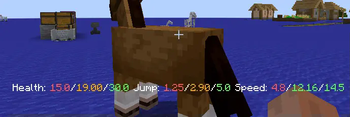
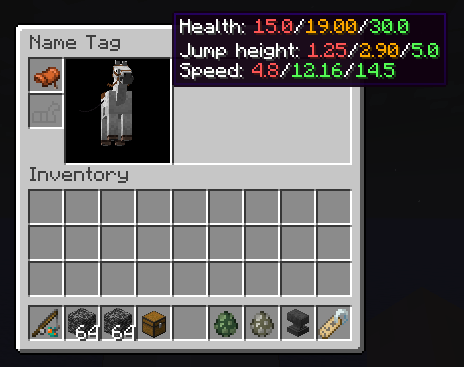
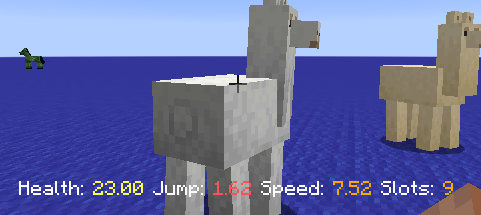
About this Mod
Horse Stats Mod is a lightweight and essential tool for Minecraft breeders. It allows you to instantly visualize the precise capabilities of your mounts (speed, jump height, health) without any guesswork.
Discord: https://discord.gg/yxMhpgUGjf
Supported versions:
- Forge: 1.15 to 1.21.1 and 26.2 and future versions
- NeoForge: 1.21.1 and future versions
- Fabric: 1.21.1 and future versions
- Supported Languages: 🇫🇷 🇺🇸 🇵🇱 🇩🇪 🇯🇵 🇰🇷 🇷🇺
- Supported Mods: all horse mods are supported
✨ Features
Display detailed statistics for Horses, Donkeys, Mules, and Llamas:
- HUD Display: View stats instantly while riding via the action bar.
- Inventory Integration: See precise values directly inside the horse's inventory screen.
- Min/Max Comparison: Compare your mount's stats against the game's theoretical limits.
- Color-Coded Feedback: Quickly identify high-quality stats (Green) versus poor ones (Red).
- Percentage Mode: Display a global "quality score" (0-100%) to easily rank your stable.
- Multi-Loader Support: Fully compatible with both Fabric and NeoForge.
📸 Screenshots
| Live HUD Stats | Grouped Inventory Stats | Detailed Min/Max View |
|---|---|---|
 |
 |
 |
| Real-time stats while mounting | Global score and quick overview | Detailed comparison with player speed |
⚙️ Configuration
The mod is highly customizable. You can toggle features via the Mod Menu (Fabric) or the Config Screen (NeoForge) to fit your playstyle.
Customizable options include:
- Toggle display in the horse inventory.
- Change interaction triggers (Right-click vs Shift+Right-click).
- Enable/Disable color indicators and percentage calculations.
- Show/Hide Min/Max reference values.
| NeoForge Config | Fabric Config |
|---|---|
 |
 |
Available Versions
How to Install Horse Statistics on Your Client
Install the Mod Loader Locally
Install fabric for your local Minecraft version.
Download the Matching File
Choose the Horse Statistics file for fabric and Minecraft 26.3.
Install Mod
Place the .jar file in your local .minecraft/mods folder and restart Minecraft. No server-side installation is required.
Compatibility
Mod Loaders
Minecraft Versions
26.3, 26.2, 26.1.2 (+29 more)
Server-side
✗ UnsupportedRecommended RAM
4 GB(min. 3 GB)Frequently Asked Questions
Does Horse Statistics need to be installed on the Minecraft server?
No. Modrinth marks Horse Statistics as unsupported on the server side. Install it only in your local Minecraft mods folder. Your server can remain unchanged unless the mod page lists an additional dependency.
Which version and loader does Horse Statistics require?
Use a file for fabric, forge, neoforge and your exact Minecraft version. Supported versions include 26.3, 26.2, 26.1.2. Files for different loaders are not interchangeable.
Horse Statistics is not working – what should I check?
First check the Minecraft version, loader version and required dependencies. Put the .jar file in your local .minecraft/mods folder and remove older duplicates. Because this mod is client-side, adding server RAM will not fix it.
Similar Mods




![[ETF] Entity Texture Features](https://cdn.modrinth.com/data/BVzZfTc1/af683d206d50b05258d865b0d6e4aa2f2cee12f2_96.webp)

Minecraft Server for Your Group
Horse Statistics stays on your client. Host a compatible world for your group.