
Immersive Overlays
Overlays useful info like coordinates and the time onto your HUD - as long as you have the right item in your inventory (or bundle!)
Screenshots

About this Mod
Immersive Overlays



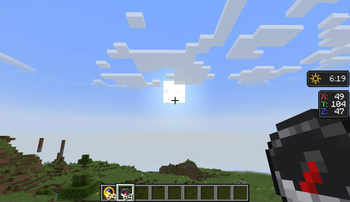
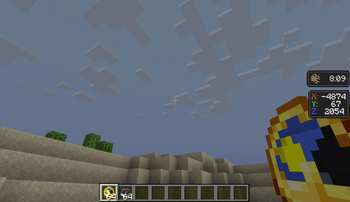
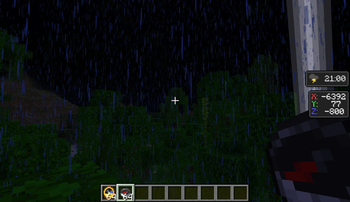
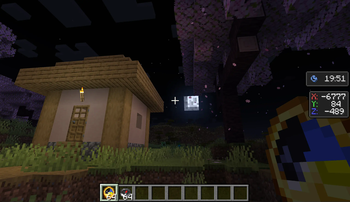
This mod integrates a highly configurable coordinate overlay as an in-world mechanic, allowing it to only be visible as long as the player has a compass. In addition, it offers a similar overlay for clocks, showing the time of day.
Coordinate Overlays
Coordinate overlays for the player's X and Z coordinates are visible whenever the player has a compass in their inventory, including in a bundle.
In 1.21.6 and above, the Player Locator Bar also requires a compass. This can be disabled in the config.
When a player additionally has an item that displays depth, like a Supplementaries Altimeter or a Depth Gauge from mods like Caverns & Chasms or Spelunkery, the Y coordinate value is shown as well. If no item is available, a compass item is sufficient to show the overlay.
Lodestone Compasses and Recovery Compasses will also override the coordinate overlay with the relative distance to their anchor.
Time and Weather Overlays
An overlay displaying the current time of day is displayed whenever the player has a clock in their inventory, including in a bundle.
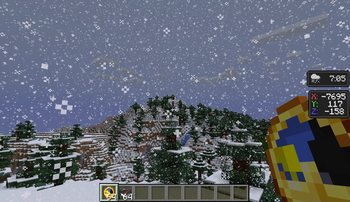
When a player additionally has an item that displays the weather, like a Caverns & Chasms Barometer, the weather is shown as well. If no item is available, a clock item is sufficient to show the overlay.
Biome Overlays
An overlay displaying the current biome is displayed whenever the player has a map in their inventory, including in a bundle.
This feature supports all vanilla biomes, as well as some modded biomes. Mod support can be added via resource packs by adding a 16x16 sprite to assets/modname/textures/immersiveoverlays/biomename.png.
Season Overlays
An overlay displaying the current season is displayed whenever the player has a calendar in their inventory, including in a bundle.
This requires a compatible seasons mod, with support for Serene Seasons, Fabric Seasons, Simple Seasons, TerraFirmaCraft, and Ecliptic Seasons.
Temperature Overlays
An overlay displaying the current temperature is displayed whenever the player has a thermometer in their inventory, including in a bundle.
- In vanilla, this data is sourced from the biome's temperature.
- With Fabric API or Forgified Fabric API installed, this data is sourced from the conventional biome tags.
- With Oreganized installed, this data is sourced from the Thermometer.
- With Tough as Nails installed, this data is sourced from the player's temperature.
- With Cold Sweat installed, this data is sourced from the player's temperature.
- With Legendary Survival Overhaul installed, this data is sourced from the player's temperature.
Speed Overlays
An overlay displaying the current speed is displayed whenever the player has a speedometer in their inventory, including in a bundle.
- In vanilla, this data is sourced from the player's speed.
- With Oreganized installed, this data is sourced from the Speedometer.
Wind Overlays
An overlay displaying wind intensity and direction is displayed whenever the player has a gust gauge in their inventory, including in a bundle.
- With Breezy installed, this data is sourced from the Gust Gauge.
Moon Overlays
An overlay displaying the current phase of the moon is displayed whenever the player has a compatible lunar clock in their inventory, including in a bundle. If no item is available, a vanilla clock is sufficient to show the overlay.
Lunar Clocks from the following mods are supported:
- Spectrum's Crescent Clock
- Urkaz Moon Tools's Lunar Clock
- Tide 2's Lunar Calendar
- Twilight Forest's Moon Dial
If you are playing with a mod that adds lunar events, these will replace the active moon phase. Supported mods include:
Translations and custom icons are present for Enhanced Celestials 1 and 2. Add-ons will have a generic event moon icon and an automatically generated title. To add a new translation, use the format gui.<namespace>.moon_phase.<path>.
Mod Compatibility
The mod has support for Spelunkery, Caverns & Chasms, and Supplementaries items out of the box. For other mods, items can be added to the mod's various config options.
In addition, the following features are present when compatible mods are installed:
- Items with overlays will work in accessory slots from the following mods:
- Items with overlays will work in backpacks from (at least) the following mods:
- The (backported) locator bar is now only displayed when the player has a compass.
- Xaero's Minimap: When a map item is set, it can be used inside a bundle.
- Xaero's World Map: When a map item is set, it can be used inside a bundle.
- Accessorify: This mod's overlays will replace the ones from Accessorify.
FAQ
- Will this mod be ported to other versions/loaders?
- New updates will only support 1.20.1, 1.21.1, 26.1, 26.2 and latest (currently 26.3-snapshot-7). There is no plan to backport to older versions or any other loaders.
- Can I request support for overlays for other mods?
- You can, but if the mod is not present on at least 26.1.2 or newer, I'm highly unlikely to add them.
Credits
The concept for this mod came from a prototype by nöelle for Raspberry Flavoured. I took this concept and iterated on it in my mod, Raspberry Core, before finalizing it here as Immersive Overlays.
Textures and mod icon are also by nöelle.
Textures for Temperature Overlays and Season Overlays by ProbablyEkho.
Textures for No Man's Land, Abundant Atmosphere, and New World biome overlays by KevBo.
Textures for Clifftree biome overlays by Kelpiesaurus.
Textures for Bloom biome overlays by sierra_wx)
Available Versions
How to Install Immersive Overlays on Your Client
Install the Mod Loader Locally
Install fabric for your local Minecraft version.
Download the Matching File
Choose the Immersive Overlays file for fabric and Minecraft 26.3.
Install Mod
Place the .jar file in your local .minecraft/mods folder and restart Minecraft. No server-side installation is required.
Compatibility
Mod Loaders
Minecraft Versions
26.3, 26.3-rc-3, 26.3-rc-2 (+77 more)
Server-side
✗ UnsupportedRecommended RAM
4 GB(min. 3 GB)Frequently Asked Questions
Does Immersive Overlays need to be installed on the Minecraft server?
No. Modrinth marks Immersive Overlays as unsupported on the server side. Install it only in your local Minecraft mods folder. Your server can remain unchanged unless the mod page lists an additional dependency.
Which version and loader does Immersive Overlays require?
Use a file for fabric, forge, neoforge and your exact Minecraft version. Supported versions include 26.3, 26.3-rc-3, 26.3-rc-2. Files for different loaders are not interchangeable.
Immersive Overlays is not working – what should I check?
First check the Minecraft version, loader version and required dependencies. Put the .jar file in your local .minecraft/mods folder and remove older duplicates. Because this mod is client-side, adding server RAM will not fix it.
Similar Mods




![[ETF] Entity Texture Features](https://cdn.modrinth.com/data/BVzZfTc1/af683d206d50b05258d865b0d6e4aa2f2cee12f2_96.webp)

Minecraft Server for Your Group
Immersive Overlays stays on your client. Host a compatible world for your group.