
Inventory Buttons
Brings the "Inventory Buttons" feature from NotEnoughUpdates (NEU) to modern versions of Minecraft (26.1 / 1.21.11 / 1.21.5)
Screenshots
About this Mod
Inventory Buttons (Unofficial Port)
A Fabric mod that brings the popular "Inventory Buttons" feature from NotEnoughUpdates (NEU) to modern version of Minecraft.
Current Versions Supported: 1.21.11, 26.1
Deprecated version on 1.21.5
This mod requires Fabric API
Features
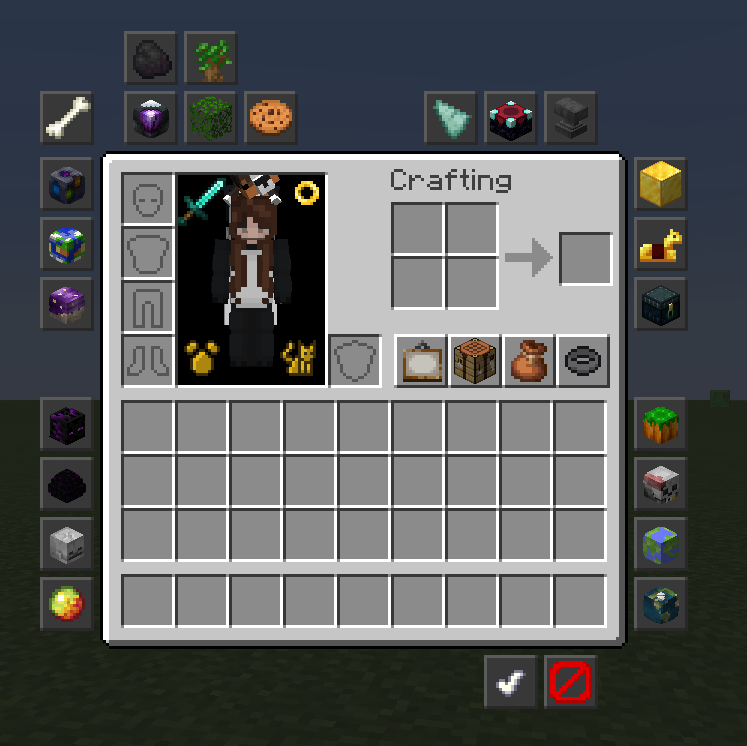
- Inventory Buttons: Add customizable buttons to your inventory for quick commands.
-> Create customizable buttons to run any command
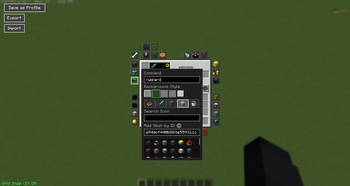
- Editor Mode: Easily move and configure buttons to suit your playstyle.
-> Add custom skulls or use any Vanilla item as your button icon.
-> Move the button on a grid with snapping or anywhere without snapping
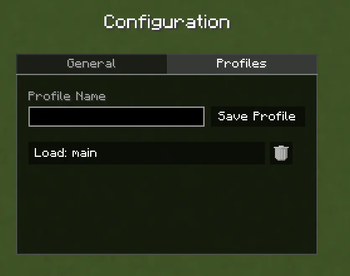
- Profiles: Save button layouts in profiles.
-> Export layouts to share or save. Import them via clipboard.
-> Switch between profiles with the built in command or in the config menu.
-> In the Profile menu (access through main config), type to save
Mod Commands
/invbuttons or /inventorybuttons: open the mod's main config. At the moment, there are just a few qol settings:
- Turn Inventory Buttons off entirely
- Show Tooltips on buttons (your commands)
- Hide buttons in Creative Mode
- Grid Snap defaults to on each time you enter the edit menu or not (otherwise, it keeps your last used setting)
/invbuttons edit: access the button editor via command
/invbuttons profile <name>: switch between button profiles by simply listing the name (compatible with buttons!)
/invbuttons help: display all of these commands and usages
Bugs and Issues
Please report bugs and issues to the mod's GitHub issues page here (also accessible on the right hand side of the Modrinth page)
Credits & Attribution
This mod is a derivative work based on NotEnoughUpdates (NEU).
- Original Author: Moulberry, Many other contributors
- Original Repository: NotEnoughUpdate
- Assets & Design: All textures and design concepts for the buttons and editor are the intellectual property of the NotEnoughUpdates contributors.
This port is not endorsed by, affiliated with, or supported by the official NotEnoughUpdates team. Please do not report bugs regarding this mod to the official NEU tracker.
License
This project is licensed under the GNU Lesser General Public License v3.0 (LGPLv3), the same license as the original NotEnoughUpdates mod.
You are free to modify and redistribute this mod under the terms of the LGPLv3. See the LICENSE file for the full text.
Available Versions
How to Install Inventory Buttons on Your Client
Install the Mod Loader Locally
Install fabric for your local Minecraft version.
Download the Matching File
Choose the Inventory Buttons file for fabric and Minecraft 26.2.
Install Mod
Place the .jar file in your local .minecraft/mods folder and restart Minecraft. No server-side installation is required.
Compatibility
Mod Loaders
Minecraft Versions
26.2, 26.1.2, 26.1.1 (+3 more)
Server-side
✗ UnsupportedRecommended RAM
4 GB(min. 3 GB)Frequently Asked Questions
Does Inventory Buttons need to be installed on the Minecraft server?
No. Modrinth marks Inventory Buttons as unsupported on the server side. Install it only in your local Minecraft mods folder. Your server can remain unchanged unless the mod page lists an additional dependency.
Which version and loader does Inventory Buttons require?
Use a file for fabric and your exact Minecraft version. Supported versions include 26.2, 26.1.2, 26.1.1. Files for different loaders are not interchangeable.
Inventory Buttons is not working – what should I check?
First check the Minecraft version, loader version and required dependencies. Put the .jar file in your local .minecraft/mods folder and remove older duplicates. Because this mod is client-side, adding server RAM will not fix it.
Similar Mods




![[ETF] Entity Texture Features](https://cdn.modrinth.com/data/BVzZfTc1/af683d206d50b05258d865b0d6e4aa2f2cee12f2_96.webp)

Minecraft Server for Your Group
Inventory Buttons stays on your client. Host a compatible world for your group.