Item Borders
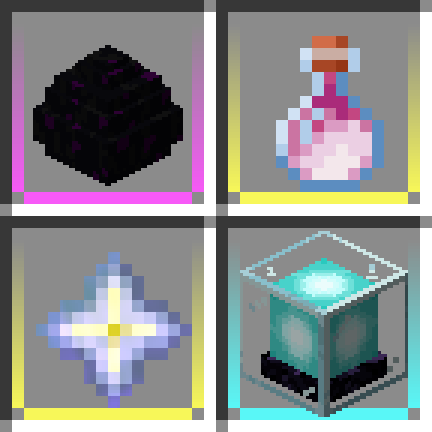
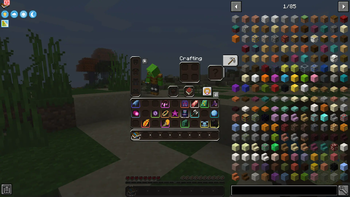
Add colored borders to inventory slots to make your rare items stand out!
Screenshots
About this Mod
Add colored borders to inventory slots to make your rare items stand out!

This mod requires Iceberg, you can download it here.
Fabric 1.1.6+ require Forge Config API Port, you can download it here.
Versions 1.2+ require Prism, you can download it here.
Client / Server
This mod is fully client-side.
Configuration
By default, borders are not displayed for common items. This can be enabled with a configuration option. Optionally, borders can be disabled on the hotbar as well. Custom colors from Loot Beams mod can be synchronized as item borders with an option. Automatic borders can be disabled completely, and manual colors can be specified for items/tags with the following format:
Compatibility
Should be fully compatible with modded items, and even modded item rarities. Let me know if you find something that doesn't work as expected!
You are free to use this mod in modpacks.

Problems, feature request, something else? Join us on Discord!
Available Versions
How to Install Item Borders on Your Client
Install the Mod Loader Locally
Install fabric for your local Minecraft version.
Download the Matching File
Choose the Item Borders file for fabric and Minecraft 26.3.
Install Mod
Place the .jar file in your local .minecraft/mods folder and restart Minecraft. No server-side installation is required.
Compatibility
Mod Loaders
Minecraft Versions
26.3, 26.2, 26.1.2 (+22 more)
Server-side
✗ UnsupportedRecommended RAM
4 GB(min. 3 GB)Frequently Asked Questions
Does Item Borders need to be installed on the Minecraft server?
No. Modrinth marks Item Borders as unsupported on the server side. Install it only in your local Minecraft mods folder. Your server can remain unchanged unless the mod page lists an additional dependency.
Which version and loader does Item Borders require?
Use a file for fabric, forge, neoforge and your exact Minecraft version. Supported versions include 26.3, 26.2, 26.1.2. Files for different loaders are not interchangeable.
Item Borders is not working – what should I check?
First check the Minecraft version, loader version and required dependencies. Put the .jar file in your local .minecraft/mods folder and remove older duplicates. Because this mod is client-side, adding server RAM will not fix it.
Similar Mods




Minecraft Server for Your Group
Item Borders stays on your client. Host a compatible world for your group.
Details
- License
- Creative Commons Attribution Non Commercial No Derivatives 4.0 International
- Server-side
- Unsupported