
Item Descriptions
This mod adds unique descriptions for all blocks, items, enchantments, effects, and mobs - built in a way that makes it easy to add modded content.
Screenshots

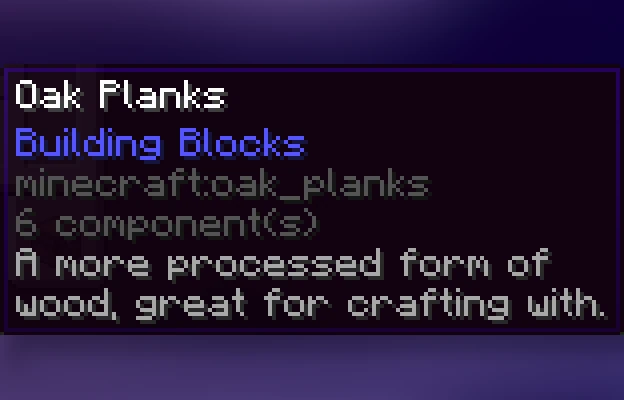
About this Mod




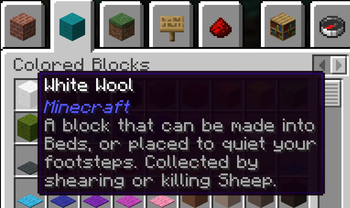
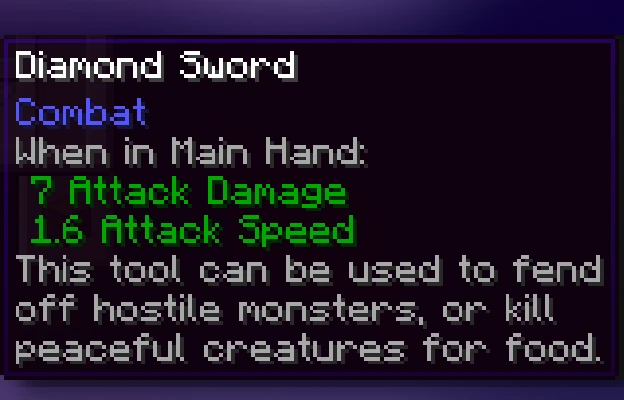
This mod adds a unique description to all blocks, items, and entities that is displayed when pressing the Ctrl key. These descriptions sum up what it can be used for, its source, and/or any other useful info. It strikes a compromise between not knowing anything about an item and constantly checking the Minecraft Wiki for detailed in-depth descriptions.
Item Descriptions includes all vanilla blocks and items. For mod support, also add Mod Descriptions!
Item Descriptions
By default, holding down Ctrl when hovering over an item will show a short description of what it can do. Unique descriptions have been written for every item, and generic descriptions are also supported for various tags so many modded blocks come with built-in descriptions.
Block and Entity Descriptions
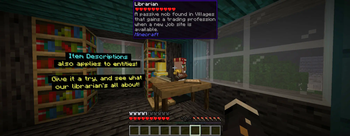
If you have Jade or WTHIT installed, blocks and entities will also show descriptions when Ctrl is held.
Enchantment Descriptions
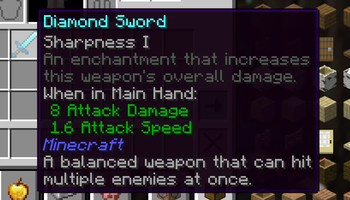
Item Descriptions supports descriptions for enchantments as well, with descriptions for every vanilla enchantments included. Item Descriptions prefers its own descriptions, but will support mods that support Enchantment Descriptions out of the box.
Enchantment Descriptions are also shown in the Enchanting Table, including Quark's Matrix Enchanting Table and Penchant's reworked Enchanting Table.
Effect Descriptions
Item Descriptions supports descriptions for enchantments as well, with descriptions for every vanilla enchantments included. Item Descriptions prefers its own descriptions, but will support mods that support Effect Insights out of the box.
Installation
Item Descriptions is a completely clientside mod for Fabric and NeoForge.
- On Fabric, only Fabric API is required.
- On NeoForge, there are no dependencies.
- Mod settings are available with Mod Menu (only required on Fabric) and Cloth Config or YACL. Built in options include the tooltip key, hints, tooltip colour, "always on" mode, toggles for description types, and more.
Mod Support
Item Descriptions includes all vanilla blocks and items. For mod support, also add the Mod Descriptions resource pack! Additionally, compatibility exists for specific features in the following mods:
| Icon | Link | Feature Added |
|---|---|---|
 |
Jade | Block and Entity Descriptions — Jade will show block and entity descriptions in its informational HUD. |
 |
WTHIT | Block and Entity Descriptions — WTHIT will show block and entity descriptions in its informational HUD. |
 |
Field Guide | Entry Descriptions — Automatically fills in entry lore. |
 |
Reliable Recipe Viewer | Item, Enchantment, Effect, Tag Descriptions — Tags shown by this mod will show Item Descriptions. Item Descriptions can also be configured to appear as info recipes, and by default Enchantment Descriptions will be shown on Enchanted Books and Effect Descriptions will be shown on Potions. |
 |
EMI | Tag Descriptions — Item Descriptions can also be configured to appear as info recipes, and by default Enchantment Descriptions will be shown on Enchanted Books and Effect Descriptions will be shown on Potions. |
 |
Enchiridion | Enchantment Descriptions — Enchiridion's default enchantment descriptions are replaced with Item Descriptions. |
 |
Penchant | Enchantment Descriptions — Penchant's modified Enchantment Table shows Item Descriptions. |
 |
Quark | Enchantment Descriptions — Quark's Matrix Enchantment Table shows Item Descriptions. |
 |
Matrix Enchanting | Enchantment Descriptions — The Matrix Enchantment Table shows Item Descriptions. |
 |
Useful Spyglass | Block and Entity Descriptions — Useful Spyglass will show block and entity descriptions in its informational HUD. |
 |
Limelight | Block and Entity Descriptions — Searching for a block or item in Limelight will show block and entity descriptions. |
 |
ToolTipFix | Tooltip Wrapping — This mod's wrapping is used instead of the built in wrapper.. |
Adding New Descriptions

By default, the mod provides descriptions for all blocks, items, and entities - including supported April Fools versions, but it has been designed in a way that makes it extensible for use in modpacks or when using other custom content. To add or replace a description for a block or item, just add the following entry to your mod or resource pack's language file.
"lore.<namespace>.<your_item_here>": "A mysterious modded block."
For more information, including details on support for entities and Custom Model Data, see the information on the Item Descriptions Wiki.
FAQ
- What versions does this mod actively support? Are ports planned?
- New updates will only support 26.1 and latest (currently 26.2-snapshot-6). There is no plan to backport to older versions or any other loaders.
Credits
The descriptions present in the mod are inspired by the Minecraft Legacy Console Editions. The interface used was inspired by the one present in the Better Than Adventure mod for Minecraft b1.7.3. Mod Menu/Cloth Config integration is based on the integration present in idwtialsimmoedm under its MIT License.
Available Versions
How to Install Item Descriptions on Your Client
Install the Mod Loader Locally
Install fabric for your local Minecraft version.
Download the Matching File
Choose the Item Descriptions file for fabric and Minecraft 26.4-snapshot-3.
Install Mod
Place the .jar file in your local .minecraft/mods folder and restart Minecraft. No server-side installation is required.
Compatibility
Mod Loaders
Minecraft Versions
26.4-snapshot-3, 26.4-snapshot-2, 26.4-snapshot-1 (+145 more)
Server-side
✗ UnsupportedRecommended RAM
4 GB(min. 3 GB)Frequently Asked Questions
Does Item Descriptions need to be installed on the Minecraft server?
No. Modrinth marks Item Descriptions as unsupported on the server side. Install it only in your local Minecraft mods folder. Your server can remain unchanged unless the mod page lists an additional dependency.
Which version and loader does Item Descriptions require?
Use a file for fabric, forge, neoforge and your exact Minecraft version. Supported versions include 26.4-snapshot-3, 26.4-snapshot-2, 26.4-snapshot-1. Files for different loaders are not interchangeable.
Item Descriptions is not working – what should I check?
First check the Minecraft version, loader version and required dependencies. Put the .jar file in your local .minecraft/mods folder and remove older duplicates. Because this mod is client-side, adding server RAM will not fix it.
Similar Mods




![[ETF] Entity Texture Features](https://cdn.modrinth.com/data/BVzZfTc1/af683d206d50b05258d865b0d6e4aa2f2cee12f2_96.webp)

Minecraft Server for Your Group
Item Descriptions stays on your client. Host a compatible world for your group.