
Legal flight in survival mode?
A configurable Fabric flight time and paid flight mod for survival servers.
Screenshots
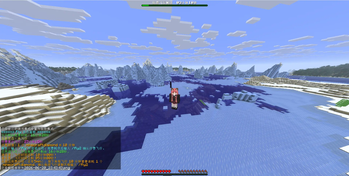
About this Mod
中文说明
这是一个适合 Fabric 生存服务器使用的飞行福利模组。
玩家每天可以获得固定免费飞行时间,免费时间用完后可以使用指定物品购买额外飞行时间。模组支持箱子 GUI、Boss 栏倒计时、彩色提示、语言文件自定义和客户端选装快捷键。
服务端安装后,客户端不安装也可以使用 /fly gui 打开控制面板。客户端安装后,可以在按键设置中自定义快捷键,默认按键为 L(是的我的朋友,这是一个失误……当然,您可以在 “选项-按键控制-按键绑定-杂项”中修改)。
Server Fly Mod
Server Fly Mod is a configurable Fabric mod that adds limited-time flight for survival servers.
Players can receive daily free flight time, purchase extra flight time with configurable items, and manage everything through a chest-style GUI. The mod is designed for servers that want to offer convenient flight without giving unlimited creative-style flying.
Features
- Daily free flight time
- Paid flight time using configurable items
- Chest-style GUI with
/fly gui - Optional client keybinding for opening the GUI
- Boss bar remaining time display
- Colored chat messages
- Custom language configuration
- Real-world time based accounting
- Persistent player data after server restart
- Dimension change flight restoration
- Admin commands for reload, reset, and grant
Commands
| Command | Description |
|---|---|
/fly |
Toggle free flight |
/fly2 |
Start paid flight |
/fly gui |
Open the flight control GUI |
/fly status |
Show current flight status |
/flymodadmin reload |
Reload config and data |
/flymodadmin reset <player> |
Reset a player's daily free flight time |
/flymodadmin grant <player> <minutes> |
Set custom free flight minutes for a player |
GUI
Use /fly gui to open the flight control panel.
The GUI includes:
- Start or stop free flight
- Start paid flight
- Disable flight
- View remaining time
- View paid flight rules
Optional client installation
The mod is mainly server-side.
Players do not need to install it on the client when joining a dedicated server. However, if players install it on the client, they will get a customizable keybinding for opening the GUI.
Default key: L
The key can be changed in Minecraft's standard keybind settings.
Configuration
The mod generates configuration files in the config folder.
You can configure:
- Daily free flight time
- Paid flight item
- Paid flight duration
- Warning messages
- Boss bar behavior
- Language text
Compatibility
| Minecraft | Java |
|---|---|
| 1.21.4 | Java 21+ |
| 26.1 | Java 25+ |
| 26.2 | Java 25+ |
Dependencies
- Fabric Loader
- Fabric API
Language / 语言
The default language of this mod is Simplified Chinese. If needed, you can replace or customize the language file using the configuration file below.
After the first launch, the mod will generate config/flymod-lang.json. You can edit this file to translate all messages into English, Traditional Chinese, or any custom wording you prefer. After changing it, restart the server or run /flymodadmin reload to apply the new text.
This language file only controls displayed messages. It does not change gameplay settings such as daily free flight time, paid flight cost, or paid flight duration.
本模组的默认语言是简体中文。如果你需要英文、繁体中文,或者想把提示文本改成服务器自己的风格,可以修改首次启动后生成的 config/flymod-lang.json。
修改完成后,可以重启服务器,或者使用 /flymodadmin reload 重新加载语言文本。
语言文件只影响玩家看到的提示文本,不会改变每日免费飞行时间、付费物品、付费时长等玩法设置。
flymod-lang.json
{
  "flyOff": "Flight disabled.",
  "paidStarted": "Paid flight has started.",
  "paidConfirmed": "Paid flight confirmed: when your free time runs out, the cost item will be charged before flight continues.",
  "alreadyPaid": "You are already using paid flight.",
  "noFreeUseFly2": "Your daily free flight time has run out. Use /fly2 to confirm paid flight.",
  "fiveMinutePaidHint": "Your free flight time will run out soon ({remaining} left). After that, every {minutes} minutes of flight will cost {count} x {item}. Type /fly2 to continue with paid flight.",
  "freeExhausted": "Your free flight time has run out, and flight has been disabled. Use /fly2 if you want to continue with paid flight.",
  "noCostItem": "No required payment item was found in your inventory. Flight will be disabled in 20 seconds.",
  "noPaidStartItem": "Paid flight requires the payment item first, but you do not have enough items in your inventory. Paid flight was not started.",
  "noItemShutdownDone": "No required payment item was found. Flight has been disabled automatically.",
  "firstJoin": "This server uses the FlyMod flight system. Use /fly to start or stop flying. You get one free hour every day; extra flight time requires payment items.",
  "flyOnFree": "Flight enabled. Today's free flight time remaining: {remaining}.",
  "timeLeft": "Notice: flight time remaining: {remaining}!",
  "noItemCountdown": "Not enough payment items. Flight will be disabled in {seconds}s.",
  "costCharged": "Charged {count} x {item}. You received another {minutes} minutes of paid flight.",
  "statusHeader": "====== Fly Status ======",
  "statusFreeRemaining": "Today's free flight time remaining: {remaining}",
  "statusCurrentState": "Current state: {mode}",
  "statusPaidTotal": "Total paid flight time used: {time}",
  "statusCost": "Paid flight cost: {count} x {item} = {minutes} minutes",
  "statusOperation": "Controls: use /fly to start or stop flight. When free time runs out, use /fly2 to confirm paid flight.",
  "modeNotFlying": "Not flying",
  "modeFree": "Free flight",
  "modePaid": "Paid flight",
  "bossBarFree": "Free flight remaining: {remaining}",
  "bossBarPaid": "Paid flight remaining: {remaining}",
  "bossBarShutdown": "No-item shutdown countdown: {remaining}"
}
Available Versions
How to Install Legal flight in survival mode? on Your Server
Order Server
Order a Minecraft Java server with at least 3 GB RAM (4 GB recommended).
Set fabric Loader
In the panel under "Egg", select the fabric loader and matching Minecraft version (26.2).
Install Mod
Open the mod browser in the dashboard and search for "Legal flight in survival mode?". Click "Install" – done! Alternatively, upload the .jar via SFTP to the /mods folder.
Compatibility
Mod Loaders
Minecraft Versions
26.2, 26.1.2, 26.1.1 (+9 more)
Server-side
✓ RequiredRecommended RAM
4 GB(min. 3 GB)Frequently Asked Questions
Legal flight in survival mode? server crashes on startup – what to do?
Most common cause: wrong fabric version or insufficient RAM. Check the server log (latest.log) for "OutOfMemoryError" or "Mixin" errors. With Mado Hosting: ensure at least 3 GB RAM is allocated and the loader matches the mod version (26.2). You can switch loaders with one click in the panel.
Is Legal flight in survival mode? compatible with fabric?
Legal flight in survival mode? officially supports fabric for Minecraft 26.2, 26.1.2, 26.1.1. The Mado dashboard automatically detects incompatible loader combinations.
Server lagging with Legal flight in survival mode? – how to optimize performance?
Recommended RAM: 4 GB (per 8 players). Use /spark profiler to check if Legal flight in survival mode? consumes the most tick time. Common fixes: reduce server view-distance to 8-10, install "performant" or "starlight" as supplementary mods on Forge. With Mado Hosting, your server runs on NVMe SSDs with dedicated CPU cores for minimal latency.
Similar Mods






Rent Modded Server
Install Legal flight in survival mode? with just one click on your server.