Legends & Myths (Cobblemon)
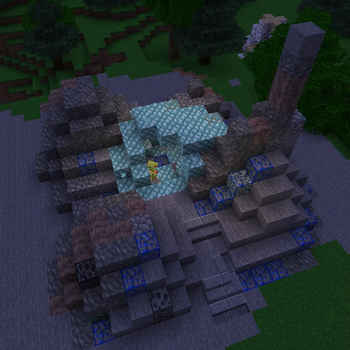
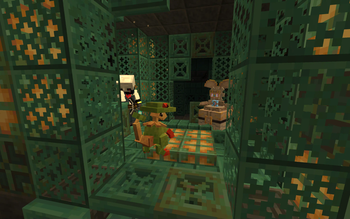
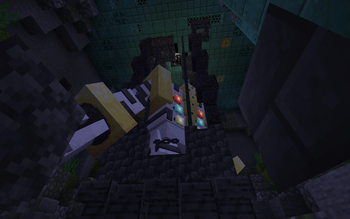
A data pack that adds legendary and mythical Pokémon to the game. Explore new buildings and Pokemon, gain new experiences in your adventures.
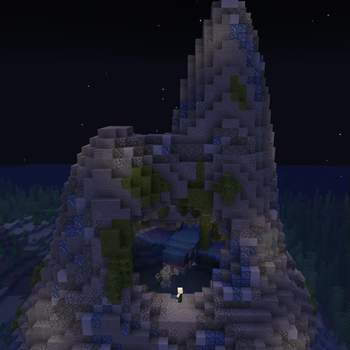
Screenshots
About this Mod
L&M IS PAUSED FOR INDEFINITE PERIOD OF TIME
FAQ:
What does Legends & Myths do?
Datapack for Cobblemon which adds legenadry and mythical pokemons to the game. Every legendary/mythical pokemon from datapack have unique structure where they spawn.
For datapack and resourcepack to work
(ONLY IF USING DATAPACK FORMAT)
Install the resourcepack and datapack files
Put it datapack file into the "datapacks" folder of your world
Put resourcepack file inside of your resourcepacks
Turn on the resourcepack
How to change Deoxys' form?
You have to go to the end in order to change it's forms (no items needed)
How to change Silvally's type?
You have to give it a gem. Based on gem held the typing of your Silvally will change
Which pokemons added?
- Deoxys (All 4 forms)
- Glastrier
- Calyrex (No forms yet)
- Keldeo (Only one form)
- Regirock
- Registeel
- Regice
- Regieleki
- Regidrago
- Regigigas
- Kyogre (Donated model by: Karlo)
- Kyurem (No other forms yet)
- Genesect (No drives yet and can't be obtained in the survival)
- Latias
- Latios
- Meloetta (Only one form)
- Type: Null (From: Pokemans Pack [Cobblemon])
- Silvally (All types) (From: Pokemans Pack [Cobblemon])
- Magearna (Only default colour)
We AREN'T Myths and Legends
Legends & Myths and Myths and Legends are two different modifications!
Which format is better to use Mod/Datapack?
Datapck is more stable version of this modification since it was focused for datapack format and thus has less visual bugs.
Links
Discord server: https://discord.gg/FExcyJSB
Discord thread: https://discord.com/channels/934267676354834442/1270303327665786891
Discord help thread: https://discord.com/channels/934267676354834442/1270304029259464767
Available Versions
How to Install Legends & Myths (Cobblemon) on Your Server
Order Server
Order a Minecraft Java server with at least 4 GB RAM (6 GB recommended).
Set datapack Loader
In the panel under "Egg", select the datapack loader and matching Minecraft version (1.21.1).
Install Mod
Open the mod browser in the dashboard and search for "Legends & Myths (Cobblemon)". Click "Install" – done! Alternatively, upload the .jar via SFTP to the /mods folder.
Compatibility
Mod Loaders
Minecraft Versions
1.21.1, 1.20.1
Server-side
✓ RequiredRecommended RAM
6 GB(min. 4 GB)Frequently Asked Questions
Legends & Myths (Cobblemon) server crashes on startup – what to do?
Most common cause: wrong datapack version or insufficient RAM. Check the server log (latest.log) for "OutOfMemoryError" or "Mixin" errors. With Mado Hosting: ensure at least 4 GB RAM is allocated and the loader matches the mod version (1.21.1). You can switch loaders with one click in the panel.
Is Legends & Myths (Cobblemon) compatible with datapack and fabric and forge and neoforge?
Legends & Myths (Cobblemon) officially supports datapack, fabric, forge, neoforge for Minecraft 1.21.1, 1.20.1. Note: Forge and Fabric mods are NOT cross-compatible – pick one loader and stick with it. The Mado dashboard automatically detects incompatible loader combinations.
Server lagging with Legends & Myths (Cobblemon) – how to optimize performance?
Recommended RAM: 6 GB (per 5 players). Use /spark profiler to check if Legends & Myths (Cobblemon) consumes the most tick time. Common fixes: reduce server view-distance to 8-10, install "performant" or "starlight" as supplementary mods on Forge. With Mado Hosting, your server runs on NVMe SSDs with dedicated CPU cores for minimal latency.
Similar Mods




Rent Modded Server
Install Legends & Myths (Cobblemon) with just one click on your server.
Details
- License
- Creative Commons Attribution Non Commercial 4.0 International
- Server-side
- Required