
librarianroller
a pure client-side mod that automates breaking and placing lecterns, causing librarian villagers to continuously refresh their trades for efficient farming of specific enchanted books.
Screenshots
About this Mod
Features
- 🧩 Pure Client - Runs entirely on the client side, does not modify server data, safe and reliable
- 🔄 Automated Loop - Automatically breaks and re-places lecterns to refresh villager trades
- 🎯 Enchantment Filtering - Specify desired enchantments and levels for precise targeting
- 👥 Multi-Villager Support - Supports 1, 4, or 6 villagers simultaneously for faster farming
- 🛡️ Durability Protection - Automatically stops when axe durability drops below threshold to prevent breakage
- ⚙️ Flexible Configuration - All parameters adjustable via config file
Usage
V1 Mode (Recommended)
- Prepare a librarian villager and a lectern
- Configure the target enchantment list
- Face the lectern and villager (Player → Lectern → Villager)
- Press
J(default) to start/stop the automation loop
V4 Mode
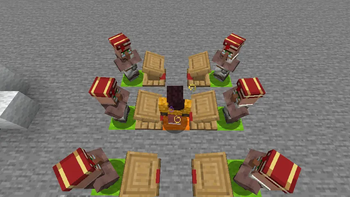
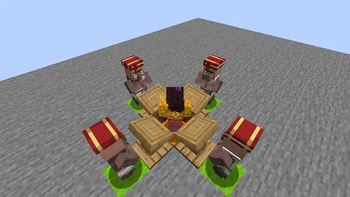
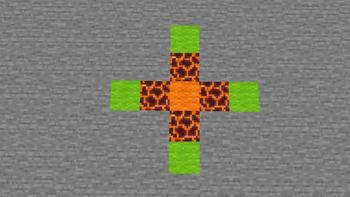
- Place librarian villagers and lecterns in the specific arrangement shown below
- Configure the target enchantment list
- Stand in the designated position
- Press
J(default) to start/stop the automation loop
V6 Mode
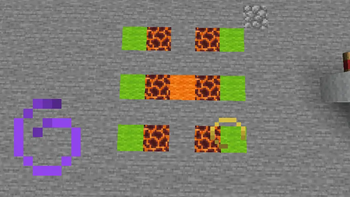
- Place librarian villagers and lecterns in the specific arrangement shown below
- Configure the target enchantment list
- 👁 Player's line of sight must be parallel to the two rows of lecternsy
- Stand in the designated position
- Press
J(default) to start/stop the automation loop
V4 & V6 Layout
- See images in the image gallery section
- Color Legend:
- 🟧 Orange: Player
- 🟩 Green: Villager
- 🟥 Magma Block: Lectern
Configuration Options
| Option | Description |
|---|---|
| Auto-Buy | Automatically purchases and locks the enchantment when found (Not yet implemented) |
| Prevent Axe Breaking | Stops automation when axe durability falls below 10 to protect the tool |
| Legit Mode | Makes player eyes follow the target lectern/villager (Not yet implemented, considering removal) |
| Villager Count | Selects V1/V4/V6 mode as described above |
| Enchantment Entries | List of enchantments to target (format: enchantment_name level, one per line) |
Example:
Smite 5
Sharpness 5
Silk Touch
Enchantments without a specified level are excluded from the filter list.
Available Versions
How to Install librarianroller on Your Server
Order Server
Order a Minecraft Java server with at least 3 GB RAM (4 GB recommended).
Set fabric Loader
In the panel under "Egg", select the fabric loader and matching Minecraft version (1.21.11).
Install Mod
Open the mod browser in the dashboard and search for "librarianroller". Click "Install" – done! Alternatively, upload the .jar via SFTP to the /mods folder.
Compatibility
Mod Loaders
Minecraft Versions
1.21.11
Server-side
✗ UnsupportedRecommended RAM
4 GB(min. 3 GB)Frequently Asked Questions
librarianroller server crashes on startup – what to do?
Most common cause: wrong fabric version or insufficient RAM. Check the server log (latest.log) for "OutOfMemoryError" or "Mixin" errors. With Mado Hosting: ensure at least 3 GB RAM is allocated and the loader matches the mod version (1.21.11). You can switch loaders with one click in the panel.
Is librarianroller compatible with fabric?
librarianroller officially supports fabric for Minecraft 1.21.11. The Mado dashboard automatically detects incompatible loader combinations.
Server lagging with librarianroller – how to optimize performance?
Recommended RAM: 4 GB (per 8 players). Use /spark profiler to check if librarianroller consumes the most tick time. Common fixes: reduce server view-distance to 8-10, install "performant" or "starlight" as supplementary mods on Forge. With Mado Hosting, your server runs on NVMe SSDs with dedicated CPU cores for minimal latency.
Similar Mods




![[ETF] Entity Texture Features](https://cdn.modrinth.com/data/BVzZfTc1/af683d206d50b05258d865b0d6e4aa2f2cee12f2_96.webp)

Rent Modded Server
Install librarianroller with just one click on your server.