
Loot Beams: Relooted!
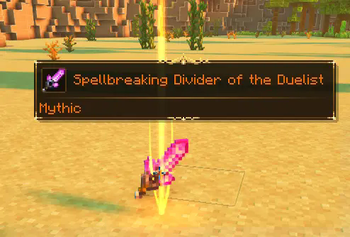
Adds colorful and customizable beams to your items!
Screenshots
About this Mod
No Fabric. Please don't port it either, I (Amo) don't want asked about fabric issues on a forge page.

A client-side mod that adds colorful and customizable loot beams to dropped items!
PLEASE LOOK AT THE CONFIG PRESETS LINKED HERE BEFORE ASKING WHY IT LOOKS WEIRD
Loot Beams are added to all items by default and they change colors depending on the items name. You can specify a whitelist/blacklist for Beams, color overrides, and even NBT tags to change their color! (like "lootbeams.color:"0xFFFFFF"").
Beams also have nametags that show up when looking at an item or crouching so you can see what an item is without even picking it up. This mod is client-side, meaning it will run on vanilla servers and forge servers that do not have this mod installed!
As of 17/09/23, this mod has received MAJOR changes to its customizability. For example configs, please visit here. You can change the textures and sound of this mod via a resource pack - including trail texture, particle texture, beam texture and glow texture.
Have any questions or need help? Visit my Discord here.
Available Versions
How to Install Loot Beams: Relooted! on Your Client
Install the Mod Loader Locally
Install forge for your local Minecraft version.
Download the Matching File
Choose the Loot Beams: Relooted! file for forge and Minecraft 1.20.2.
Install Mod
Place the .jar file in your local .minecraft/mods folder and restart Minecraft. No server-side installation is required.
Compatibility
Mod Loaders
Minecraft Versions
1.20.2, 1.20.1
Server-side
✗ UnsupportedRecommended RAM
4 GB(min. 3 GB)Frequently Asked Questions
Does Loot Beams: Relooted! need to be installed on the Minecraft server?
No. Modrinth marks Loot Beams: Relooted! as unsupported on the server side. Install it only in your local Minecraft mods folder. Your server can remain unchanged unless the mod page lists an additional dependency.
Which version and loader does Loot Beams: Relooted! require?
Use a file for forge and your exact Minecraft version. Supported versions include 1.20.2, 1.20.1. Files for different loaders are not interchangeable.
Loot Beams: Relooted! is not working – what should I check?
First check the Minecraft version, loader version and required dependencies. Put the .jar file in your local .minecraft/mods folder and remove older duplicates. Because this mod is client-side, adding server RAM will not fix it.
Similar Mods




Minecraft Server for Your Group
Loot Beams: Relooted! stays on your client. Host a compatible world for your group.