
Magicraft
Spells, scrolls, mana system and grimoires, be a mage!
Screenshots
About this Mod
Magicraft 🪄




📖 Description
Become a Powerful Mage!
Be a mage with a spell, scroll, mana, and grimoire vanilla-style system!
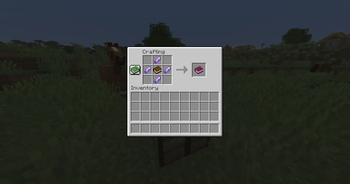
- Learn Spells: Right-click a Scroll to permanently learn a new spell.
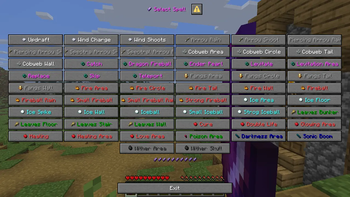
- Manage Your Magic: Right-click your Grimoire to open your spell list and select the spell you want to cast.
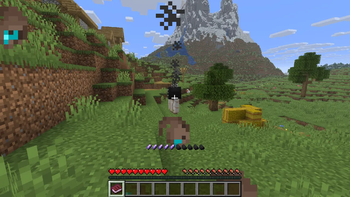
- Cast Spells: Once a spell is selected, left-click while holding the Grimoire to unleash its power.
- Mana System: Every spell consumes mana. By default, you regenerate 1 mana point every 5 seconds.
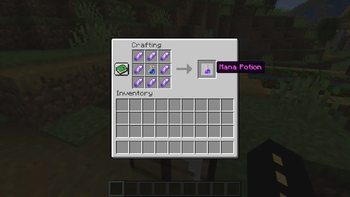
- Mana Potions: Running out of mana? Craft a Mana Potion to instantly restore your entire mana pool.
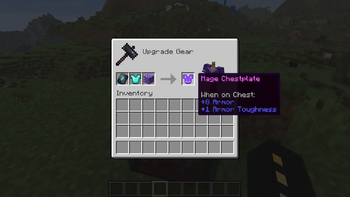
- Mage Armor: Craft the Mage Armor in the smithing table to regenerate mana more faster!
Where can you find Scrolls?
Scrolls are extremely rare, making every new spell feel like a valuable discovery. You can obtain them from:
- Wandering Trader trades
- Fishing treasure
- Archaeology loot
- Bastion Remnant treasure
- Buried treasure
- End City treasure
- Shipwreck treasure
- Evoker Drop
- Wandering Trader Drop
- The Wither Drop
- Illusioner Drop
- Mage Drop
Every scroll you find brings you one step closer to becoming the ultimate mage.
Good luck, and may your magical journey begin!
⌨️ Commands
Reset player spells:
/execute as <player> run function magicraft:player/spell/learn/reset/reset
Summon mage:
/function magicraft:mage/summon
Give Magicraft item:
/loot give @a loot magicraft:<item>
🪪 License
👾 Bugs/Issues
Please report any problem/bug/issues in the Discord Server.
💌 Donate
🎁 Server Hosting
Creating your own server can be a very lengthy, tedious and costly process.
Interested? Then we've got a deal for you!
!
Available Versions
How to Install Magicraft on Your Server
Order Server
Order a Minecraft Java server with at least 3 GB RAM (4 GB recommended).
Set datapack Loader
In the panel under "Egg", select the datapack loader and matching Minecraft version (26.3).
Install Mod
Open the mod browser in the dashboard and search for "Magicraft". Click "Install" – done! Alternatively, upload the .jar via SFTP to the /mods folder.
Compatibility
Mod Loaders
Minecraft Versions
26.3, 26.2, 26.1.2 (+3 more)
Server-side
✓ RequiredRecommended RAM
4 GB(min. 3 GB)Frequently Asked Questions
Magicraft server crashes on startup – what to do?
Most common cause: wrong datapack version or insufficient RAM. Check the server log (latest.log) for "OutOfMemoryError" or "Mixin" errors. With Mado Hosting: ensure at least 3 GB RAM is allocated and the loader matches the mod version (26.3). You can switch loaders with one click in the panel.
Is Magicraft compatible with datapack and fabric and forge and neoforge and quilt?
Magicraft officially supports datapack, fabric, forge, neoforge, quilt for Minecraft 26.3, 26.2, 26.1.2. Note: Forge and Fabric mods are NOT cross-compatible – pick one loader and stick with it. The Mado dashboard automatically detects incompatible loader combinations.
Server lagging with Magicraft – how to optimize performance?
Recommended RAM: 4 GB (per 8 players). Use /spark profiler to check if Magicraft consumes the most tick time. Common fixes: reduce server view-distance to 8-10, install "performant" or "starlight" as supplementary mods on Forge. With Mado Hosting, your server runs on NVMe SSDs with dedicated CPU cores for minimal latency.
Similar Mods




Rent Modded Server
Install Magicraft with just one click on your server.