MCC Fishing Messages Mod
A mod to separate out all Fishing Events from the main chat window to its own separate window in MCCI
Screenshots
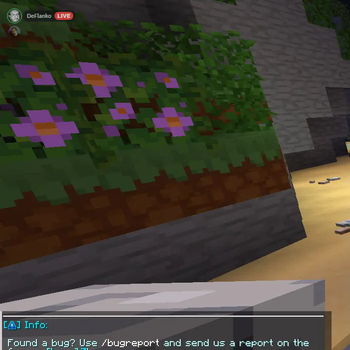
About this Mod
MCCI Fishing Messages Mod







A Minecraft MCCI Mod to separate fishing events from the main chat.
Please report any bugs by opening an issue.
Installation
Download the latest version of the mod and place it in your mods folder.
The following mods are required to be installed (dependencies):
1.21.11
1.21.8
1.21.5
1.21.4
Configuration
.minecraft\config\mccfishingmessages.json
Use
Press F9 to toggle.
Press [ and ] to scale text.
Press (R)Alt to adjust window size and position.
Click the Fishing Messages box then mouse wheel to scroll though messages.
Mac Users: set sillymacdisplay to true in the config file to enable the mod.
TODO: support for ModMenu

Project Contributors
Available Versions
How to Install MCC Fishing Messages Mod on Your Client
Install the Mod Loader Locally
Install fabric for your local Minecraft version.
Download the Matching File
Choose the MCC Fishing Messages Mod file for fabric and Minecraft 1.21.11.
Install Mod
Place the .jar file in your local .minecraft/mods folder and restart Minecraft. No server-side installation is required.
Compatibility
Mod Loaders
Minecraft Versions
1.21.11, 1.21.8, 1.21.5 (+2 more)
Server-side
✗ UnsupportedRecommended RAM
4 GB(min. 3 GB)Frequently Asked Questions
Does MCC Fishing Messages Mod need to be installed on the Minecraft server?
No. Modrinth marks MCC Fishing Messages Mod as unsupported on the server side. Install it only in your local Minecraft mods folder. Your server can remain unchanged unless the mod page lists an additional dependency.
Which version and loader does MCC Fishing Messages Mod require?
Use a file for fabric and your exact Minecraft version. Supported versions include 1.21.11, 1.21.8, 1.21.5. Files for different loaders are not interchangeable.
MCC Fishing Messages Mod is not working – what should I check?
First check the Minecraft version, loader version and required dependencies. Put the .jar file in your local .minecraft/mods folder and remove older duplicates. Because this mod is client-side, adding server RAM will not fix it.
Similar Mods





Minecraft Server for Your Group
MCC Fishing Messages Mod stays on your client. Host a compatible world for your group.