
MemoPad
Floating sticky notes inside Minecraft — write, pin, and organize with Markdown and checklists.
Screenshots
About this Mod
MemoPad



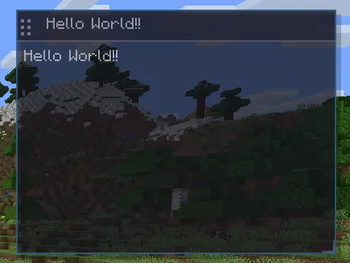
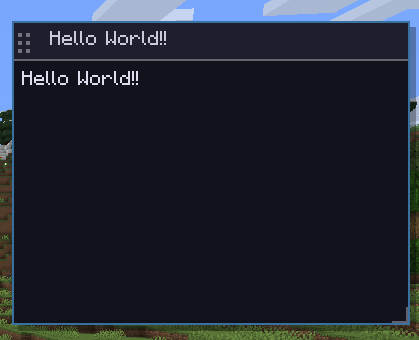
Floating sticky notes inside Minecraft. Press M, write anything, pin it to your HUD.
Features
Memo Management
| Action | How |
|---|---|
| Open / close pad | key |
| New memo | |
| Delete focused memo | |
| Move memo | Drag title bar |
| Rename memo | Double-click title bar |
| Resize memo | Drag bottom-right corner |
| Change font size | S / M / L buttons |
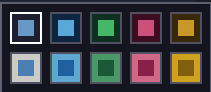
| Change color & opacity | Color picker button |
HUD Pin
Pin any memo and it stays visible on your HUD even when the pad is closed — perfect for coordinates or active task lists.
Markdown Rendering
| Syntax | Result |
|---|---|
| Large heading | |
| bold | |
| italic | |
| Bullet list |
Checklists
Type for unchecked or for checked. Click the checkbox in-game to toggle.
Per-World / Per-Server Storage
MemoPad automatically switches memo sets when you join different worlds or servers. Singleplayer and multiplayer memos stay completely separate.
Coordinate Memo (Alt+M)
Press **** anywhere to instantly capture your current XYZ coordinates as a timestamped memo.
Export / Import (.txt)
- Export — saves all memos to
- Import — place a file at and click Import
Requirements
- Minecraft 1.20.1
- Fabric Loader
- Fabric API
Client-side only — works on any server without server-side installation.
Links
YouTube: MC clip
Subscribe for updates and tutorials!
日本語
Minecraft内でメモを自由に書き留められるクライアントMOD。キーで開いて、何でも書いてHUDにピン留め。
機能一覧
メモ操作
| 操作 | 方法 |
|---|---|
| パッドを開く/閉じる | キー |
| 新規メモ | |
| フォーカス中メモを削除 | |
| メモを移動 | タイトルバーをドラッグ |
| タイトル変更 | タイトルバーをダブルクリック |
| リサイズ | 右下角をドラッグ |
| フォントサイズ変更 | S / M / L ボタン |
| 色・透明度変更 | カラーピッカーボタン |
HUDピン留め
メモをピン留めすると、パッドを閉じていてもHUDに常時表示されます。座標メモやタスクリストに最適。
Markdownレンダリング
| 記法 | 結果 |
|---|---|
| 大きな見出し | |
| 太字 | |
| 斜体 | |
| 箇条書き |
チェックリスト
で未チェック、 でチェック済み。ゲーム内でチェックボックスをクリックして切り替え可能。
ワールド/サーバー別保存
ワールドやサーバーに参加するたびに、メモセットが自動で切り替わります。シングルプレイとマルチプレイのメモは完全分離。
座標メモ(Alt+M)
を押すだけで現在のXYZ座標をタイムスタンプ付きメモとして即時作成。
エクスポート/インポート(.txt)
- エクスポート — に保存
- インポート — を置いてインポートボタンを押す
対応バージョン
Minecraft 1.20.1 (Fabric)
クライアントサイド専用 — サーバー側へのインストール不要
YouTube
チャンネル: MCクリップ
チャンネル登録よろしく!
Available Versions
How to Install MemoPad on Your Server
Order Server
Order a Minecraft Java server with at least 3 GB RAM (4 GB recommended).
Set fabric Loader
In the panel under "Egg", select the fabric loader and matching Minecraft version (1.20.1).
Install Mod
Open the mod browser in the dashboard and search for "MemoPad". Click "Install" – done! Alternatively, upload the .jar via SFTP to the /mods folder.
Compatibility
Mod Loaders
Minecraft Versions
1.20.1
Server-side
✗ UnsupportedRecommended RAM
4 GB(min. 3 GB)Frequently Asked Questions
MemoPad server crashes on startup – what to do?
Most common cause: wrong fabric version or insufficient RAM. Check the server log (latest.log) for "OutOfMemoryError" or "Mixin" errors. With Mado Hosting: ensure at least 3 GB RAM is allocated and the loader matches the mod version (1.20.1). You can switch loaders with one click in the panel.
Is MemoPad compatible with fabric?
MemoPad officially supports fabric for Minecraft 1.20.1. The Mado dashboard automatically detects incompatible loader combinations.
Server lagging with MemoPad – how to optimize performance?
Recommended RAM: 4 GB (per 8 players). Use /spark profiler to check if MemoPad consumes the most tick time. Common fixes: reduce server view-distance to 8-10, install "performant" or "starlight" as supplementary mods on Forge. With Mado Hosting, your server runs on NVMe SSDs with dedicated CPU cores for minimal latency.
Similar Mods




![[ETF] Entity Texture Features](https://cdn.modrinth.com/data/BVzZfTc1/af683d206d50b05258d865b0d6e4aa2f2cee12f2_96.webp)

Rent Modded Server
Install MemoPad with just one click on your server.