
Merchant Markers
Adds custom markers above villagers based on their professions!
Screenshots
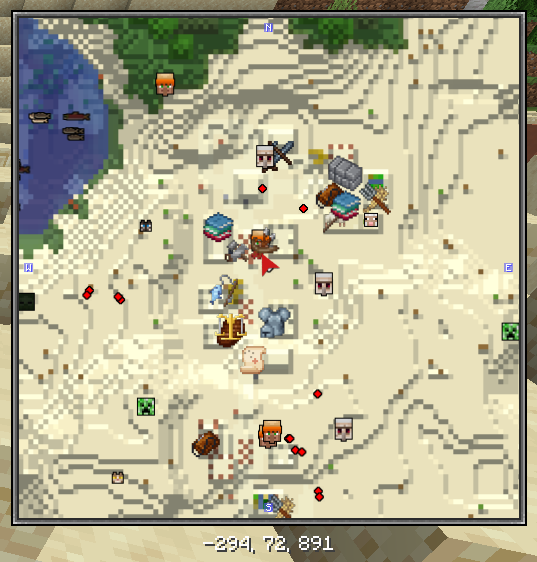
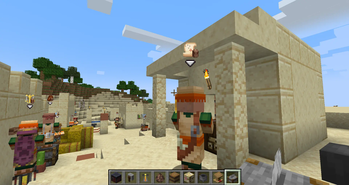
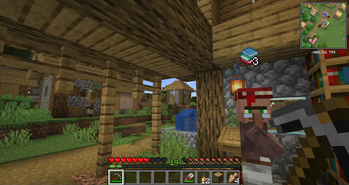
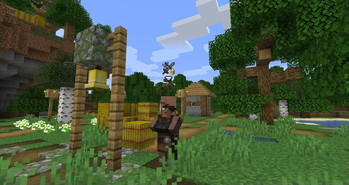
About this Mod
Have you ever forgotten what different villager professions look like? Ever wanted to be able to quickly find specific merchants in your home village?
Merchant Markers makes it easier than ever.

This mod will add custom markers above villagers to make them stand out and be easier to find than ever. There are several customization options, and the mod is built with modpacks in mind. Modded villagers are fully supported, and it even integrates with Xaero minimap, FTB Chunks, or JourneyMap for a much more cohesive experience!
This mod requires Iceberg, you can download it here. The fabric version also requires Forge Config API Port, you can download it here.
Client / Server
This mod is fully client-side.
Configuration
The configuration file for the mod includes lots of different options for getting the markers to display just how you like. There are options for whether markers should show through walls, if an arrow icon should show under the markers, and the maximum distance away from villagers that markers should be visible. There are also four different options for the types of icons to display:
- Custom - The default hand-drawn custom icons for each profession. (New ones for modded professions can be added via resource packs)
- Items - Uses an item icon for an item associated with the profession. For example, shows an iron chestplate for armorers, etc. The associated items can also be reconfigured.
- Jobs - Shows the texture of the job block used for the profession. These can't be changed but should automatically support modded professions.
- Generic - Shows the same generic "merchant" icon for all villagers with a profession. (This icon can be changed via resource packs.)
There is also a profession blacklist, which contains "none" and "nitwit" by default so that only villagers with trades have markers. Finally, there are five different options for the icon "overlay", which is a smaller icon that is shown in the lower right corner of the marker: Backpack, emerald, coin stack, bag, or none.
Compatibility
This mod should fully support modded villager professions, including custom icons when provided with resource packs. It also supports displaying markers on Xaero's Minimap, FTB Chunks, or JourneyMap in place of standard villager head icons.
You are free to use this mod in modpacks.

Problems, feature request, something else? Join us on Discord!
Available Versions
How to Install Merchant Markers on Your Client
Install the Mod Loader Locally
Install fabric for your local Minecraft version.
Download the Matching File
Choose the Merchant Markers file for fabric and Minecraft 1.21.4.
Install Mod
Place the .jar file in your local .minecraft/mods folder and restart Minecraft. No server-side installation is required.
Compatibility
Mod Loaders
Minecraft Versions
1.21.4, 1.21.3, 1.21.1 (+13 more)
Server-side
✗ UnsupportedRecommended RAM
4 GB(min. 3 GB)Frequently Asked Questions
Does Merchant Markers need to be installed on the Minecraft server?
No. Modrinth marks Merchant Markers as unsupported on the server side. Install it only in your local Minecraft mods folder. Your server can remain unchanged unless the mod page lists an additional dependency.
Which version and loader does Merchant Markers require?
Use a file for fabric, forge, neoforge and your exact Minecraft version. Supported versions include 1.21.4, 1.21.3, 1.21.1. Files for different loaders are not interchangeable.
Merchant Markers is not working – what should I check?
First check the Minecraft version, loader version and required dependencies. Put the .jar file in your local .minecraft/mods folder and remove older duplicates. Because this mod is client-side, adding server RAM will not fix it.
Similar Mods




Minecraft Server for Your Group
Merchant Markers stays on your client. Host a compatible world for your group.
Details
- License
- Creative Commons Attribution Non Commercial No Derivatives 4.0 International
- Server-side
- Unsupported