
Mob Spawn Indicator
Highlights block surfaces where hostile mobs can spawn using color-coded overlays
Screenshots
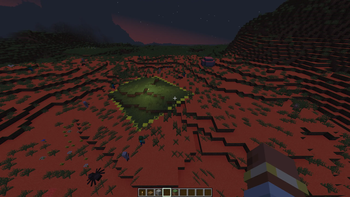
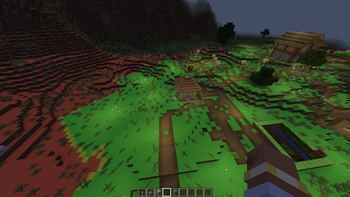
About this Mod
Mob Spawn Indicator highlights valid mob spawn floors in your vicinity with color-coded overlays. It uses vanilla spawn rules, so it works on any server without needing to be installed server-side.
Features
- Color-coded overlays on valid spawn floors: red (danger), yellow (warn), green (safe)
- Configurable render distance, opacity, and which colors to display
- Settings GUI accessible from the Options screen or via commands
- Client-side only — works on vanilla servers, SMPs, and modded servers
Commands
/msi settings— open the settings GUI/msi toggle— toggle the overlay on/off/msi on|/msi off— enable or disable the overlay/msi reset— reset all settings to defaults
Configuration
Default keybind: J (toggle overlay)
Config file: config/msi-common.toml
| Option | Default | Description |
|---|---|---|
render_rad |
16 | Render distance in blocks |
overlay_opacity |
0.5 | Overlay transparency |
show_danger |
true | Show red overlay (valid spawn, no space for mobs) |
show_warn |
true | Show yellow overlay (valid spawn, 1 block space) |
show_safe |
false | Show green overlay (valid spawn, 2+ block space) |
Notes
- Uses vanilla Minecraft spawn rules: slabs, stairs, trapdoors, glass, and leaves are correctly excluded as non-spawnable
- Overlays update every 5 ticks
- Works in singleplayer, LAN, and multiplayer
Available Versions
How to Install Mob Spawn Indicator on Your Server
Order Server
Order a Minecraft Java server with at least 3 GB RAM (4 GB recommended).
Set neoforge Loader
In the panel under "Egg", select the neoforge loader and matching Minecraft version (1.21.1).
Install Mod
Open the mod browser in the dashboard and search for "Mob Spawn Indicator". Click "Install" – done! Alternatively, upload the .jar via SFTP to the /mods folder.
Compatibility
Mod Loaders
Minecraft Versions
1.21.1
Server-side
✗ UnsupportedRecommended RAM
4 GB(min. 3 GB)Frequently Asked Questions
Mob Spawn Indicator server crashes on startup – what to do?
Most common cause: wrong neoforge version or insufficient RAM. Check the server log (latest.log) for "OutOfMemoryError" or "Mixin" errors. With Mado Hosting: ensure at least 3 GB RAM is allocated and the loader matches the mod version (1.21.1). You can switch loaders with one click in the panel.
Is Mob Spawn Indicator compatible with neoforge?
Mob Spawn Indicator officially supports neoforge for Minecraft 1.21.1. The Mado dashboard automatically detects incompatible loader combinations.
Server lagging with Mob Spawn Indicator – how to optimize performance?
Recommended RAM: 4 GB (per 8 players). Use /spark profiler to check if Mob Spawn Indicator consumes the most tick time. Common fixes: reduce server view-distance to 8-10, install "performant" or "starlight" as supplementary mods on Forge. With Mado Hosting, your server runs on NVMe SSDs with dedicated CPU cores for minimal latency.
Similar Mods






Rent Modded Server
Install Mob Spawn Indicator with just one click on your server.