
ResBundler
A simple mod to sort through your resource packs. Inspired by 'recursive resources" and this was made over a weekend. Works well!
Screenshots


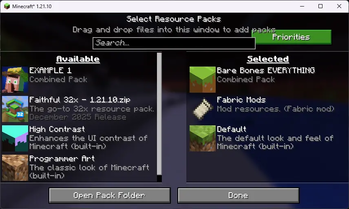
About this Mod
ResBundler
Organize your resource packs into folders and manage their load order with granular precision!
ResBundler is a quality-of-life mod designed for players who love customizing their game but hate the clutter of having dozens of individual packs in their list. This mod allows you to group multiple resource packs into subfolders within your standard resourcepacks directory, treating each folder as a single, unified entry in the Minecraft resource pack selection screen.
✨ Key Features
📂 Folder-Based Organization
Clean up your resource pack menu! Simply create a subfolder inside your .minecraft/resourcepacks/ directory (e.g., resourcepacks/PvP_Bundle/ or resourcepacks/Skyblock_Addons/) and drop your resource pack ZIPs or folders inside it. The mod automatically detects these subfolders and presents them as a single pack to the game.
🔢 Advanced Priority System
Stop renaming files to "!!a_pack" just to get them to load first. We provide a dedicated Priority Configuration Screen (accessible via Mod Menu) that gives you full control over the load order of packs within your bundles.
- Lower Number = Higher Priority: Want a specific UI tweak to override everything else? Give it a low number (e.g.,
1,10, or even negative numbers). - 0 = Lowest Priority (Default): All packs default to priority
0. In our system,0is treated as the lowest possible priority, placing these packs at the very bottom of the stack (sorted alphabetically). This ensures that any pack you explicitly prioritize will always override the defaults. - Duplicate Prevention: The intelligent UI prevents you from assigning the same non-zero priority number to multiple packs, ensuring a conflict-free and deterministic load order.
🛠️ User-Friendly Interface
- Collapsible Categories: The configuration menu groups your packs by their parent folder. You can expand or collapse these folders to easily manage huge collections without endless scrolling.
- Instant Reload: No need to restart! A built-in "Reload Resources" button in the config menu saves your changes and refreshes the game's resources immediately, so you can see your changes in real-time.
📦 Requirements & Installation
This mod requires the following dependencies to function:
- Fabric Loader (Latest version recommended)
- Fabric API
- Cloth Config API (Required for the configuration screen)
To Install:
- Download the
.jarfile. - Make sure you have Fabric API and Cloth Config API installed in your
modsfolder. - Drop
ResBundler-x.x.x.jarinto yourmodsfolder. - Launch Minecraft and start organizing!
💡 Why use this?
If you use many small "tweak" packs—like a custom crosshair, a dark mode UI, and a specific sound pack—your resource pack list can quickly become unmanageable. With Combined Resource Packs, you can bundle all those tweaks into a single "Tweaks" folder. They stay separate on your disk (making them easy to update individually) but act as one unit in-game. Plus, with the priority system, you ensure your dark mode always overlays correctly without manually merging zip files!
Available Versions
How to Install ResBundler on Your Client
Install the Mod Loader Locally
Install fabric for your local Minecraft version.
Download the Matching File
Choose the ResBundler file for fabric and Minecraft 1.21.11.
Install Mod
Place the .jar file in your local .minecraft/mods folder and restart Minecraft. No server-side installation is required.
Compatibility
Mod Loaders
Minecraft Versions
1.21.11, 1.21.10
Server-side
✗ UnsupportedRecommended RAM
4 GB(min. 3 GB)Frequently Asked Questions
Does ResBundler need to be installed on the Minecraft server?
No. Modrinth marks ResBundler as unsupported on the server side. Install it only in your local Minecraft mods folder. Your server can remain unchanged unless the mod page lists an additional dependency.
Which version and loader does ResBundler require?
Use a file for fabric and your exact Minecraft version. Supported versions include 1.21.11, 1.21.10. Files for different loaders are not interchangeable.
ResBundler is not working – what should I check?
First check the Minecraft version, loader version and required dependencies. Put the .jar file in your local .minecraft/mods folder and remove older duplicates. Because this mod is client-side, adding server RAM will not fix it.
Similar Mods




![[ETF] Entity Texture Features](https://cdn.modrinth.com/data/BVzZfTc1/af683d206d50b05258d865b0d6e4aa2f2cee12f2_96.webp)

Minecraft Server for Your Group
ResBundler stays on your client. Host a compatible world for your group.