
RedsTony's: Redstone Expansion
Standalone vanilla redstone overhaul
Screenshots
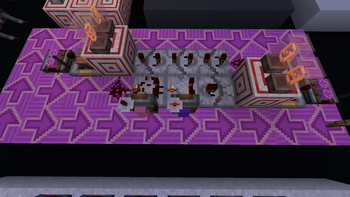
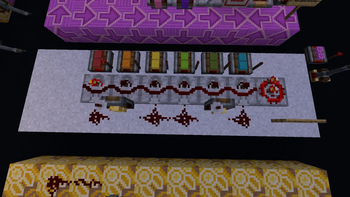
About this Mod

Tired of building huge and bulky circuits just to invert signal strength or process complex logic? This mod elegantly expands vanilla redstone capabilities by introducing advanced analog logic gates, hardware signal inversion, and mathematical operations directly into your world!
Create incredibly compact and smart contraptions in just a couple of clicks.
Features
Core Mechanics
This mod introduces two innovative technical logic toggles that change how redstone components process analog signals:
- Inverted Signal (
inverted_signal): Reverses the final output of a gate using the formula15 - X(whereXis the standard output strength). For example, if a gate normally outputs 14, in this mode it will output15 - 14 = 1.- How to toggle: Right-click a compatible gate with a Redstone Torch.
- Inverted Logic (
inverted_logic): Inverts the internal mathematical operation of the gate.- How to toggle: Right-click a compatible gate with an Analog Torch.

Comparator Inverted Logic Mode: Alters the core behavior of the standard Comparator based on the main input (F) and side input (S):
- Compare Mode: Outputs
F * (F < S)instead of the vanillaF * (F >= S). - Subtract Mode: Performs addition instead of subtraction, outputting
F + Sinstead ofF - S.

Comparator Inverted Signal Mode: Applies the signal inversion to the Comparator's final output, mapping the result directly to 15 - X.

Subtractor: A dedicated gate designed for constant subtraction and signal offsets.
- Base Logic: Outputs
F - C, whereCis the block's internal state value (ranging from 0 to 15). - Controls: Right-click to increase the value of
C; Shift + Right-click to decrease it. - With Inverted Signal: Outputs
15 - (F - C). - With Inverted Logic: Switches the operation to addition, outputting
F + C.

Matcher: Perfect for precise signal routing, address matching, and bus systems.
- Base Logic: Compares the main input
Fand side inputS. If they are exactly equal, it outputs the maximum signal strength of 15 (15 * (F == S)). - Parallel Chaining: Automatically outputs
S - 1from its side, allowing you to easily tile multiple Matchers side-by-side for parallel data processing. - With Inverted Signal: Flips the conditional logic entirely into a "Not Equal" check, outputting
15 * (F != S). (Note: This block does not feature an inverted_logic mode, as inverted_signal already provides full logical inversion).
Utility Blocks
- Analog Repeater: Unlike a vanilla repeater that boosts any input above 0 into a full signal of 15, the Analog Repeater preserves the exact incoming signal strength
Fwhile applying the standard repeater delay. - Analog Torch: An inverted power source that outputs a signal strength of
15 - Fbased on the block's input. It also serves as the tool required to activate Inverted Logic on components.
⚠️ Important Information
The mod is currently in active early access and have some bugs.
🚀 Roadmap
The mod will be actively developed! Here is what awaits you in future versions:
- New complex logic gates: Triple XNOR, Triple XOR, Join and Split.
- Add-ons and native integration with other popular mods.
Optimize your circuits and discover new horizons of redstone engineering!
Screenshots feature the Redstone Tweaks resource pack, used under CC-BY-NC-SA 4.0.
Available Versions
How to Install RedsTony's: Redstone Expansion on Your Server
Order Server
Order a Minecraft Java server with at least 3 GB RAM (4 GB recommended).
Set neoforge Loader
In the panel under "Egg", select the neoforge loader and matching Minecraft version (1.21.1).
Install Mod
Open the mod browser in the dashboard and search for "RedsTony's: Redstone Expansion". Click "Install" – done! Alternatively, upload the .jar via SFTP to the /mods folder.
Compatibility
Mod Loaders
Minecraft Versions
1.21.1
Server-side
✓ RequiredRecommended RAM
4 GB(min. 3 GB)Frequently Asked Questions
RedsTony's: Redstone Expansion server crashes on startup – what to do?
Most common cause: wrong neoforge version or insufficient RAM. Check the server log (latest.log) for "OutOfMemoryError" or "Mixin" errors. With Mado Hosting: ensure at least 3 GB RAM is allocated and the loader matches the mod version (1.21.1). You can switch loaders with one click in the panel.
Is RedsTony's: Redstone Expansion compatible with neoforge?
RedsTony's: Redstone Expansion officially supports neoforge for Minecraft 1.21.1. The Mado dashboard automatically detects incompatible loader combinations.
Server lagging with RedsTony's: Redstone Expansion – how to optimize performance?
Recommended RAM: 4 GB (per 8 players). Use /spark profiler to check if RedsTony's: Redstone Expansion consumes the most tick time. Common fixes: reduce server view-distance to 8-10, install "performant" or "starlight" as supplementary mods on Forge. With Mado Hosting, your server runs on NVMe SSDs with dedicated CPU cores for minimal latency.
Similar Mods






Rent Modded Server
Install RedsTony's: Redstone Expansion with just one click on your server.