
SkillBind Bridge
Custom keybind support for MMOCore skill slots using a Fabric client mod and server plugin bridge.
Screenshots
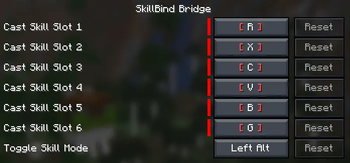
About this Mod
SkillBind Bridge
SkillBind Bridge is a client-side Fabric mod that adds custom keybinds for RPG skill slots. It is designed for Minecraft servers that use MMOCore or similar skill systems and need a more comfortable way to cast skills during combat.
Players can assign their own keys in the standard Minecraft Controls menu. The mod adds separate keybinds for skill slots and also includes a toggleable Skill Mode key, so skills are only cast when the player wants to use them.
Features
- Custom keybinds for RPG skill slots
- Configurable controls through Minecraft settings
- Toggleable Skill Mode key
- Prevents accidental skill usage while scrolling the hotbar
- Designed for MMOCore skill casting
- Lightweight client-side mod
Requirements
Client
- Fabric Loader
- Fabric API
- SkillBind Bridge client mod
Server
To actually cast skills on a multiplayer server, the server must have the SkillBind Bridge Paper plugin installed.
The Fabric mod only sends keybind input to the server. The Paper plugin receives that input and executes the skill casting logic on the server side.
Important
This mod does not add skills by itself. It is a bridge for existing RPG skill systems, especially MMOCore. Skills must already be configured on the server.
For MMOCore servers, it is recommended to disable the default MMOCore skill casting mode if you want to avoid accidental skill usage from number keys or mouse wheel scrolling.
Available Versions
How to Install SkillBind Bridge on Your Server
Order Server
Order a Minecraft Java server with at least 3 GB RAM (4 GB recommended).
Set fabric Loader
In the panel under "Egg", select the fabric loader and matching Minecraft version (1.21.10).
Install Mod
Open the mod browser in the dashboard and search for "SkillBind Bridge". Click "Install" – done! Alternatively, upload the .jar via SFTP to the /mods folder.
Compatibility
Mod Loaders
Minecraft Versions
1.21.10, 1.21.9, 1.21.8
Server-side
✗ UnsupportedRecommended RAM
4 GB(min. 3 GB)Frequently Asked Questions
SkillBind Bridge server crashes on startup – what to do?
Most common cause: wrong fabric version or insufficient RAM. Check the server log (latest.log) for "OutOfMemoryError" or "Mixin" errors. With Mado Hosting: ensure at least 3 GB RAM is allocated and the loader matches the mod version (1.21.10). You can switch loaders with one click in the panel.
Is SkillBind Bridge compatible with fabric?
SkillBind Bridge officially supports fabric for Minecraft 1.21.10, 1.21.9, 1.21.8. The Mado dashboard automatically detects incompatible loader combinations.
Server lagging with SkillBind Bridge – how to optimize performance?
Recommended RAM: 4 GB (per 8 players). Use /spark profiler to check if SkillBind Bridge consumes the most tick time. Common fixes: reduce server view-distance to 8-10, install "performant" or "starlight" as supplementary mods on Forge. With Mado Hosting, your server runs on NVMe SSDs with dedicated CPU cores for minimal latency.
Similar Mods






Rent Modded Server
Install SkillBind Bridge with just one click on your server.