
Sky Book
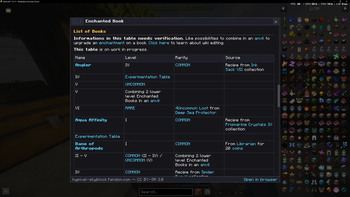
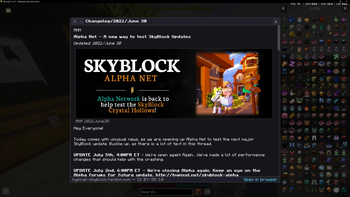
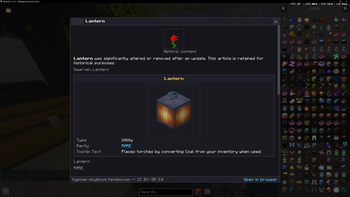
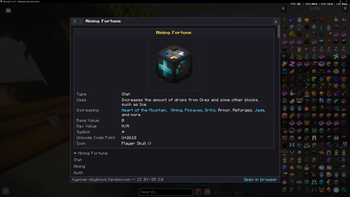
SkyBook is a Fabric client-side Minecraft mod for 1.21.11 (Java 21) that brings the Hypixel SkyBlock WIKI into the game without ever leaving a container screen.
Screenshots
About this Mod
SkyBook - Summary
SkyBook is a Fabric client-side Minecraft mod for 1.21.11 (Java 21) that brings the Hypixel
SkyBlock wiki into the game without ever leaving a container screen.
What it does
Middle-click any SkyBlock item (in a chest, your inventory, a REI/JEI entry list, anywhere)
and an in-game overlay panel slides in over the current screen, showing that item's page from
the Hypixel SkyBlock Fandom wiki. The underlying container stays open and fully interactive
behind it.
Feature highlights
- Smart item resolution: reads ExtraAttributes NBT to extract the SkyBlock ID, then looks up
the canonical wiki title via the NEU item repo (handles pets, enchanted books, potions,
runes, reforges) - Rich wiki rendering: infoboxes, tables, headings, images, and tab groups (e.g. Wither armor
variants), parsed from live Fandom API responses and rendered in MC's GUI - Link navigation + history: clickable wiki links, mouse-4/5 back/forward, /skybook
command - Caching: disk cache with 24h TTL + lightweight revid revalidation; never hammers the wiki
- REI + JEI integration: intercepts hovered entries in both recipe viewers
- Hypixel-safe: middle-clicks are only consumed, never synthesized; glass-pane clicks pass
through untouched; complies with Hypixel's client mod rules
Tech stack
Fabric Loader 0.18.5 | Fabric API 0.140.0 | jsoup (bundled) | NEU item repo (ZIP-mounted,
no extraction) | Fandom action=parse API | Mojang mappings
Current status
v0.1.0 is built and packaged (skybook-0.1.0+1.21.11.jar, 602 KB). All 12 unit tests pass.
Smoke-tested in the dev client (boots clean, REI/JEI registered, repo ETag caching works).
Awaiting first in-game interactive test.
Available Versions
How to Install Sky Book on Your Server
Order Server
Order a Minecraft Java server with at least 3 GB RAM (4 GB recommended).
Set fabric Loader
In the panel under "Egg", select the fabric loader and matching Minecraft version (1.21.11).
Install Mod
Open the mod browser in the dashboard and search for "Sky Book". Click "Install" – done! Alternatively, upload the .jar via SFTP to the /mods folder.
Compatibility
Mod Loaders
Minecraft Versions
1.21.11
Server-side
✗ UnsupportedRecommended RAM
4 GB(min. 3 GB)Frequently Asked Questions
Sky Book server crashes on startup – what to do?
Most common cause: wrong fabric version or insufficient RAM. Check the server log (latest.log) for "OutOfMemoryError" or "Mixin" errors. With Mado Hosting: ensure at least 3 GB RAM is allocated and the loader matches the mod version (1.21.11). You can switch loaders with one click in the panel.
Is Sky Book compatible with fabric?
Sky Book officially supports fabric for Minecraft 1.21.11. The Mado dashboard automatically detects incompatible loader combinations.
Server lagging with Sky Book – how to optimize performance?
Recommended RAM: 4 GB (per 8 players). Use /spark profiler to check if Sky Book consumes the most tick time. Common fixes: reduce server view-distance to 8-10, install "performant" or "starlight" as supplementary mods on Forge. With Mado Hosting, your server runs on NVMe SSDs with dedicated CPU cores for minimal latency.
Similar Mods




![[ETF] Entity Texture Features](https://cdn.modrinth.com/data/BVzZfTc1/af683d206d50b05258d865b0d6e4aa2f2cee12f2_96.webp)

Rent Modded Server
Install Sky Book with just one click on your server.