
SpiffyHUD
Addon for FancyMenu to customize the in-game HUD.
Screenshots
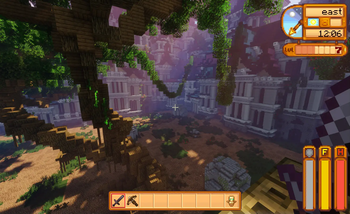
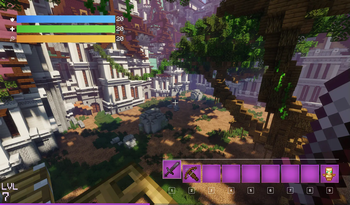
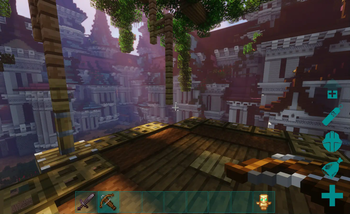
About this Mod




SpiffyHUD is an addon for FancyMenu that lets you fully customize Minecraft’s in-game HUD, and it’s super easy to use. You can add new stuff, animations, images, pretty much make it look however you want. Since it’s built on top of FancyMenu, most of the cool things you can do there also work here.
It’s like having full control of your HUD, right at your fingertips. Want it to look cleaner? Fancier? Just straight-up awesome? Spiffy’s got you.
If you want to see everything it can do, check out the documentation. It covers all the basics and even the more advanced stuff, so whether you’re just messing around or going full pro, you’ll find what you need.
For support, tips, and to connect with other users, join the official Discord server.
If you experience crashes or other issues, please check the incompatibility list for mod conflicts!
Copyright
SpiffyHUD Copyright © 2021-2025 Keksuccino.
SpiffyHUD is licensed under DSMSLv3 (DON'T SNATCH MA STUFF LICENSE v3).
See LICENSE.md for more information about the license.
Server Needed?
Looking to play Minecraft with friends but setting up a server is just too time-consuming?
No worries! Simply rent a pre-configured server and start playing in a snap.
Just click the image below and use code **** to enjoy a 25% discount on your first month! You can also click the code itself if your ad blocker hides the banner.
Available Versions
How to Install SpiffyHUD on Your Server
Order Server
Order a Minecraft Java server with at least 3 GB RAM (4 GB recommended).
Set fabric Loader
In the panel under "Egg", select the fabric loader and matching Minecraft version (26.3).
Install Mod
Open the mod browser in the dashboard and search for "SpiffyHUD". Click "Install" – done! Alternatively, upload the .jar via SFTP to the /mods folder.
Compatibility
Mod Loaders
Minecraft Versions
26.3, 26.2, 26.1.2 (+11 more)
Server-side
~ OptionalRecommended RAM
4 GB(min. 3 GB)Frequently Asked Questions
SpiffyHUD server crashes on startup – what to do?
Most common cause: wrong fabric version or insufficient RAM. Check the server log (latest.log) for "OutOfMemoryError" or "Mixin" errors. With Mado Hosting: ensure at least 3 GB RAM is allocated and the loader matches the mod version (26.3). You can switch loaders with one click in the panel.
Is SpiffyHUD compatible with fabric and forge and neoforge?
SpiffyHUD officially supports fabric, forge, neoforge for Minecraft 26.3, 26.2, 26.1.2. Note: Forge and Fabric mods are NOT cross-compatible – pick one loader and stick with it. The Mado dashboard automatically detects incompatible loader combinations.
Server lagging with SpiffyHUD – how to optimize performance?
Recommended RAM: 4 GB (per 8 players). Use /spark profiler to check if SpiffyHUD consumes the most tick time. Common fixes: reduce server view-distance to 8-10, install "performant" or "starlight" as supplementary mods on Forge. With Mado Hosting, your server runs on NVMe SSDs with dedicated CPU cores for minimal latency.
Similar Mods




![[ETF] Entity Texture Features](https://cdn.modrinth.com/data/BVzZfTc1/af683d206d50b05258d865b0d6e4aa2f2cee12f2_96.webp)

Rent Modded Server
Install SpiffyHUD with just one click on your server.