
StarHUD
Display fancy HUDs in your game.
Screenshots

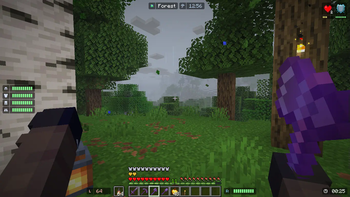
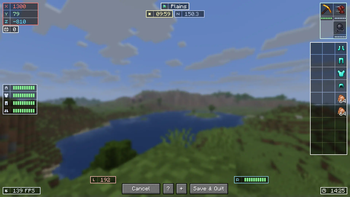


About this Mod
A Minecraft mod that display HUDs in a more fancy way...

Requires Cloth Config
Features
List of HUD
- Armor Durability HUD
- Coordinate & Nether Coordinate HUD
- Direction and Horizontal Yaw HUD
- Ping HUD
- FPS HUD
- System & In-Game Clock HUD (+ Weather Indicator)
- Biome Indicator HUD (+ Dimension Indicator)
- Inventory HUD (Disabled by default)
- Hand Items Indicator HUD (Durability + Item Count)
- Status Effect HUD
- Day Counter HUD
- Targetted Crosshair HUD
- TPS HUD
- Speed HUD
- Combo HUD
- Reach HUD
- Player Count HUD
- Inventory Space HUD
Others
- Drag and Drop HUD Placement
- HUD Snapping
- Automatic HUD Screen Alignment
- Multiple HUD Display Mode (Icon, Info, or Both)
- Customizable Data Collection Interval (For faster performance)
- HUD Screen Alignment Placement
- HUD Growing direction
- Grouping System
- Conditional Positioning
Configuring the HUD
Edit HUD Screen
- Press RIGHT SHIFT to Open this screen.
- Help (indicated by '?') will give you a list of keybinds.
- More Options (indicated by '+') will give you advanced HUD positioning.

- Press 'G' or Group / Ungroup HUDs.
- Set the gap between each child element on group hud for spaced layout.

Configuration Screen
- You need Mod Menu To access the configuration screen.
- Modify the General Setting to your liking.
- add a Condition Rule if your HUD is being overlapped by Minecraft's HUDs.
- Toggle HUD
Performance Concern
Yes, this mod DOES reduce your FPS. Worst case, if EVERY HUD is rendered, you will have 60% FPS loss.
I highly recommend using ImmediatelyFast for faster HUD Performance (the HUD can be 1.5x faster).
Worst to Best HUD Performance
- Inventory HUD (the more items the worse)
- Status Effect HUD (The more effects the worse)
- Targetted Crosshair HUD
- Durability HUD that uses item as it's icon
- The rest of the HUD
Performance Tips
Combine Background on Group HUD (set Group Background: On)


(16 Draw Calls -> 3 Draw Calls)Set "Icon to Info Gap": 0 or lower


(4 Draw Calls -> 3 Draw Calls)Set "Draw Background Rounded": False

(3 Draw Calls -> 1 Draw Call)Set a Condition for your HUD to only render in a specific condition, disabling them dynamically.
Disable any HUD you rarely / never used.
For Support or Suggestion you may go to Discord or Github.
CREDITS
Color Hunt and Atom Material Icons: Color Inspirations
MCC Island and Origin Realms: HUD Inspirations
Status Effect Bars and Simple HUD Enchanced: Status Effect HUD Inspiration
Jade and WTHIT: Targetted Crosshair HUD Inspiration
MiniHUD: TPS Tracking Implementation (Code)
Available Versions
How to Install StarHUD on Your Client
Install the Mod Loader Locally
Install fabric for your local Minecraft version.
Download the Matching File
Choose the StarHUD file for fabric and Minecraft 26.3.
Install Mod
Place the .jar file in your local .minecraft/mods folder and restart Minecraft. No server-side installation is required.
Compatibility
Mod Loaders
Minecraft Versions
26.3, 26.2, 26.1.2 (+14 more)
Server-side
✗ UnsupportedRecommended RAM
4 GB(min. 3 GB)Frequently Asked Questions
Does StarHUD need to be installed on the Minecraft server?
No. Modrinth marks StarHUD as unsupported on the server side. Install it only in your local Minecraft mods folder. Your server can remain unchanged unless the mod page lists an additional dependency.
Which version and loader does StarHUD require?
Use a file for fabric, forge, neoforge and your exact Minecraft version. Supported versions include 26.3, 26.2, 26.1.2. Files for different loaders are not interchangeable.
StarHUD is not working – what should I check?
First check the Minecraft version, loader version and required dependencies. Put the .jar file in your local .minecraft/mods folder and remove older duplicates. Because this mod is client-side, adding server RAM will not fix it.
Similar Mods




![[ETF] Entity Texture Features](https://cdn.modrinth.com/data/BVzZfTc1/af683d206d50b05258d865b0d6e4aa2f2cee12f2_96.webp)

Minecraft Server for Your Group
StarHUD stays on your client. Host a compatible world for your group.