
One Block
One Block: Begin your Minecraft adventure in a desolate world with just one respawning block. Break it, level it up, and unlock richer rewards with each upgrade.
Screenshots
About this Mod

OneBlock
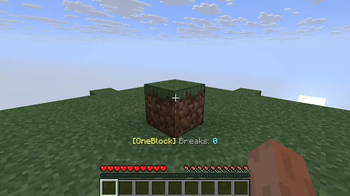
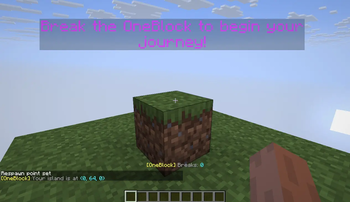
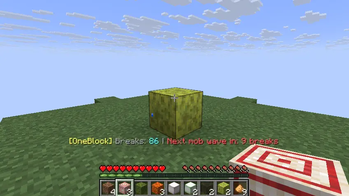
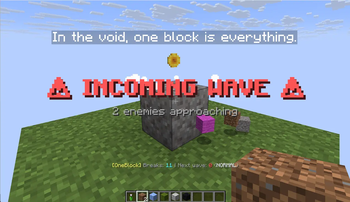
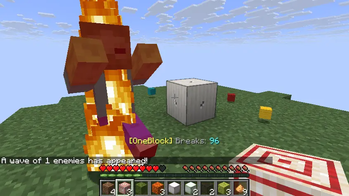
You spawn in the void on a single block. Break it, and it comes back — as something else.
Every break is a step through a progression you control: blocks get harder, mobs start
showing up in waves, the biome around you changes, and eventually portals open to
dungeons built around real Minecraft structures.
Everything in this mod is configurable, in-game through an admin menu, through
commands, or by editing one JSON file — and that file has a
visual editor on the web.
Runs on Minecraft 1.20.1 through 26.2, on Fabric, Forge and NeoForge.
Requires CodxLib — install the build matching
your Minecraft version and loader.
Features
The block
- Registry-wide spawn pool. Every block in the game can appear, including blocks
added by other mods — nothing is hardcoded, so a modded pack just works. - Hardness-based progression. Soft blocks come first and harder ones scale in as you
break more, up to a progression cap you set. Or flip on Any Block (No Progression)
and let the whole registry spawn from break one. - Category weights. Logs, planks, ores, rare ores, wool, structural blocks, plants —
each category is a relative weight you can raise, lower or zero out. - Item and chest drops, plant growth, bucket drops, and end portal frames on a
configurable chance and break requirement.
Your own drop tables
- Browse everything spawnable in the in-game dictionaries — blocks, items, hostile
mobs and friendly mobs — with live spawn chances, and toggle any entry off. - Custom weighted tables: write exactly what drops and how often.
- Tiers and unlocks: gate any entry behind a break threshold, either directly or by
tier. Locked entries contribute zero weight, so the percentages you see always add up.
Biomes
- Pick how the biome changes as you progress: rotate in order, draw at random by
weight, hard-set which biome comes at which break count, pin one biome
forever, or let players vote. - Each biome can replace the block pool outright or just favour the blocks that
suit it, and can bring its own mob list. - Biome progress beside your break count in the tab list and the floating text —
Forest 37/100.
Mob waves
- Write your own waves: which mobs come, when, in what numbers, hostile or friendly,
limited to certain biomes and certain break ranges, with their own countdown, size and
scaling. Anything you leave unset falls back to the built-in behaviour. - Lock during waves (optional): while a wave counts down and runs, your OneBlock
turns to bedrock — 30s by default, or any block, any duration, or until the wave is
cleared — so the wave has to be fought instead of mined past. - Incoming-wave alerts, completion feedback, and per-wave size scaling.
Structure Dungeons
- Optional: every break has a small chance of opening a portal above your OneBlock.
Jump in and you land in a private dimension built around a real structure — a
woodland mansion, an ocean monument, a desert pyramid, a jungle temple, a stronghold, a
nether fortress, a village or a pillager outpost. - The world border sits just outside the structure, the biome matches it, and a
return portal is always available. - Admins set the chance, which dungeons unlock at which break counts or biomes, an
optional timer that sends players home, and Avoid Repeats so you don't get the same
dungeon twice in a row.
Multiplayer
- One island per player, spaced however far apart you want.
- Per-player or shared global break counts, and rules for whether players may break
each other's blocks and who gets the credit. - Manage Players page: full stats per player, teleport to their OneBlock, or delete
their island entirely. - A leaderboard command.
Dimensions
- Void the Nether and the End (or restore them) from the admin menu or a command —
backed up before wiping. - Bundled datapacks for a void Nether, void End, no starter island, and multiplayer mode.
Quality of life
- Floating text above your OneBlock showing progress, plus optional break counts in
the tab list. - Visual effects, gentle item drops, keep-inventory-on-death, verbose logging — all
toggles. - Built-in update checker and
/oneblock helpdebug report for bug reports.
Configure it your way
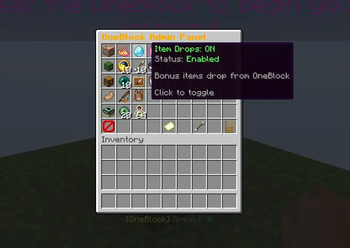
In-game admin menu — /oneblock admin opens a chest menu with pages for Overview,
Core Settings, Biomes & Progression, UI & Quality of Life, Animal Spawn Control, Block
Spawn Control, Drops & Tables, Dimensions and Manage Players. It's a normal chest GUI, so
it works on a vanilla client.
Commands — /oneblock with admin, leaderboard, dictionary, table, export,config, biome, waves, dungeon, leave, void and restore subcommands.
One JSON file — everything lives in config/oneblock.json. Hit Export For Website
on the admin menu's Overview page, edit it visually at
codx.io/tools/one-block, drop the file back in and
hit Reload From File. Both buttons are op-only.
Installation
- Install your loader (Fabric / Forge / NeoForge) for your Minecraft version.
- Put CodxLib for that same version and loader in
yourmodsfolder — OneBlock will not start without it. - Put the matching
OneBlockjar in yourmodsfolder. - Create a world using the
oneblock:oneblockworld preset (level-type=oneblock:oneblock). - (Optional) Enable the built-in datapacks below for multiplayer mode, a void Nether or
End, or to skip the starter island.
New to this? The step-by-step guides at the bottom of this page walk through it.
Datapack usage by loader (client + server)
All loaders use the same world preset:
level-type=oneblock:oneblock
Built-in pack meanings
...multiplayer= one island slot per player...void_nether= removes Nether terrain...void_end= removes End terrain...no_island= disables the initial 3x3 starter island...dungeons= carries the Structure Dungeon dimensions (the admin menu turns this on
for you when you enable dungeons)
Fabric (and Quilt)
Singleplayer / client-hosted world
In Create World → Data Packs, enable:
oneblock:oneblock_multiplayer(optional)oneblock:oneblock_void_nether(optional)oneblock:oneblock_void_end(optional)oneblock:oneblock_no_island(optional)oneblock:oneblock_dungeons(optional)
Set:
level-type=oneblock:oneblockinitial-enabled-packs=vanilla,oneblock\:oneblock_multiplayer,oneblock\:oneblock_void_nether,oneblock\:oneblock_void_end,oneblock\:oneblock_no_island,oneblock\:oneblock_dungeons
Forge
Singleplayer / client-hosted world
In Create World → Data Packs, enable:
oneblock:oneblock_multiplayer(optional)oneblock:oneblock_void_nether(optional)oneblock:oneblock_void_end(optional)oneblock:oneblock_no_island(optional)oneblock:oneblock_dungeons(optional)
Set:
level-type=oneblock:oneblockinitial-enabled-packs=vanilla,oneblock\:oneblock_multiplayer,oneblock\:oneblock_void_nether,oneblock\:oneblock_void_end,oneblock\:oneblock_no_island,oneblock\:oneblock_dungeons
NeoForge
Singleplayer / client-hosted world
In Create World → Data Packs, enable these built-ins:
mod/oneblock:resourcepacks/oneblock_multiplayer(optional)mod/oneblock:resourcepacks/oneblock_void_nether(optional)mod/oneblock:resourcepacks/oneblock_void_end(optional)mod/oneblock:resourcepacks/oneblock_no_island(optional)mod/oneblock:resourcepacks/oneblock_dungeons(optional)
Set:
level-type=oneblock:oneblockinitial-enabled-packs=vanilla,mod/oneblock\:resourcepacks/oneblock_multiplayer,mod/oneblock\:resourcepacks/oneblock_void_nether,mod/oneblock\:resourcepacks/oneblock_void_end,mod/oneblock\:resourcepacks/oneblock_no_island,mod/oneblock\:resourcepacks/oneblock_dungeons
Multiplayer spacing
- Set
oneblock.multiplayerIslandSpacing=<blocks>before first world creation. - If spacing was wrong once, delete the world and recreate it after updating this value.
A note on Structure Dungeons
A world only reads its dimension list while it loads, so turning dungeons on takes a
world reload. The admin menu enables the datapack for you and then tells you what to do:
on a server, restart it; in singleplayer, quit to the title screen and re-open the
world — that's enough, you don't have to restart the game. If something didn't take,/oneblock dungeon says so instead of letting the first portal fail silently.
Getting started guides
Step-by-step walkthroughs live on the Discord — how to install the mod, create the world,
turn the datapacks on, and get a server running.
Join the Discord first, then open the guide you need:
Questions, bug reports and suggestions are welcome in the same place.
Available Versions
How to Install One Block on Your Server
Order Server
Order a Minecraft Java server with at least 4 GB RAM (6 GB recommended).
Set fabric Loader
In the panel under "Egg", select the fabric loader and matching Minecraft version (26.3).
Install Mod
Open the mod browser in the dashboard and search for "One Block". Click "Install" – done! Alternatively, upload the .jar via SFTP to the /mods folder.
Compatibility
Mod Loaders
Minecraft Versions
26.3, 26.2, 26.1.2 (+20 more)
Server-side
~ OptionalRecommended RAM
6 GB(min. 4 GB)Frequently Asked Questions
One Block server crashes on startup – what to do?
Most common cause: wrong fabric version or insufficient RAM. Check the server log (latest.log) for "OutOfMemoryError" or "Mixin" errors. With Mado Hosting: ensure at least 4 GB RAM is allocated and the loader matches the mod version (26.3). You can switch loaders with one click in the panel.
Is One Block compatible with fabric and forge and neoforge and quilt?
One Block officially supports fabric, forge, neoforge, quilt for Minecraft 26.3, 26.2, 26.1.2. Note: Forge and Fabric mods are NOT cross-compatible – pick one loader and stick with it. The Mado dashboard automatically detects incompatible loader combinations.
Server lagging with One Block – how to optimize performance?
Recommended RAM: 6 GB (per 5 players). Use /spark profiler to check if One Block consumes the most tick time. Common fixes: reduce server view-distance to 8-10, install "performant" or "starlight" as supplementary mods on Forge. With Mado Hosting, your server runs on NVMe SSDs with dedicated CPU cores for minimal latency.
Similar Mods




Rent Modded Server
Install One Block with just one click on your server.
Details
- License
- Creative Commons Attribution Non Commercial 4.0 International
- Server-side
- Optional