
Tidal
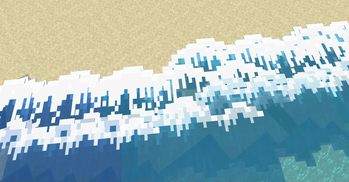
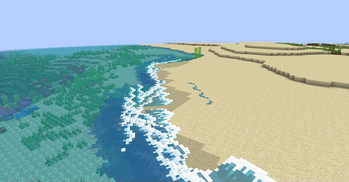
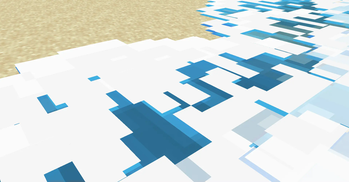
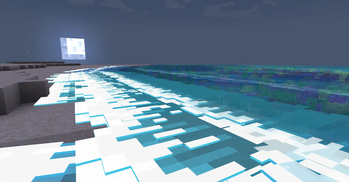
Adds ambient tidal waves to beaches and oceans!
Screenshots
About this Mod
Tidal
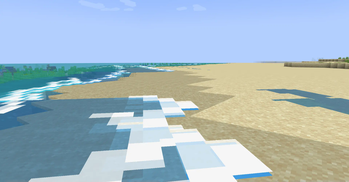
Beach waves!
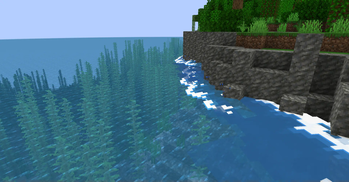
Tidal adds ambient water waves! They are most noticeable at beaches & shores where they get really big, but can also spawn around islands to help make the water feel more alive.
Waves can also crash against blocks if they're in the way, making rocky cliffs next to water even more dramatic! During full moons, the waves glow at night too.
Note: Tidal is currently in alpha! There's plenty of known bugs and plans for optimizations.
Lots of work happens behind the scenes to figure out where & how to spawn waves. If waves are not spawning, or spawning unusually(e.g. going wrong way), you can recalculate this info by reloading the chunks via F3 + a.

Dependencies
Requires Fabric API. In the near future, a config library might also be required.
Note for resource packs
If you decide to change the wave textures via a resource pack, the naming and mcmeta is very specific!!
The names & locations of textures must be the same.
A custom mcmeta format is used. Instead of animation, use wave_animation. This provides you with 2 options:
frametime- The amount of ticks each frame should exist. (Default = 5)frame_height- The height(in pixels) of each frame. (Default = 16)
It is expected that the animation is done with a single vertical sprite sheet image. The amount of frames will be determined using the frame_height variable.
Available Versions
How to Install Tidal on Your Client
Install the Mod Loader Locally
Install fabric for your local Minecraft version.
Download the Matching File
Choose the Tidal file for fabric and Minecraft 1.21.1.
Install Mod
Place the .jar file in your local .minecraft/mods folder and restart Minecraft. No server-side installation is required.
Compatibility
Mod Loaders
Minecraft Versions
1.21.1
Server-side
✗ UnsupportedRecommended RAM
4 GB(min. 3 GB)Frequently Asked Questions
Does Tidal need to be installed on the Minecraft server?
No. Modrinth marks Tidal as unsupported on the server side. Install it only in your local Minecraft mods folder. Your server can remain unchanged unless the mod page lists an additional dependency.
Which version and loader does Tidal require?
Use a file for fabric and your exact Minecraft version. Supported versions include 1.21.1. Files for different loaders are not interchangeable.
Tidal is not working – what should I check?
First check the Minecraft version, loader version and required dependencies. Put the .jar file in your local .minecraft/mods folder and remove older duplicates. Because this mod is client-side, adding server RAM will not fix it.
Similar Mods




Minecraft Server for Your Group
Tidal stays on your client. Host a compatible world for your group.