
Timber
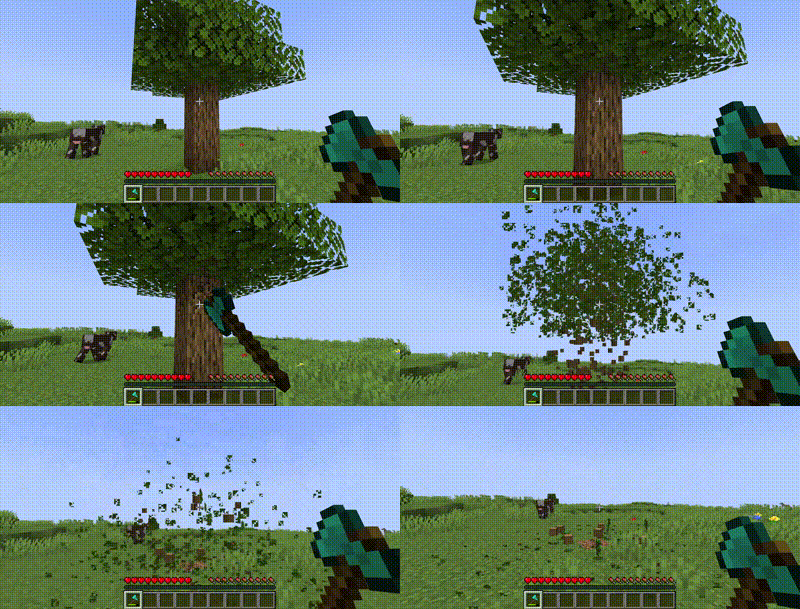
Automatically break the whole tree by breaking one log and disable it at will by shifting!
Screenshots
About this Mod
DESCRIPTION
This datapack/mod makes the whole tree get instantly destroyed when one log is broken with an axe. You can also mine a log normally if you shift while doing so. This makes it really convenient and fast to farm trees. The datapack/mod can be customized to enable or disable leaf breaking, to consume axe durability, and to enable or disable giant mushrooms.
DATAPACK INSTALLATION GUIDE
- go to your saves folder located here on Windows:
C:\Users(your name)\AppData\Roaming\.minecraft\saves
put the zipped file in the data packs folder, and either restart your world or execute /reload
UNINSTALLATION GUIDE
- run
function timberstrike:uninstall. Do not reload before deleting the pack. - delete the datapack/mod and then run
/reload
OTHER THINGS TO NOTE
- You may change settings by running
/function timberstrike:config. There are currently 6 settings:
| Setting | Default Value | Description |
|---|---|---|
mine_leaves |
true (1) | Makes tree leaves and mushroom blocks also get mined when the log/stem is broken. |
consume_durability |
true (1) | 1 durability point is consumed from the axe for every block that is broken using timber if this setting is enabled (unbreaking supported) |
enable_giant_mushrooms |
true (1) | Allows timber to be used on giant mushrooms. (red/brown) |
blocklimit |
500 | Limits the number of blocks that can be mined at once using timber. Set to 999999999 for practically infinite blocks. |
showanimation |
true (1) | If block breaking animation should be shown. When disabled, there will be no noise or particles and using timber would be less laggy |
trigger |
default (0) | Setting this to default will make timber not work when you are sneaking, to prevent unwanted destruction. For extra safety, set it to sneak so that timber will only work when you are shifting. |
- Due to minecraft limitations and the nature of the datapack/mod, you will need to have silk touch on your axe when mining overworld giant mushrooms. [fixed in v4.0]
- there is an enchantment version which makes timber only work if you have the timber strike enchantment!
- versions v2.0 and below will NOT work with pale wood from the winter drop!
- for feedback, bug reports, or other help, join the discord server from the links section of this page!
Available Versions
How to Install Timber on Your Server
Order Server
Order a Minecraft Java server with at least 3 GB RAM (4 GB recommended).
Set datapack Loader
In the panel under "Egg", select the datapack loader and matching Minecraft version (26.3).
Install Mod
Open the mod browser in the dashboard and search for "Timber". Click "Install" – done! Alternatively, upload the .jar via SFTP to the /mods folder.
Compatibility
Mod Loaders
Minecraft Versions
26.3, 26.2, 26.1.2 (+55 more)
Server-side
✓ RequiredRecommended RAM
4 GB(min. 3 GB)Frequently Asked Questions
Timber server crashes on startup – what to do?
Most common cause: wrong datapack version or insufficient RAM. Check the server log (latest.log) for "OutOfMemoryError" or "Mixin" errors. With Mado Hosting: ensure at least 3 GB RAM is allocated and the loader matches the mod version (26.3). You can switch loaders with one click in the panel.
Is Timber compatible with datapack and fabric and forge and neoforge and quilt?
Timber officially supports datapack, fabric, forge, neoforge, quilt for Minecraft 26.3, 26.2, 26.1.2. Note: Forge and Fabric mods are NOT cross-compatible – pick one loader and stick with it. The Mado dashboard automatically detects incompatible loader combinations.
Server lagging with Timber – how to optimize performance?
Recommended RAM: 4 GB (per 8 players). Use /spark profiler to check if Timber consumes the most tick time. Common fixes: reduce server view-distance to 8-10, install "performant" or "starlight" as supplementary mods on Forge. With Mado Hosting, your server runs on NVMe SSDs with dedicated CPU cores for minimal latency.
Similar Mods




Rent Modded Server
Install Timber with just one click on your server.