
Traveler's Compass
A compass that will help you find any mob, block or item nearby
Screenshots




About this Mod
About:
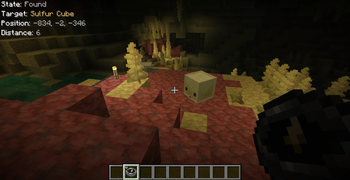
The compass can search for mobs (based on their drops or spawn eggs), villagers (based on their goods), blocks or containers (like chests or furnaces) by their contents, and more
How it works:
- Open the Compass menu with RMB
- Put the block or item you want to find into its inventory
- Choose the desired search mode(s)
- Wait while it searches for the item you placed
Features:
- Shift + RMB on a block or mob to add it to the compass inventory
- Shift + RMB on an item in the compass inventory to mark it as priority
- Priority items are searched first
- Configure HUD, ping sound, search range, and more in the compass menu
- Use JEI/REI/EMI to drag and drop items into the compass inventory
Configuration:
- Most values are synchronized from server to client
- Any search mode can be enabled or disabled
- The search range (number of scanned chunks per tick) can be set per compass or globally
- Filtering by item tags, IDs, or mods is available
- Define search costs in XP levels in travelerscompass-cost.toml
- Costs can be set per item ID or per tag
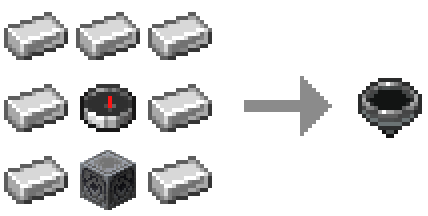
Recipe:
Target position markers (below / same / above): regular & priority
Compatibility with other mods:
JEI / REI / EMI
- Drag & drop items into the compass inventory
- Filtering and XP costs apply
- Can be disabled in config
Lootr
- Search Lootr containers by contents
- Options: only opened / only unopened / any
- Can be disabled or restricted
Jade / The One Probe
- Tooltips show filter restrictions
- Display XP search costs (if set)
- Can be disabled in config
Available Versions
How to Install Traveler's Compass on Your Server
Order Server
Order a Minecraft Java server with at least 3 GB RAM (4 GB recommended).
Set fabric Loader
In the panel under "Egg", select the fabric loader and matching Minecraft version (26.3).
Install Mod
Open the mod browser in the dashboard and search for "Traveler's Compass". Click "Install" – done! Alternatively, upload the .jar via SFTP to the /mods folder.
Compatibility
Mod Loaders
Minecraft Versions
26.3, 26.2, 26.1.2 (+16 more)
Server-side
✓ RequiredRecommended RAM
4 GB(min. 3 GB)Frequently Asked Questions
Traveler's Compass server crashes on startup – what to do?
Most common cause: wrong fabric version or insufficient RAM. Check the server log (latest.log) for "OutOfMemoryError" or "Mixin" errors. With Mado Hosting: ensure at least 3 GB RAM is allocated and the loader matches the mod version (26.3). You can switch loaders with one click in the panel.
Is Traveler's Compass compatible with fabric and forge and neoforge?
Traveler's Compass officially supports fabric, forge, neoforge for Minecraft 26.3, 26.2, 26.1.2. Note: Forge and Fabric mods are NOT cross-compatible – pick one loader and stick with it. The Mado dashboard automatically detects incompatible loader combinations.
Server lagging with Traveler's Compass – how to optimize performance?
Recommended RAM: 4 GB (per 8 players). Use /spark profiler to check if Traveler's Compass consumes the most tick time. Common fixes: reduce server view-distance to 8-10, install "performant" or "starlight" as supplementary mods on Forge. With Mado Hosting, your server runs on NVMe SSDs with dedicated CPU cores for minimal latency.
Similar Mods




Rent Modded Server
Install Traveler's Compass with just one click on your server.