
Viltrumite
Become Omni-Man or any other Viltrumite from Invincible and never go into aura debt. This mod is updated as a part of my video series on Youtube where I code it into reality (in Turkish).
About this Mod
This mod requires Viltrumite Flight 1.6.5+ and is meant to be played in third person.
Please note that this mod is in an early stage of development. Many features are still being actively worked on and you may encounter bugs or incomplete mechanics.
Press K for the ability menu and ALT to swap skill sets. Drag and drop skills onto slots or right-click to remove them. Press O to open the main menu.
Currently supported languages: English, Turkish, Chinese, Spanish and German.
DM me on CurseForge if you want your language added or if you find any inaccuracies in the translations.

Viltrumite Player Clones
Spoiler

Use /spawnclone to open the clone summoning menu.
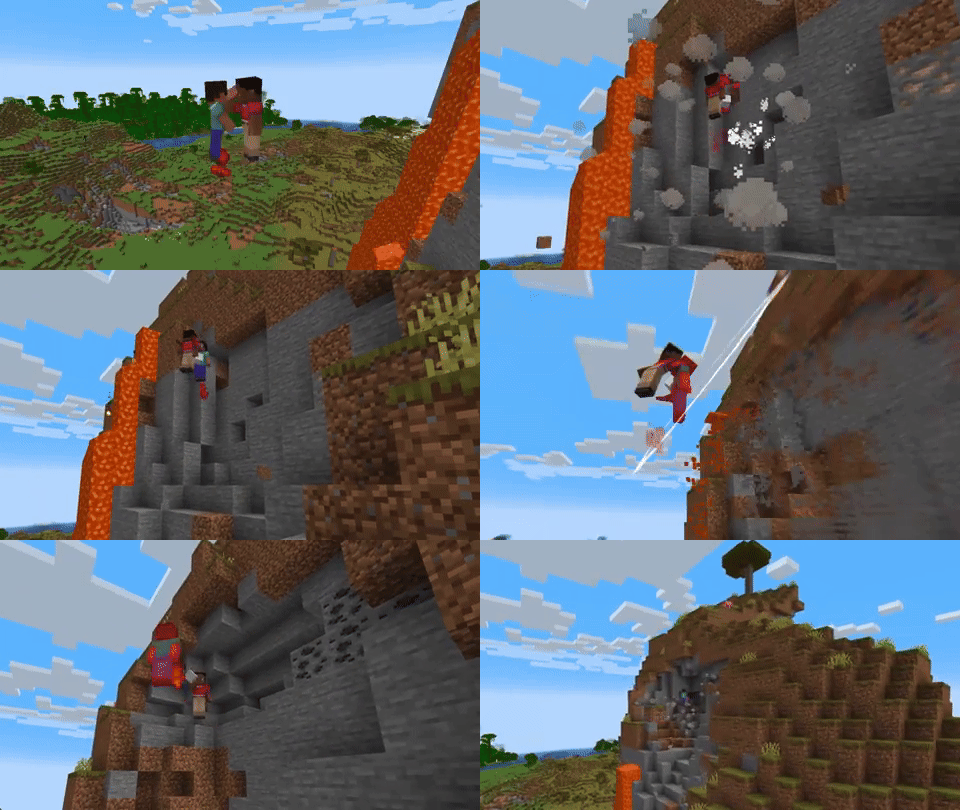
They actually know how to fight like a Viltrumite. You have to fight like a VILTRUMITE! They can fly, dash, block your attacks and humble you, like they can low-mid dif you if you don't lock in.
Two Viltrumite Bots fighting (1.3x)
Infinity Gun (Yes, not ray)
Spoiler

Added the Infinity Gun. Inspired by modern gun mods like JEG.
It shoots a beam that deals massive damage and pierces through any block regardless of its hardness. Shift + Left-click to charge the Infinity Gun with nether stars (5 charges per star).
Added falling meteors that drop Infinity Gun parts when they crash. In order to craft the Infinity Gun you need to combine its parts in the crafting table.
Scourge Virus and World Events
Spoiler

Added blood. Viltrumites and humans now bleed when they take heavy damage and the blood leaves stains on the ground. Right-click a blood stain with a glass bottle to collect it.

Scourge Virus, a weapon built to be used against Viltrumites. It turns their screen green, causes visual lag and makes them lose their powers randomly. Combine 6 Viltrumite Blood Samples with 3 fermented spider eyes to get Scourge Concentrate then brew it into an Awkward Potion.

Added random world events where Conquest or the Viltrumite trio spawn naturally. (You can use /viltrumite event start <event_name> to trigger them manually).
Thunderclap

Flying through blocks

POV: Your friend zooooms away into a pixel (you better catch up to him) (DASH + CTRL(your sprint key) while hovering)

Lethal Chop

POV: Your friend teaches you the ways of Viltrum

Guarding against CC

POV: Your friend is throwing hands with the air

Just reminding these weak insignificant creatures who the real boss is

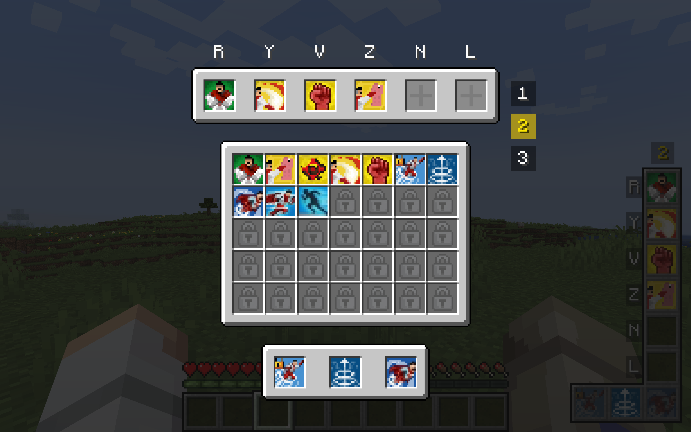
(WIP) (Max GUI scale)
Currently supported space mods:
- Ad Astra
- Tizio's Space Project
The mod automatically creates a viltrumitetextures folder inside your .minecraft directory and extracts the default skins (skin_omniman_2, skin_lucan, etc.) and the red cape into your folders if they are empty on startup. You can add your custom skins and capes but if you want other players to be able to see your custom textures, they need to have the same textures installed locally. These textures are also applicable to player clones.
| Command | What it does | Who can use it? |
|---|---|---|
/viltrumite skin <file name> |
Applies the specified mod skin to the character. (e.g., skin_omniman_2) | Everyone |
/viltrumite skin off |
Removes the active skin. | Everyone |
/viltrumite cape <file name> |
Equips a cape to the character. | Everyone |
/viltrumite cape off |
Removes the cape. | Everyone |
/viltrumite model default |
Sets the character model to normal (thick) arms. | Everyone |
/viltrumite model slim |
Sets the character model to slim arms. | Everyone |
/viltrumite power |
Grants Viltrumite powers to the player who ran the command. | OP (Admin) |
/viltrumite power <player> |
Grants Viltrumite powers to the specified player. | OP (Admin) |
/viltrumite depower |
Removes Viltrumite powers from the player who ran the command. | OP (Admin) |
/viltrumite depower <player> |
Removes Viltrumite powers from the specified player. | OP (Admin) |
Available Versions
How to Install Viltrumite on Your Server
Order Server
Order a Minecraft Java server with at least 3 GB RAM (4 GB recommended).
Set fabric Loader
In the panel under "Egg", select the fabric loader and matching Minecraft version (1.20.1).
Install Mod
Open the mod browser in the dashboard and search for "Viltrumite". Click "Install" – done! Alternatively, upload the .jar via SFTP to the /mods folder.
Compatibility
Mod Loaders
Minecraft Versions
1.20.1
Server-side
✓ RequiredRecommended RAM
4 GB(min. 3 GB)Frequently Asked Questions
Viltrumite server crashes on startup – what to do?
Most common cause: wrong fabric version or insufficient RAM. Check the server log (latest.log) for "OutOfMemoryError" or "Mixin" errors. With Mado Hosting: ensure at least 3 GB RAM is allocated and the loader matches the mod version (1.20.1). You can switch loaders with one click in the panel.
Is Viltrumite compatible with fabric and forge?
Viltrumite officially supports fabric, forge for Minecraft 1.20.1. Note: Forge and Fabric mods are NOT cross-compatible – pick one loader and stick with it. The Mado dashboard automatically detects incompatible loader combinations.
Server lagging with Viltrumite – how to optimize performance?
Recommended RAM: 4 GB (per 8 players). Use /spark profiler to check if Viltrumite consumes the most tick time. Common fixes: reduce server view-distance to 8-10, install "performant" or "starlight" as supplementary mods on Forge. With Mado Hosting, your server runs on NVMe SSDs with dedicated CPU cores for minimal latency.
Similar Mods




Rent Modded Server
Install Viltrumite with just one click on your server.