
Wavify
Adds ambient waves to beaches,oceans and rivers!
Screenshots
About this Mod


Wavify
Dynamic ocean and shoreline waves for Minecraft
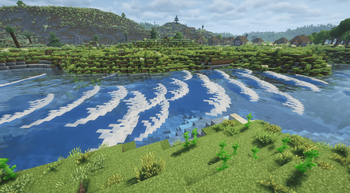
Wavify adds ambient water waves to oceans, beaches, shores, and islands to make Minecraft's water feel more alive and dynamic.
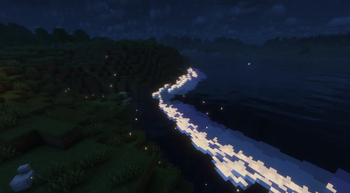
Waves are most noticeable along coastlines, where larger swells can roll toward beaches and rocky terrain. Waves may also interact with nearby blocks, creating more dramatic shorelines and cliffside water effects. During full moons, some waves can emit a subtle nighttime glow.
Wavify is client-side. You can run it on any server without the server needing to install anything.
About This Project
Wavify is an independently maintained fork inspired by the original Tidal mod.
This project exists to keep the wave system playable and functional on newer Minecraft versions while also addressing bugs, crashes, and gameplay issues encountered during testing. It is not an official continuation of the original project and is not affiliated with or endorsed by the original author.
The focus of this fork is:
- Updating compatibility for newer Minecraft versions
- Fixing reproducible bugs and crashes
- Improving general stability and gameplay behavior
- Continuing maintenance when possible
Because the original project was still in an early/experimental state, some unfinished systems and edge cases may still exist.
Known Issues
Some issues and limitations may still be present, including:
- Incomplete or missing wave sound effects
- Limited configuration options
- Rendering or overlay systems that may still need optimization
- Occasional unusual wave behavior or performance spikes in certain environments
If you encounter problems, please report them with as much detail as possible so they can be reproduced and investigated properly.
Chunk Reloading
Wave generation relies on environmental calculations that are performed in the background. If waves appear incorrect or fail to spawn properly, you can refresh nearby chunk data using:
F3 + A

The most maintained version is 26.2 Fabric. However, I will be fixing bugs on other versions if/when I can.
- Requires: Fabric API, MidnightLib
- Optional: Mod Menu, for the in-game config screen

Q: Do I need this on the server?
No. Wavify is client-side only, so it works on any server without the server installing it.
Q: Waves aren't spawning, or they're going the wrong way.
Reload nearby chunks with F3 + A. Wave placement is calculated in the background, and reloading forces it to recalculate.
Q: Can I use your mod in a modpack?
Yes, feel free to include it.

- Superkat32 — original author of the mod this fork is based on


Available Versions
How to Install Wavify on Your Client
Install the Mod Loader Locally
Install fabric for your local Minecraft version.
Download the Matching File
Choose the Wavify file for fabric and Minecraft 26.3.
Install Mod
Place the .jar file in your local .minecraft/mods folder and restart Minecraft. No server-side installation is required.
Compatibility
Mod Loaders
Minecraft Versions
26.3, 26.2, 26.1.2 (+3 more)
Server-side
✗ UnsupportedRecommended RAM
4 GB(min. 3 GB)Frequently Asked Questions
Does Wavify need to be installed on the Minecraft server?
No. Modrinth marks Wavify as unsupported on the server side. Install it only in your local Minecraft mods folder. Your server can remain unchanged unless the mod page lists an additional dependency.
Which version and loader does Wavify require?
Use a file for fabric, forge, neoforge and your exact Minecraft version. Supported versions include 26.3, 26.2, 26.1.2. Files for different loaders are not interchangeable.
Wavify is not working – what should I check?
First check the Minecraft version, loader version and required dependencies. Put the .jar file in your local .minecraft/mods folder and remove older duplicates. Because this mod is client-side, adding server RAM will not fix it.
Similar Mods




Minecraft Server for Your Group
Wavify stays on your client. Host a compatible world for your group.