
Pioneer Production Planner
Plan multi-product factories, power production and transport in-game using the recipes and unlocks from your current save.
Description
Pioneer Production Planner
Plan your factory. Follow the flow. Build it in Satisfactory.
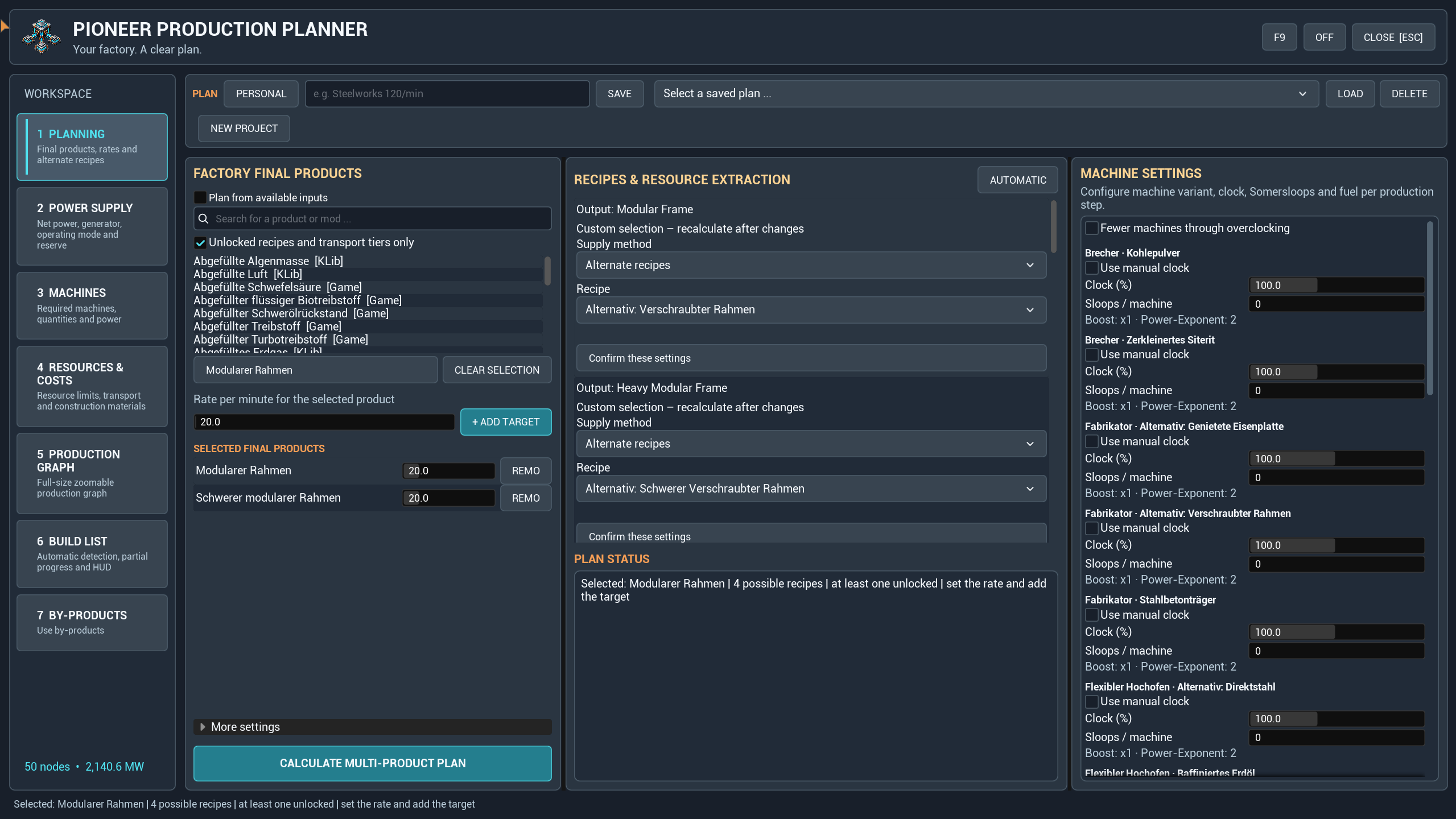
Pioneer Production Planner brings production chains, power planning and a personal build checklist into the game. Set your targets, explore the graph and turn useful by-products into the next production step.
Version 1.7.3 · German & English interface · Mod reference: `SFPFactoryPlanner`
New in 1.7.3
- Redesigned interface with a fixed left navigation, consistent controls and a new logo.
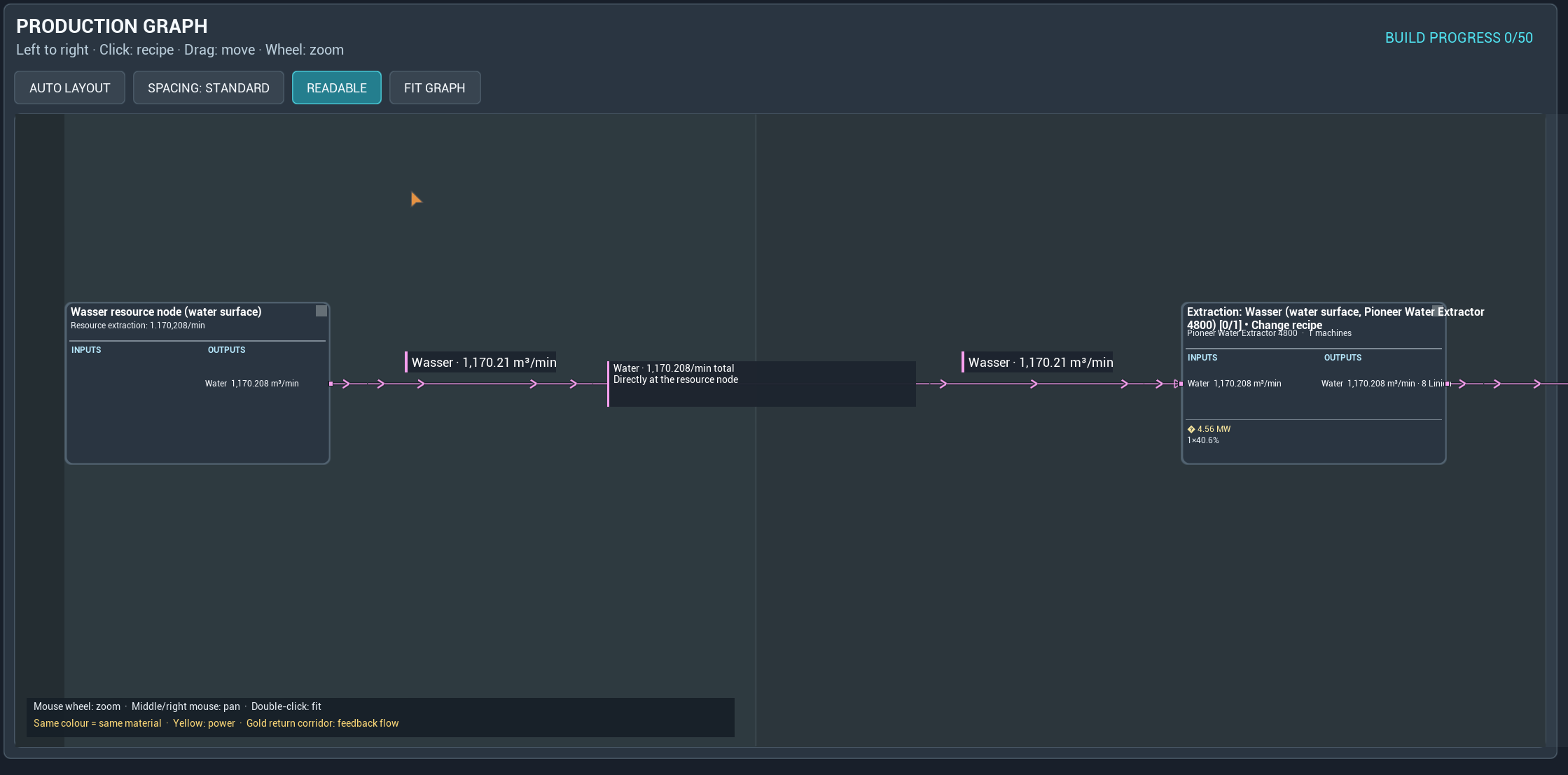
- Change recipes directly from graph machine cards. Inspect ingredients, products and by-products per minute before applying the choice and recalculating.
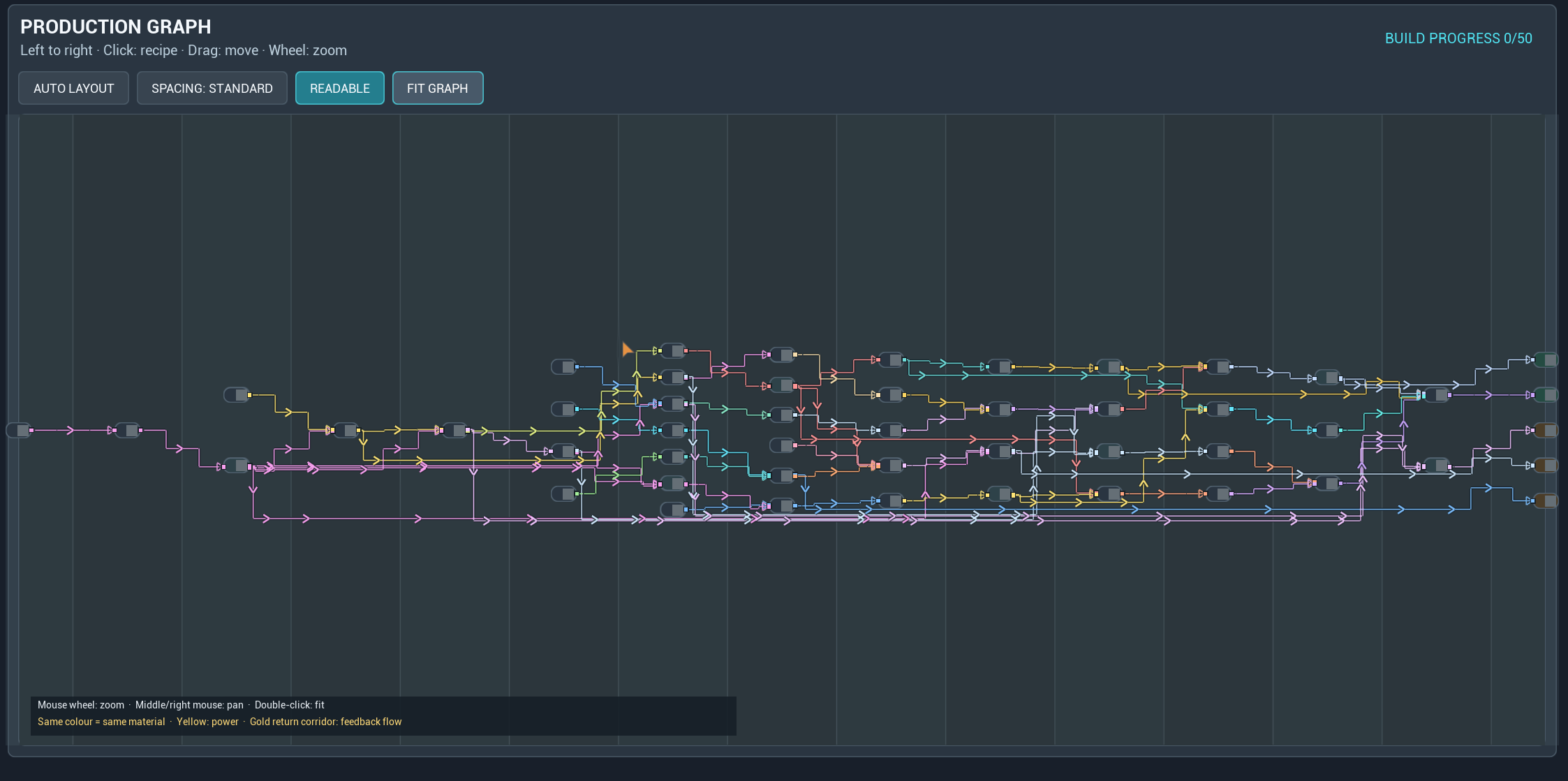
- A continuous left-to-right graph with standard or open spacing. Use Readable to return to the start at a useful zoom, or Fit Graph for the whole factory.
- Saved personal views and spacing. Recipe changes preserve zoom and focus where possible; a failed calculation keeps the previous plan.
Plan around your goals
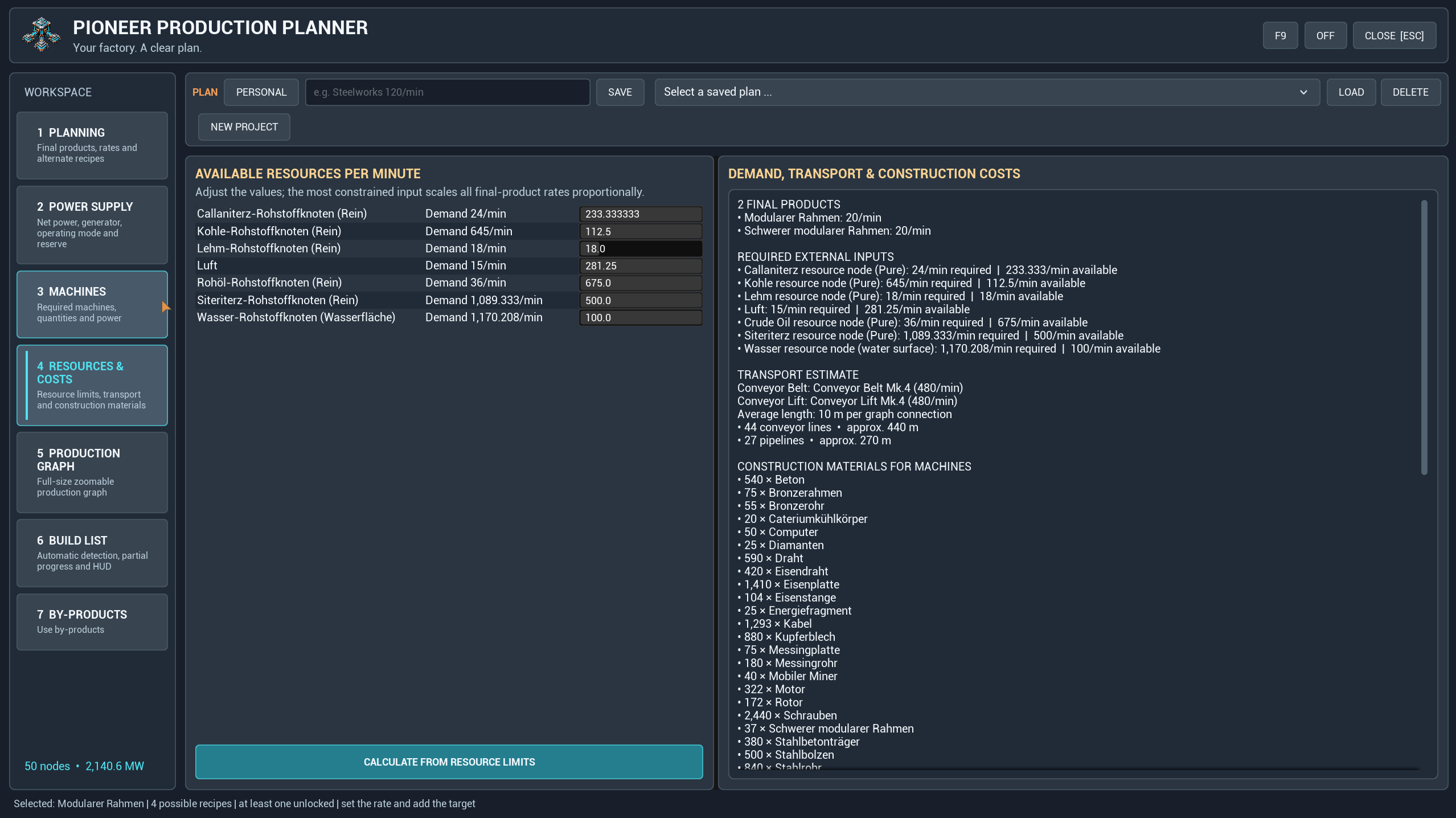
Plan several products together or work from available resource limits. Review machine counts, clock speeds, power demand and construction materials. Select alternative recipes, use the unlock filter and adjust production amplification where supported.
Transport settings include belts, lifts and pipelines, with compatible tiers discovered from the running game. Transport figures are planning estimates, not a measurement of routes you have built.
Understand every production step
Follow material flows from left to right, zoom into machine cards and arrange the view to suit your factory. Recipe previews show rates for the selected step's current demand, including the machine count and clock speed.
Applying a recipe creates a manual override for that product throughout the plan and recalculates the production chain.
Give by-products a purpose
Select a by-product in the graph or open the by-products section to explore compatible processing recipes. Preview a suggestion, then add a production branch. Compatible fuel options can also be used for a power branch.
Proposals and added processing branches are visually separated so you can distinguish the original production chain from its extensions.
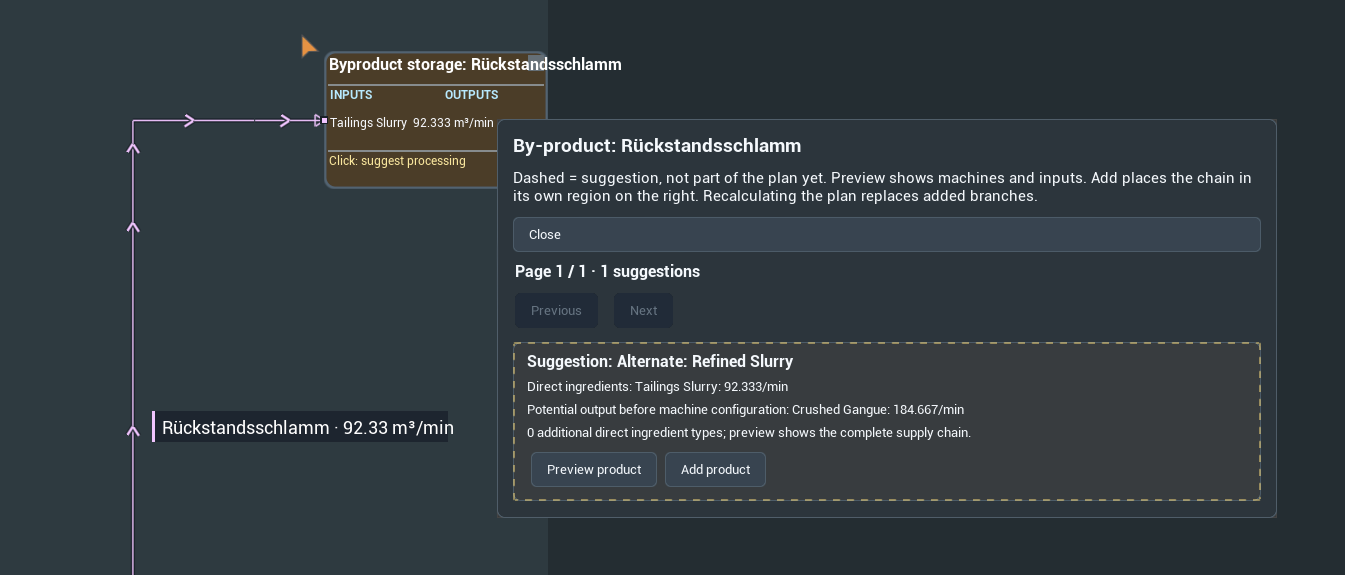
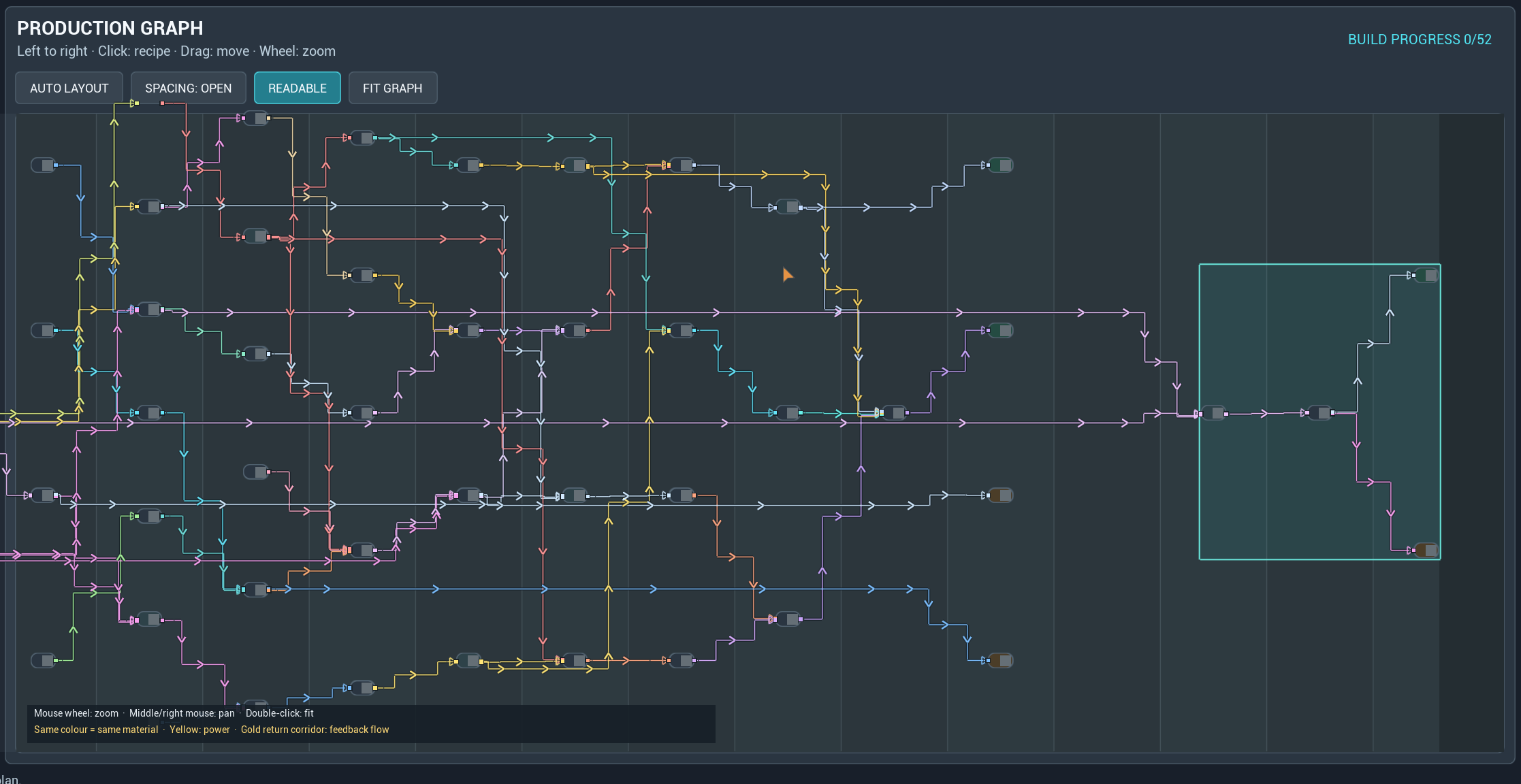
Added branches are changed through the by-product selection; their graph recipe dialog is for inspection. Recalculating the main plan replaces appended branches. Named saved plans preserve the branches they contain.
Plan power alongside production
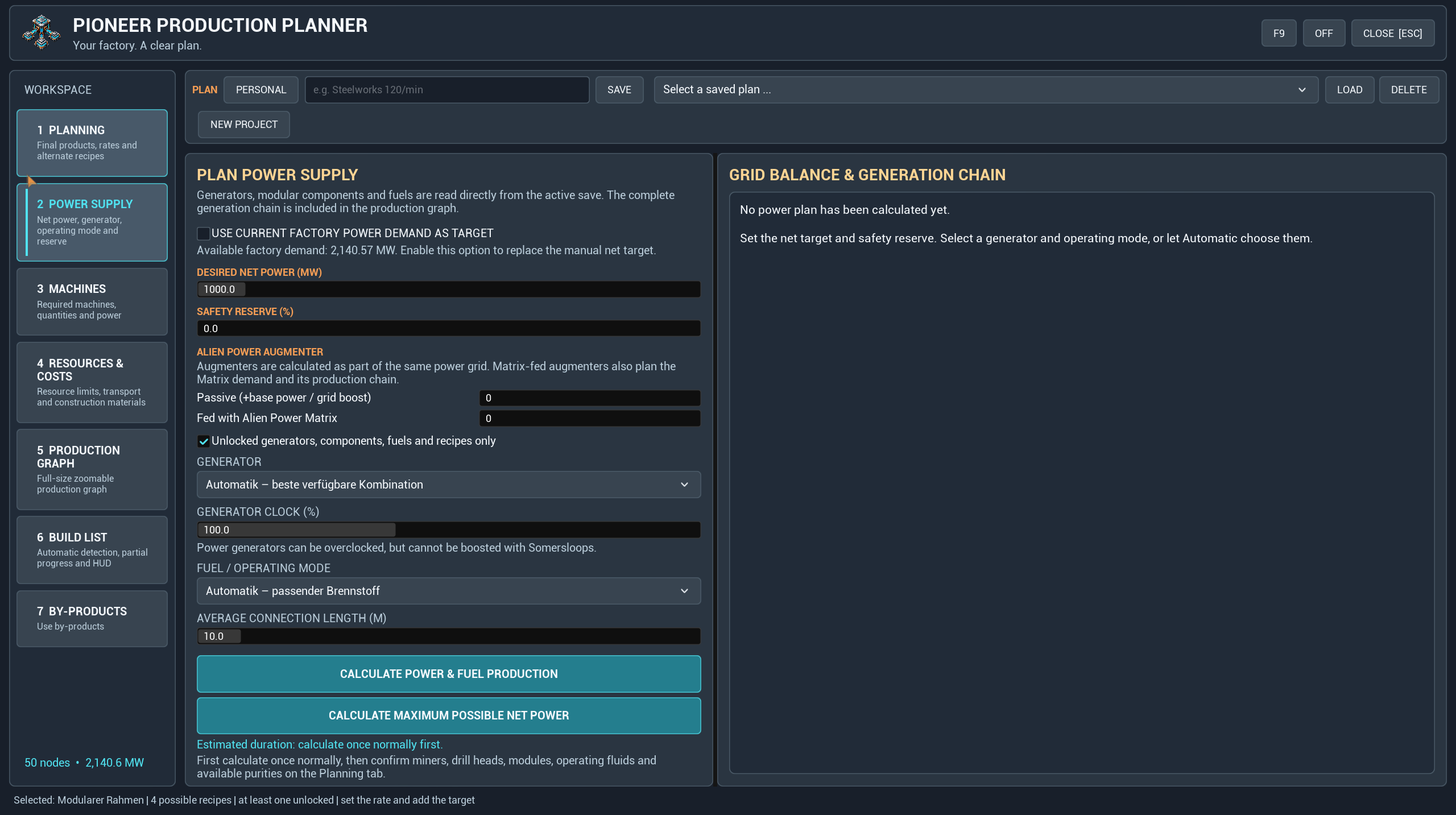
Choose generators and fuels, set the desired net output and reserve, or use the factory's calculated demand. Include the fuel production chain and its own consumption, and calculate the maximum possible net power for the selected constraints.
Build at your own pace
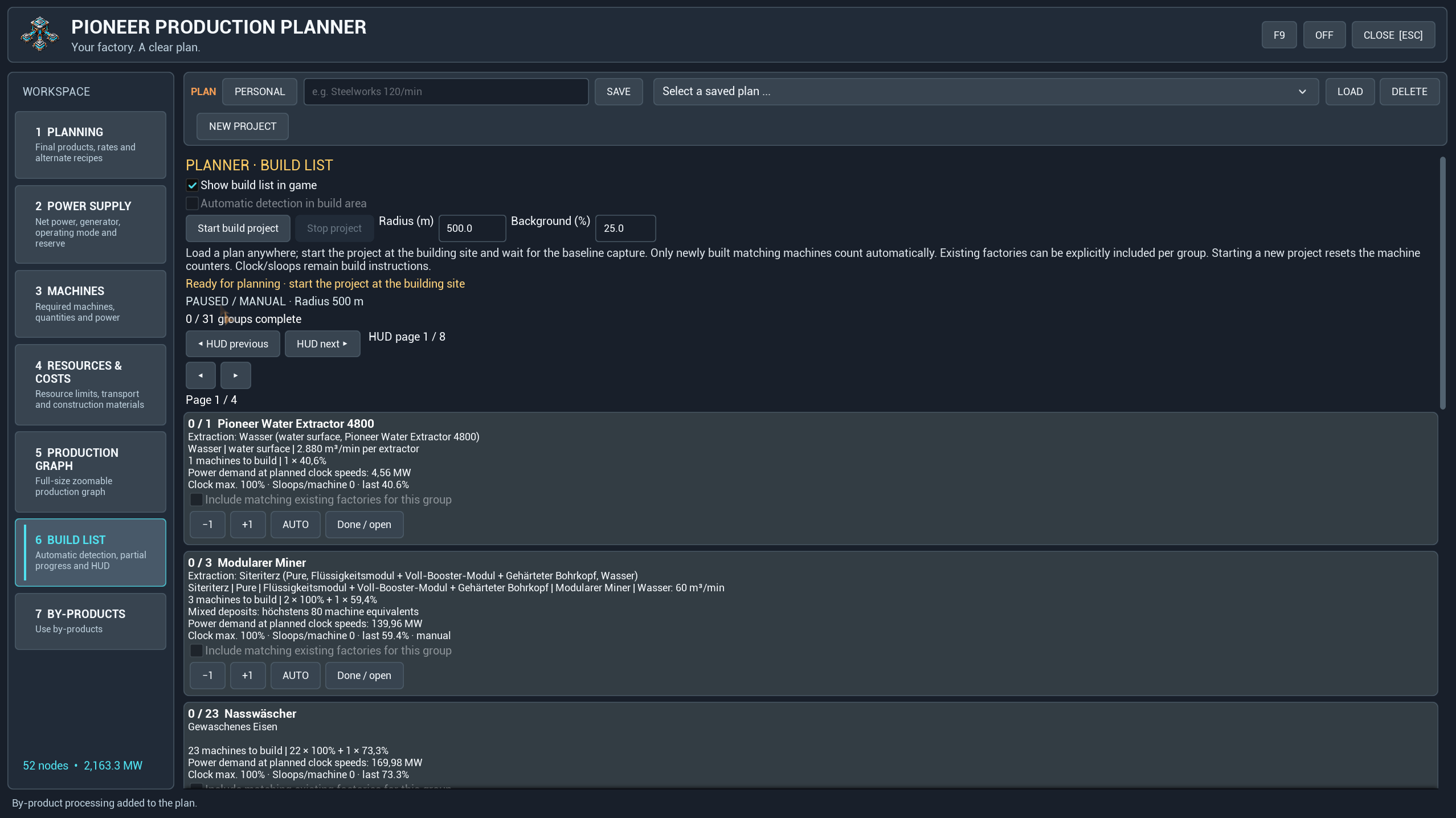
The personal build list tracks partial progress and provides manual corrections, completion controls and an optional transparent HUD. HUD pages switch manually, so you decide which part stays visible.
Load or calculate a plan whenever you like. Start the build project at the actual construction site to capture the existing machines as a baseline. Automatic tracking then counts matching new machines within your selected area; existing machines can be included explicitly. Demolition and manual corrections let you adjust progress as the site changes.
Build progress belongs to each player, including when a plan design is shared. Machine detection counts buildings; clock and amplification settings remain instructions to configure yourself.
Getting started
1. Install Pioneer Production Planner through Satisfactory Mod Manager.
2. Open the planner with your configured shortcut or enter `/sfpplanner open` in chat. Use `/sfpplanner hotkey reset` if you need to restore the default shortcut.
3. Choose your products and rates, check recipes and settings, then calculate.
4. Inspect the graph, resources and power needs. Save the plan when you are ready.
5. At your build site, start the build project and enable the HUD if wanted.
New Project resets the current working plan so you can start again. Named saved plans and shared plans remain available.
Compatibility and support
Recipes and compatible machine data are read from the running game. The screenshots include modded content, including Satisfactory Plus; those items are examples and are not required for every plan. Support depends on the data exposed by each mod, and mod-provided item names may retain their original language.
For multiplayer, clients and server must all use 1.7.3. Plan designs can be shared while personal views and build progress stay with each player.
Found a problem? [Open an issue](https://github.com/DerDoesewicht/PioneerProductionPlanner/issues) with the mod version, installed mods, reproduction steps and a screenshot or log where useful.
Development
Development used AI assistance. The new logo was generated with AI. The screenshots show the in-game interface.
Pioneer Production Planner
Fabrik planen. Produktionswege verstehen. Direkt in Satisfactory bauen.
Pioneer Production Planner verbindet Produktionsketten, Stromplanung und eine persönliche Bauliste direkt im Spiel. Lege deine Ziele fest, prüfe den Graphen und nutze Nebenprodukte für weitere Produktionsschritte.
Version 1.7.3 · Deutsche und englische Oberfläche · Mod-Referenz: `SFPFactoryPlanner`

Neu in 1.7.3
- Überarbeitete Oberfläche mit fester linker Navigation, einheitlichen Bedienelementen und neuem Logo.
- Rezepte direkt an den Maschinenkarten im Graphen ändern. Eingänge, Ausgänge und Nebenprodukte pro Minute vor dem Übernehmen und Neuberechnen prüfen.
- Durchgehender Graph von links nach rechts mit normalem oder großzügigem Abstand. Lesbar zeigt den Anfang bei sinnvoller Vergrößerung; Fit Graph zeigt den gesamten Plan.
- Gespeicherte persönliche Ansichten und Abstände. Beim Rezeptwechsel bleiben Zoom und Fokus soweit möglich erhalten. Schlägt die Berechnung fehl, bleibt der bisherige Plan bestehen.
Nach deinen Zielen planen
Plane mehrere Produkte gemeinsam oder berechne die Produktion anhand verfügbarer Ressourcen. Prüfe Maschinenanzahl, Takt, Strombedarf und Baumaterialien. Wähle alternative Rezepte, nutze den Freischaltungsfilter und passe die Produktionsverstärkung an, sofern unterstützt.
Die Transporteinstellungen umfassen Förderbänder, Lifte und Pipelines. Kompatible Stufen werden aus dem laufenden Spiel ermittelt. Die Transportangaben sind Planungsschätzungen und keine Vermessung bereits gebauter Strecken.

Jeden Produktionsschritt verstehen
Verfolge Materialflüsse von links nach rechts, vergrößere einzelne Maschinenkarten und ordne die Ansicht passend zu deiner Fabrik an. Die Rezeptvorschau zeigt Mengen für den aktuellen Bedarf des ausgewählten Schritts einschließlich Maschinenanzahl und Takt.
Ein übernommenes Rezept wird zur manuellen Vorgabe für dieses Produkt im gesamten Plan. Anschließend wird die Produktionskette neu berechnet.


Nebenprodukte sinnvoll verwerten
Wähle ein Nebenprodukt im Graphen oder öffne den Bereich für Nebenprodukte, um passende Weiterverarbeitungsrezepte zu entdecken. Prüfe einen Vorschlag und füge anschließend einen Produktionszweig hinzu. Für kompatible Brennstoffe lassen sich auch Zweige zur Stromerzeugung ergänzen.
Vorschläge und hinzugefügte Verarbeitungszweige werden optisch getrennt dargestellt. So bleiben die ursprüngliche Produktionskette und ihre Erweiterungen erkennbar.


Ergänzte Zweige werden über die Nebenproduktauswahl geändert; ihr Rezeptdialog im Graphen dient zur Ansicht. Eine Neuberechnung des Hauptplans ersetzt angehängte Zweige. Benannte gespeicherte Pläne behalten die darin enthaltenen Zweige.
Stromversorgung mitplanen
Wähle Generatoren und Brennstoffe, lege die gewünschte Nettoleistung und Reserve fest oder übernimm den berechneten Fabrikbedarf. Berücksichtige die Brennstoffproduktion und deren Eigenverbrauch und berechne die maximal mögliche Nettoleistung unter den gewählten Bedingungen.

Im eigenen Tempo bauen
Die persönliche Bauliste erfasst Teilfortschritte und bietet manuelle Korrekturen, Erledigt-Markierungen sowie ein optionales transparentes HUD. Die HUD-Seiten werden manuell gewechselt: Du bestimmst, welcher Abschnitt sichtbar bleibt.
Lade oder berechne deinen Plan jederzeit. Starte das Bauprojekt erst am tatsächlichen Bauplatz, damit die vorhandenen Maschinen als Ausgangsbestand erfasst werden. Die automatische Erkennung zählt danach passende neue Maschinen im gewählten Bereich. Vorhandene Maschinen lassen sich ausdrücklich einbeziehen. Abrisse und manuelle Korrekturen ermöglichen Anpassungen während des Baus.
Der Baufortschritt gilt pro Spieler, auch bei gemeinsam genutzten Planentwürfen. Die Erkennung zählt Gebäude; Takt und Produktionsverstärkung bleiben Einstellungen, die du selbst an den Maschinen vornehmen musst.

Erste Schritte
1. Installiere Pioneer Production Planner über den Satisfactory Mod Manager.
2. Öffne den Planner mit deinem eingestellten Tastenkürzel oder mit `/sfpplanner open` im Chat. Mit `/sfpplanner hotkey reset` stellst du bei Bedarf das Standardkürzel wieder her.
3. Wähle Produkte und Mengen, prüfe Rezepte und Einstellungen und starte die Berechnung.
4. Kontrolliere Graph, Ressourcen und Strombedarf. Speichere deinen Plan.
5. Starte das Bauprojekt am Bauplatz und blende bei Bedarf das HUD ein.
Neues Projekt setzt den aktuellen Arbeitsplan zurück. Benannte gespeicherte Pläne und gemeinsam genutzte Pläne bleiben erhalten.
Kompatibilität und Hilfe
Rezepte und kompatible Maschinendaten werden aus dem laufenden Spiel gelesen. Die Screenshots zeigen auch Inhalte anderer Mods, darunter Satisfactory Plus. Diese sind Beispiele und nicht für jeden Plan erforderlich. Die Unterstützung hängt von den Daten der jeweiligen Mod ab. Von Mods gelieferte Gegenstandsnamen können in ihrer ursprünglichen Sprache bleiben.
Im Mehrspielermodus müssen Clients und Server dieselbe Version 1.7.3 verwenden. Planentwürfe können geteilt werden; persönliche Ansichten und Baufortschritte bleiben beim jeweiligen Spieler.
Ein Problem gefunden? [Erstelle ein Issue](https://github.com/DerDoesewicht/PioneerProductionPlanner/issues) mit Mod-Version, installierten Mods, Schritten zur Reproduktion und nach Möglichkeit einem Screenshot oder Log.
Entwicklung
Die Entwicklung erfolgte mit KI-Unterstützung. Das neue Logo wurde mit KI erstellt. Die Screenshots zeigen die Oberfläche im Spiel.
Versions
How to Install Pioneer Production Planner on Your Server
Order Satisfactory Server
Order a Satisfactory server with at least 4 GB RAM (6 GB recommended). For multiplayer: per 3 players.
Install Mod
Open the mod manager in the dashboard and search for "Pioneer Production Planner". Installation dependencies are installed automatically.
Restart Server
Restart the server so the mod is loaded. Players need to have the mod installed locally as well.
Frequently Asked Questions
Pioneer Production Planner not working after update – what to do?
After a Satisfactory update, mods need to be updated. Check ficsit.app whether Pioneer Production Planner has been updated for the new game version. With Mado Hosting: open the mod manager and click "Update All". If the mod hasn't been updated yet, temporarily remove it so the server starts.
Pioneer Production Planner causing crashes in multiplayer – solution
Most common cause: all players must have exactly the same mod version installed. Check server logs for "ModMismatch" or "Version Conflict". Ensure all players use Pioneer Production Planner v1.7.4 and the same SML. With Mado Hosting, Satisfactory servers run with 6 GB RAM for stable multiplayer performance.
Is Pioneer Production Planner compatible with other Satisfactory mods?
Pioneer Production Planner uses the Satisfactory Mod Loader (SML). Generally, SML-based mods are cross-compatible, but mods modifying the same game systems can cause conflicts. Test new mod combinations on a backup save. The Mado dashboard automatically detects known conflicts and warns you.
Rent Pioneer Production Planner Server
Play Pioneer Production Planner on your own Satisfactory server with mod support.
Mod Information
- Author
- Doesewicht
- Latest Version
- v1.7.4
- Created
- September 4, 2026
- Last Updated
- October 7, 2026