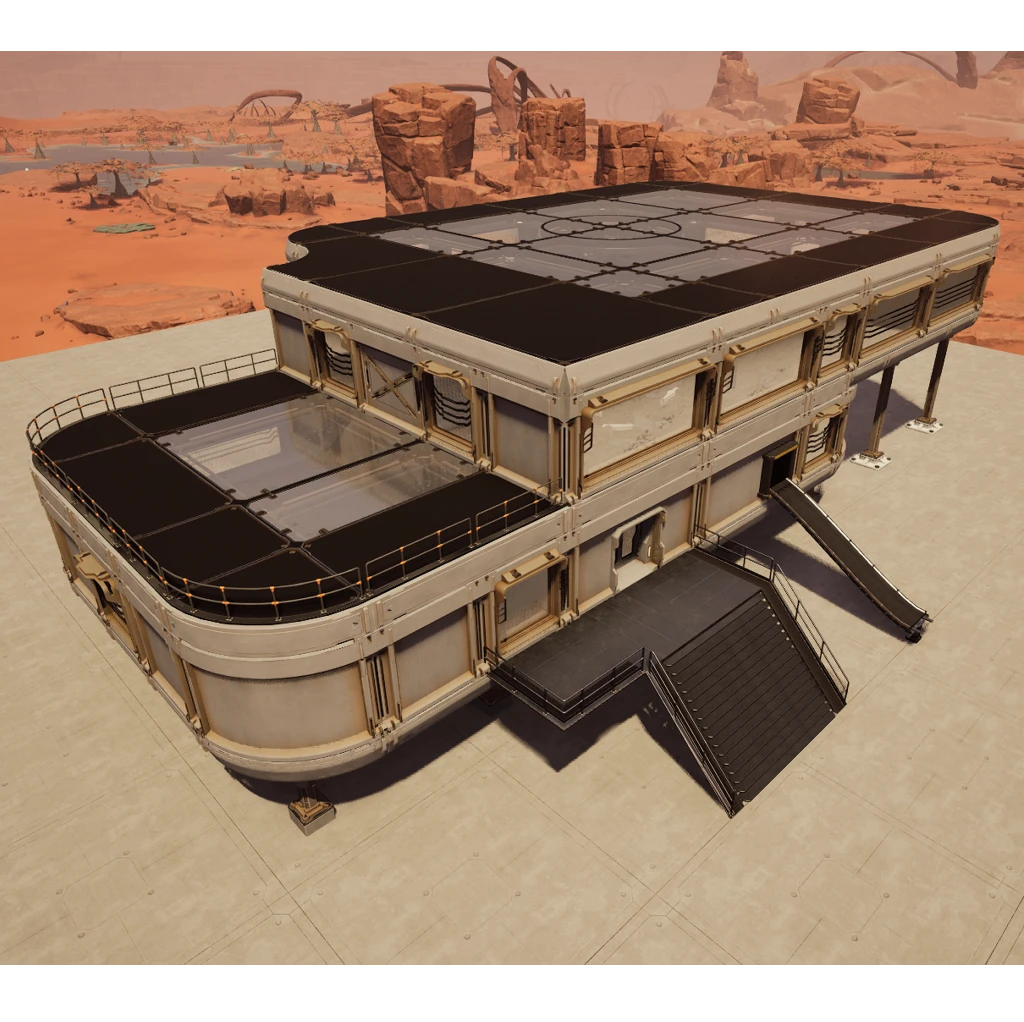
SciFi 01
Architectural elements for a futuristic base
Description
<div style="background:#78B3FFFF; padding:5px; margin-top:10px; border-radius:10px; box-shadow: 5px 5px 3px #40628FFF;" >
<h1 id="Title" align="center" style="text-shadow: black 5px 2px 10px;">Architectural elements for a futuristic base </h1>
</div>
<div style="background:#78B3FFFF; padding:5px; margin-top:10px; border-radius:10px; box-shadow: 5px 5px 3px #40628FFF;" >
<h5 align="center" style="color:black; text-shadow: white 0px 0px 5px;">3 new foundation types + 3 new wall types</h5>
<h3 align="center" style="text-shadow: black 5px 2px 10px;"> Unlock them in the Awesome</h3>
<div style="display:flex; justify-content:center; gap:20px; flex-wrap:wrap; margin:0px;" align="center">
<img src=https://github.com/Evasion4D/Satisfactory_Mods/raw/main/SciFi01/Images/Awesome_Foundations.png>
<img src=https://github.com/Evasion4D/Satisfactory_Mods/raw/main/SciFi01/Images/Awesome_Walls.png>
<img src=https://github.com/Evasion4D/Satisfactory_Mods/raw/main/SciFi01/Images/Customizer_Materials.png "Customizer Materials")>
<h5 align="center" style="color:black; text-shadow: white 0px 0px 5px;">They have a default primary and secondary color (which can be changed).</h5>
<img src=https://github.com/Evasion4D/Satisfactory_Mods/raw/main/SciFi01/Images/Customizer_Color.png "Customizer Colors")>
</div>
<div align="center" style="color:black;">
<h4 align="center" style="color:green; text-shadow: white 0px 0px 5px;">Swatch color compatibility</h4>
These two swatches are compatible with the following three mods:<br>
- More Swatch Slots<br>
- +64 Extra Swatch Slots<br>
- +128 Extra Swatch Slots<br>
But there is a conflict with Universal Swatch Slots, <a style="color:blue;" href="https://discord.com/channels/555424930502541343/1457327462038896825/1461422072533221531" target="_blank" rel="noopener noreferrer">resolved by Drangir</a>
</div>
</div>
<div style="background:#78B3FFFF; padding:5px; margin-top:10px; border-radius:10px; box-shadow: 5px 5px 3px #40628FFF;" >
<h3 align="center" style="text-shadow: black 5px 2px 10px;"> Unlock the elements in the Milestone Tier 3</h3>
<div style="display:flex; justify-content:center; gap:20px; flex-wrap:wrap; margin:0px;" align="center">
<img src=https://github.com/Evasion4D/Satisfactory_Mods/raw/main/SciFi01/Images/Milestone_3.png>
</div>
<h5 align="center" style="color:black; text-shadow: white 0px 0px 5px;">Find all the elements in the new Sci-Fi 01 category</h5>
<div style="display:flex; justify-content:center; gap:20px; flex-wrap:wrap; margin:0px;" align="center">
<img src=https://github.com/Evasion4D/Satisfactory_Mods/raw/main/SciFi01/Images/Categories_110.png>
</div>
</div>
<div style="background:#78B3FFFF; padding:5px; margin-top:10px; border-radius:10px; box-shadow: 5px 5px 3px #40628FFF;" >
<h5 align="center" style="color:black; text-shadow: white 0px 0px 5px;">Filter the items</h5>
<div style="display:flex; justify-content:center; gap:20px; flex-wrap:wrap; margin:0px;" align="center">
<img src=https://github.com/Evasion4D/Satisfactory_Mods/raw/main/SciFi01/Images/Filter_Walls.png>
<img src=https://github.com/Evasion4D/Satisfactory_Mods/raw/main/SciFi01/Images/Filter_Foundations.png>
</div>
</div>
<div style="background:#78B3FFFF; padding:5px; margin-top:10px; border-radius:10px; box-shadow: 5px 5px 3px #40628FFF;" >
<h5 align="center" style="color:black; text-shadow: white 0px 0px 5px;">Solid 8x4x1 walls are compatible and interchangeable with vanilla walls.</h5>
<h5 align="center" style="color:black; text-shadow: white 0px 0px 5px;">Foundations 8x8x1, 8x4x1 are compatible and interchangeable with vanilla foundations.</h5>
</div>
<div style="background:#78B3FFFF; padding:5px; margin-top:10px; border-radius:10px; box-shadow: 5px 5px 3px #40628FFF;" >
<h5 align="center" style="color:black; text-shadow: white 0px 0px 5px;">Foundations Inner and outer corner are compatible and interchangeable with vanilla foundations.</h5>
<img src=https://github.com/Evasion4D/Satisfactory_Mods/raw/main/SciFi01/Images/Inner-Outer-Foundations.png>
</div>
<div style="background:#78B3FFFF; padding:5px; margin-top:10px; border-radius:10px; box-shadow: 5px 5px 3px #40628FFF;" >
<h5 align="center" style="color:black; text-shadow: white 0px 0px 5px;">Solid 4x4x1 walls are compatible and interchangeable with vanilla walls in my <a style="color:blue;" href="https://ficsit.app/mod/Architecture02" target="_blank">Architecture + 02 mod</a></h5>
<img src=https://github.com/Evasion4D/Satisfactory_Mods/raw/main/SciFi01/Images/Walls.png>
<h5 align="center" style="color:black; text-shadow: white 0px 0px 5px;">Foundations 4x4x1 are compatible and interchangeable with vanilla foundations in my <a style="color:blue;" href="https://ficsit.app/mod/Architecture" target="_blank">Architecture + mod</a></h5>
<img src=https://github.com/Evasion4D/Satisfactory_Mods/raw/main/SciFi01/Images/Foundations.png>
</div>
<div style="background:#78B3FFFF; padding:5px; margin-top:10px; border-radius:10px; box-shadow: 5px 5px 3px #40628FFF;" >
<h3 align="center" style="text-shadow: black 5px 2px 10px;">How do I position the door and the gate?</h3>
<img src=https://github.com/Evasion4D/Satisfactory_Mods/raw/main/SciFi01/Images/Door.png>
</div>
<div style="background:#78B3FFFF; padding:5px; margin-top:10px; border-radius:10px; box-shadow: 5px 5px 3px #40628FFF;" >
<h3 align="center" style="text-shadow: black 5px 2px 10px;">Door configuration</h3>
<img src=https://github.com/Evasion4D/Satisfactory_Mods/raw/main/SciFi01/Images/Door-Gate.png>
<div align="center" style="color:black;">
<h4 align="center" style="color:green; text-shadow: white 0px 0px 5px;">Configuration in the widget</h4>
1/ Select mode (Auto - Always Open - Always Closed)<br>
2/ Select the sound for the movement of the doors (6 different sounds)<br>
3/ Adjust the volume of this sound<br>
4/ Adjust the speed of this sound<br>
Copy and paste the parameters between the doors and gates using CTRL-C & CTRL-V
</div>
</div>
<div style="background:#78B3FFFF; padding:5px; margin-top:10px; border-radius:10px; box-shadow: 5px 5px 3px #40628FFF;" >
<h3 align="center" style="text-shadow: black 5px 2px 10px;"><h3 align="center" style="text-shadow: black 5px 2px 10px;">Possibility of removing dirt and details </h3></h3>
<h5 align="center" style="color:black; text-shadow: white 0px 0px 5px;">(to achieve a pure, vibrant color)</h5>
<img src=https://github.com/Evasion4D/Satisfactory_Mods/raw/main/SciFi01/Images/Session.png>
<h5 align="center" style="color:black; text-shadow: white 0px 0px 5px;">Checked and unchecked</h5>
<img src=https://github.com/Evasion4D/Satisfactory_Mods/raw/main/SciFi01/Images/Checked.png>
<img src=https://github.com/Evasion4D/Satisfactory_Mods/raw/main/SciFi01/Images/Unchecked.png>
</div>
<div style="background:#78B3FFFF; padding:5px; margin-top:10px; border-radius:10px; box-shadow: 5px 5px 3px #40628FFF;" >
<h3 align="center" style="text-shadow: black 5px 2px 10px;">2 types of lamps to connect to Light Control Panel</h3>
<h5 align="center" style="color:black; text-shadow: white 0px 0px 5px;">Wall and Ceiling</h5>
<img src=https://github.com/Evasion4D/Satisfactory_Mods/raw/main/SciFi01/Images/Light-Wall.png>
<img src=https://github.com/Evasion4D/Satisfactory_Mods/raw/main/SciFi01/Images/Light-Ceiling.png>
</div>
<div style="background:#78B3FFFF; padding:5px; margin-top:10px; border-radius:10px; box-shadow: 5px 5px 3px #40628FFF;" >
<h3 align="center" style="text-shadow: black 5px 2px 10px;">All elements are modular</h3>
<h5 align="center" style="color:black; text-shadow: white 0px 0px 5px;">Example 1 <a style="color:blue;" href="https://skfb.ly/pF9vr" target="_blank">Assembling a base support</a></h5>
<h5 align="center" style="color:black; text-shadow: white 0px 0px 5px;">Example 2 <a style="color:blue;" href="https://skfb.ly/pF9QF" target="_blank">Assembling the windows</a></h5>
<h5 align="center" style="color:black; text-shadow: white 0px 0px 5px;">Example 3 <a style="color:blue;" href="https://skfb.ly/pFvUX" target="_blank">Assembling the door, gate and ark</a></h5>
<h5 align="center">Use precise positioning with the 'H' key if necessary (with Ctrl).</h5>
</div>
<div style="background:#78B3FFFF; padding:5px; margin-top:10px; border-radius:10px; box-shadow: 5px 5px 3px #40628FFF;" >
<h3 align="center" style="text-shadow: black 5px 2px 10px;">Credits</h3>
<h5 align="center" style="color:black; text-shadow: white 0px 0px 5px;">Adaptation of a pack I bought in 2024: <a style="color:blue;" href="https://www.fab.com/listings/aab28a31-74b2-4ee5-9b7e-5818047d97d7" target="_blank">Modular Sci-Fi Environment L</a></h5>
<h5 align="center" style="color:black; text-shadow: white 0px 0px 5px;">License terms: <a style="color:blue;" href="https://skfb.ly/pF9QF" target="_blank">https://www.fab.com/eula</a></h5>
</div>
<div style="background:#78B3FFFF; padding:5px; margin-top:10px; border-radius:10px; box-shadow: 5px 5px 3px #40628FFF;" >
<h3 align="center" style="text-shadow: black 5px 2px 10px;">Thank you to</h3>
<h5 align="center" style="color:black; text-shadow: white 0px 0px 5px;">Robb and D4rk for helping me with the <a style="color:blue;" href="https://discord.com/channels/555424930502541343/1441027604894453892" target="_blank">Swatch Color</a></h5>
<h5 align="center" style="color:black; text-shadow: white 0px 0px 5px;">Robb, D4rk and SirDigby for helping me with the <a style="color:blue;" href="https://discord.com/channels/555424930502541343/1441819368185921636/1441819368185921636" target="_blank">Sessions</a></h5>
</div>
<div style="background:#78B3FFFF; padding:5px; margin-top:10px; border-radius:10px; box-shadow: 5px 5px 3px #40628FFF;" >
<h5 align="center" style="color:black; text-shadow: white 0px 0px 5px;">You can contact me on the 2 Satisfactory discords (Jean Michel (jeanmichel4d ))</h5>
<h5 align="center" style="color:black; text-shadow: white 0px 0px 5px;">Submit your questions, ideas, and images <a style="color:blue;" href="https://discord.com/channels/555424930502541343/1457327462038896825" target="_blank"> here</a></h5>
</div>
<div style="background:grey; padding:5px; margin-top:10px; border-radius:10px; box-shadow: 5px 5px 3px #3e3e3e;" >
<h5 align="center" style="color:white; text-shadow: black 1px 1px 1px;">User interface modifications (widgets):</h5><h5 align="center" style="color:orange; text-shadow: black 1px 1px 1px;">do not work in multiplayer mode on a G-portal server,</h5>
<h5 align="center" style="color:green; text-shadow: black 1px 1px 1px;">but work in single player mode and on other servers.</h5>
</div>
<div style="background:#78B3FFFF; padding:5px; margin-top:10px; border-radius:10px; box-shadow: 5px 5px 3px #40628FFF;" >
<h5 align="center" style="color:black; text-shadow: white 0px 0px 5px;">Version 1.1.0: Added Ladders</h5>
<img src=https://github.com/Evasion4D/Satisfactory_Mods/raw/main/SciFi01/Images/Ladders.png>
</div>
<div style="background:#78B3FFFF; padding:5px; margin-top:10px; border-radius:10px; box-shadow: 5px 5px 3px #40628FFF;" >
<img src=https://github.com/Evasion4D/Satisfactory_Mods/raw/main/SciFi01/Images/Example01.png>
</div>
<div style="background:#78B3FFFF; padding:5px; margin-top:10px; border-radius:10px; box-shadow: 5px 5px 3px #40628FFF;" >
<img src=https://github.com/Evasion4D/Satisfactory_Mods/raw/main/SciFi01/Images/Example02.png>
</div>
<div style="background:#78B3FFFF; padding:5px; margin-top:10px; border-radius:10px; box-shadow: 5px 5px 3px #40628FFF;" >
<img src=https://github.com/Evasion4D/Satisfactory_Mods/raw/main/SciFi01/Images/Example03.png>
</div>
<div style="background:#78B3FFFF; padding:5px; margin-top:10px; border-radius:10px; box-shadow: 5px 5px 3px #40628FFF;" >
<img src=https://github.com/Evasion4D/Satisfactory_Mods/raw/main/SciFi01/Images/Example04.png>
</div>
<div style="background:#78B3FFFF; padding:5px; margin-top:10px; border-radius:10px; box-shadow: 5px 5px 3px #40628FFF;" >
<img src=https://github.com/Evasion4D/Satisfactory_Mods/raw/main/SciFi01/Images/Example05.png>
</div>
<div style="background:#78B3FFFF; padding:5px; margin-top:10px; border-radius:10px; box-shadow: 5px 5px 3px #40628FFF;" >
<img src=https://github.com/Evasion4D/Satisfactory_Mods/raw/main/SciFi01/Images/Example06.png>
</div>
<div style="background:#78B3FFFF; padding:5px; margin-top:10px; border-radius:10px; box-shadow: 5px 5px 3px #40628FFF;" >
<img src=https://github.com/Evasion4D/Satisfactory_Mods/raw/main/SciFi01/Images/Example07.png>
</div>
<div style="background:#78B3FFFF; padding:5px; margin-top:10px; border-radius:10px; box-shadow: 5px 5px 3px #40628FFF;" >
<img src=https://github.com/Evasion4D/Satisfactory_Mods/raw/main/SciFi01/Images/Example08.png>
</div>
Versions
How to Install SciFi 01 on Your Server
Order Satisfactory Server
Order a Satisfactory server with at least 4 GB RAM (6 GB recommended). For multiplayer: per 4 players.
Install Mod
Open the mod manager in the dashboard and search for "SciFi 01". Installation dependencies are installed automatically.
Restart Server
Restart the server so the mod is loaded. Players need to have the mod installed locally as well.
Frequently Asked Questions
SciFi 01 not working after update – what to do?
After a Satisfactory update, mods need to be updated. Check ficsit.app whether SciFi 01 has been updated for the new game version. With Mado Hosting: open the mod manager and click "Update All". If the mod hasn't been updated yet, temporarily remove it so the server starts.
SciFi 01 causing crashes in multiplayer – solution
Most common cause: all players must have exactly the same mod version installed. Check server logs for "ModMismatch" or "Version Conflict". Ensure all players use SciFi 01 v2.0.3 and the same SML. With Mado Hosting, Satisfactory servers run with 6 GB RAM for stable multiplayer performance.
Is SciFi 01 compatible with other Satisfactory mods?
SciFi 01 uses the Satisfactory Mod Loader (SML). Generally, SML-based mods are cross-compatible, but mods modifying the same game systems can cause conflicts. Test new mod combinations on a backup save. The Mado dashboard automatically detects known conflicts and warns you.
Rent SciFi 01 Server
Play SciFi 01 on your own Satisfactory server with mod support.
Mod Information
- Author
- Jean Michel
- Latest Version
- v2.0.3
- Created
- January 12, 2026
- Last Updated
- October 8, 2026
- Source Code
- GitHub →