
TestFabricAddItemMod1
1510ty's first FabricMod, which adds items and blocks
Screenshots
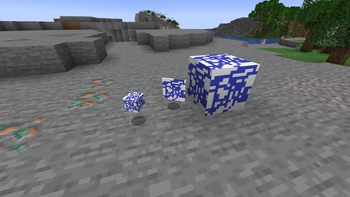
About this Mod
TestFabricAddItemMod1
Overview of this Mod
A mod made by 1510ty that adds items and blocks.
This mod was created as a trial by 1510ty, a Java beginner.
Please don't expect too much.
Versions prior to 3.1.1 are available on Github.
However, most of them are not translated into English and there are no explanations for the mods, so I don't recommend them.
This mod was created using IntelliJ IDEA.
Please note: 1510ty is Japanese, so some of the content of the mod may be in Japanese and some of the English may be translated, so you may feel uncomfortable.
what is added
・TestItem1
・TestBlock1
In future updates, more items that are useful for building will be added.
Test environment
Minecraft 1.21.4
Fabric lorder 0.16.10
Fabric API 0.114.2
CPU: Intel Core i7 13620H
RAM: 32GB 5200MT/s
SSD: 512GB
GPU:Nvidia Geforce RTX 4060 laptop
How to install
- Download the mod file (.jar) for your version of Minecraft.
- Download the FabricAPI that matches the version of Fabric loader.
- Install Fabric loader 0.16.10 on Launcher
- Move the downloaded Mod file and FabricAPI to the Mods folder in your profile.
- Start!
We plan to add a video on how to install it at a later date.
If you install this mod and want to play multiplayer, you will need to install it on both the client and the server.
others
The source code is available on Github.
Development environment: IntelliJ IDEA
About the creator 1510ty
1510ty on Scratch
https://scratch.mit.edu/users/1510ty/
Available Versions
How to Install TestFabricAddItemMod1 on Your Server
Order Server
Order a Minecraft Java server with at least 3 GB RAM (4 GB recommended).
Set fabric Loader
In the panel under "Egg", select the fabric loader and matching Minecraft version (1.21.4).
Install Mod
Open the mod browser in the dashboard and search for "TestFabricAddItemMod1". Click "Install" – done! Alternatively, upload the .jar via SFTP to the /mods folder.
Compatibility
Mod Loaders
Minecraft Versions
1.21.4
Server-side
✓ RequiredRecommended RAM
4 GB(min. 3 GB)Frequently Asked Questions
TestFabricAddItemMod1 server crashes on startup – what to do?
Most common cause: wrong fabric version or insufficient RAM. Check the server log (latest.log) for "OutOfMemoryError" or "Mixin" errors. With Mado Hosting: ensure at least 3 GB RAM is allocated and the loader matches the mod version (1.21.4). You can switch loaders with one click in the panel.
Is TestFabricAddItemMod1 compatible with fabric?
TestFabricAddItemMod1 officially supports fabric for Minecraft 1.21.4. The Mado dashboard automatically detects incompatible loader combinations.
Server lagging with TestFabricAddItemMod1 – how to optimize performance?
Recommended RAM: 4 GB (per 8 players). Use /spark profiler to check if TestFabricAddItemMod1 consumes the most tick time. Common fixes: reduce server view-distance to 8-10, install "performant" or "starlight" as supplementary mods on Forge. With Mado Hosting, your server runs on NVMe SSDs with dedicated CPU cores for minimal latency.
Similar Mods

![[ETF] Entity Texture Features](https://cdn.modrinth.com/data/BVzZfTc1/af683d206d50b05258d865b0d6e4aa2f2cee12f2_96.webp)
![[EMF] Entity Model Features](https://cdn.modrinth.com/data/4I1XuqiY/6e5bbd0d06b1741bfdab6c0cfab6de8fdaf0064c_96.webp)



Rent Modded Server
Install TestFabricAddItemMod1 with just one click on your server.