
AdvancedHUD
A unified HUD mod that does a lot of things!
Screenshots
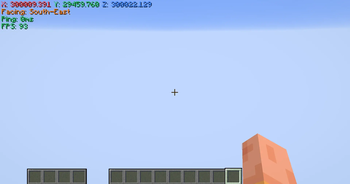
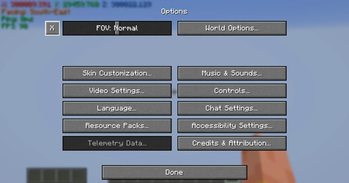
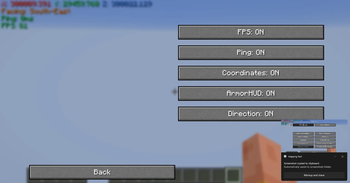
About this Mod
AdvancedHUD is a mod that can be shaped and bent to anyone's will. Built on the Fabric modding platform, it is designed to be lightweight and resource efficient. While I have tried to minimise external dependencies, it requires
Fabric API to work.
AdvancedHUD aims to eliminate the need of 3rd party libraries (aside from Fabric API) and also reduce resource usage by cutting down the extra code that is inherently copy-pasted between different individual mods with minor changes because they need them to work individually.
There are a lot of popular, customisable and somewhat resource efficient HUD mods out there, however they all lack one key detail, they are not unified and in some cases overlap, causing unexpected behaviour. Furthermore, most of these mods are created by different individuals or teams. Each one of them have their own way, preferences and design choices of making said mods, which may, make the user experience less clean overall. Another key detail to mention is that some of these mods require other library mods as (optional) dependencies, which adds unnecessary resource usage.
AdvancedHUD currently as of version 0.2.1 has the following features/can show the following:
- FPS
- Coordinates
- Direction
- Ping
- Armor
The features can be turned on/off individually and removes the need of having a separate mod specifically for displaying armor.
Disclaimer:
AdvancedHUD is still under development. New features and versions may take some time to release as there is only me as the sole developer.
AdvancedHUD is a name taken by, in my knowledge at least 3 projects including mine. I do not intend on impersonating or affiliating with said projects.
These projects are:
Important:
Some of you may notice that the ModID of my mod is the same as Advanced HUD - By Razuuu, worry not as I have asked permission for usage of said ModID from Razuuu. You can find my interaction with him here.
Available Versions
How to Install AdvancedHUD on Your Server
Order Server
Order a Minecraft Java server with at least 3 GB RAM (4 GB recommended).
Set fabric Loader
In the panel under "Egg", select the fabric loader and matching Minecraft version (26.1.2).
Install Mod
Open the mod browser in the dashboard and search for "AdvancedHUD". Click "Install" – done! Alternatively, upload the .jar via SFTP to the /mods folder.
Compatibility
Mod Loaders
Minecraft Versions
26.1.2
Server-side
✗ UnsupportedRecommended RAM
4 GB(min. 3 GB)Frequently Asked Questions
AdvancedHUD server crashes on startup – what to do?
Most common cause: wrong fabric version or insufficient RAM. Check the server log (latest.log) for "OutOfMemoryError" or "Mixin" errors. With Mado Hosting: ensure at least 3 GB RAM is allocated and the loader matches the mod version (26.1.2). You can switch loaders with one click in the panel.
Is AdvancedHUD compatible with fabric?
AdvancedHUD officially supports fabric for Minecraft 26.1.2. The Mado dashboard automatically detects incompatible loader combinations.
Server lagging with AdvancedHUD – how to optimize performance?
Recommended RAM: 4 GB (per 8 players). Use /spark profiler to check if AdvancedHUD consumes the most tick time. Common fixes: reduce server view-distance to 8-10, install "performant" or "starlight" as supplementary mods on Forge. With Mado Hosting, your server runs on NVMe SSDs with dedicated CPU cores for minimal latency.
Similar Mods




![[ETF] Entity Texture Features](https://cdn.modrinth.com/data/BVzZfTc1/af683d206d50b05258d865b0d6e4aa2f2cee12f2_96.webp)
![[EMF] Entity Model Features](https://cdn.modrinth.com/data/4I1XuqiY/6e5bbd0d06b1741bfdab6c0cfab6de8fdaf0064c_96.webp)
Rent Modded Server
Install AdvancedHUD with just one click on your server.