
AartBars
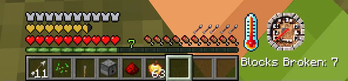
Customizable Minecraft HUD mod featuring a speedometer, thermometer, stuck arrows display, and block tracker.
Screenshots
About this Mod
AartBars - HUD Components
A lightweight Minecraft mod that adds various HUD components.

Features
Broken Block Tracker
- Tracks and displays the number of blocks broken by the player
- Simple text-based display
- Customizable position (right-aligned with experience bar by default)
- Counter persists across game sessions
Stuck Arrows
- Displays the number of arrows stuck in your player
- Arrow icon rendering
- Customizable position (right-aligned with food bar by default)
- Basic animation when arrow count changes
Speedometer
- Measures player movement speed
- Analog gauge display
- Customizable position (left of center by default)
- Smooth interpolation between speed changes
- Uses position history for accurate speed calculation
Thermometer
- Displays current biome temperature
- Graphical thermometer display
- Customizable position (left-aligned with health bar by default)
- Temperature range from -0.5 to 1.5
- Updates based on player's current biome
Options
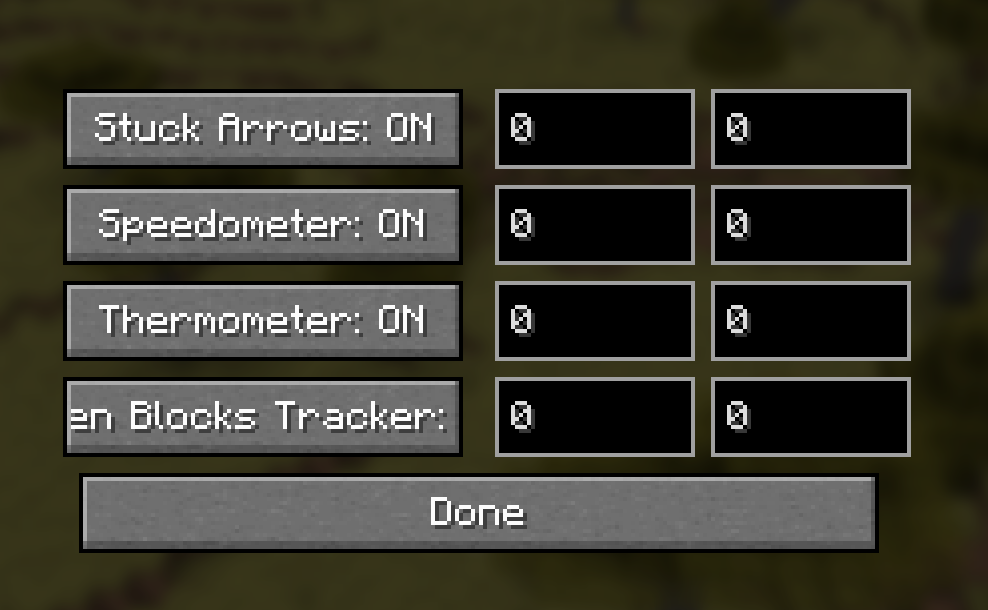
Adjust visibility and X/Y position offset. Menu hotkey needs to be bound.
Compatibility
- Works with Fabric API
- Client-side only - no server installation needed
Credits
- Technical Director: Aart
- Developer: aaddrick
- Special Thanks: Squeek from Appleskin fame, from whom I shamelessly stole the bones of this mode from.
License
This mod is released under the Unlicense, meaning you're free to use, modify, and distribute it however you like!
Available Versions
How to Install AartBars on Your Server
Order Server
Order a Minecraft Java server with at least 3 GB RAM (4 GB recommended).
Set fabric Loader
In the panel under "Egg", select the fabric loader and matching Minecraft version (1.21.4).
Install Mod
Open the mod browser in the dashboard and search for "AartBars". Click "Install" – done! Alternatively, upload the .jar via SFTP to the /mods folder.
Compatibility
Mod Loaders
Minecraft Versions
1.21.4
Server-side
✗ UnsupportedRecommended RAM
4 GB(min. 3 GB)Frequently Asked Questions
AartBars server crashes on startup – what to do?
Most common cause: wrong fabric version or insufficient RAM. Check the server log (latest.log) for "OutOfMemoryError" or "Mixin" errors. With Mado Hosting: ensure at least 3 GB RAM is allocated and the loader matches the mod version (1.21.4). You can switch loaders with one click in the panel.
Is AartBars compatible with fabric?
AartBars officially supports fabric for Minecraft 1.21.4. The Mado dashboard automatically detects incompatible loader combinations.
Server lagging with AartBars – how to optimize performance?
Recommended RAM: 4 GB (per 8 players). Use /spark profiler to check if AartBars consumes the most tick time. Common fixes: reduce server view-distance to 8-10, install "performant" or "starlight" as supplementary mods on Forge. With Mado Hosting, your server runs on NVMe SSDs with dedicated CPU cores for minimal latency.
Similar Mods




![[ETF] Entity Texture Features](https://cdn.modrinth.com/data/BVzZfTc1/af683d206d50b05258d865b0d6e4aa2f2cee12f2_96.webp)

Rent Modded Server
Install AartBars with just one click on your server.