
Additional Enchantments
Adds new enchantments to the game
Screenshots
About this Mod

FAQ
Versions / Loaders
- Fabric is not planned
- Backports are not being considered at the moment
Known problems
- The player transparency rendering of the
Hunterenchantment has some issues with transparent blocks (e.g. water)
Configuration
- All enchantments are configurable
- There might be some enchantment-related extra configuration
Enchantments
Enchantment Categories
- Melee: Sword, Axe and Trident
- Ranged: Bow and Crossbow
- Ranged and Trident: Entries from Ranged and Tridents
- Note that these are enchantments for projectiles, meaning for Tridents they only apply when thrown (and are therefor incompatible with the
Riptideenchantment)
- Note that these are enchantments for projectiles, meaning for Tridents they only apply when thrown (and are therefor incompatible with the
- Digger: Vanilla category and contains things like pickaxes or shovels
Faster Attacks (Melee)
- Default max. level: 4
- Increases attack speed
- Enchantment level increases the amount
Plague (Melee)
- Default max. level: 6
- Applies a poison effect to entities which deals magic damage
- Also has a chance to spread to nearby targets (does not affect players or Tamable Animals owned by players)
- Targets can be blacklisted with the tag
additional_enchantments:plague_blacklist
- Enchantment level increases the duration, damage, application chance and reduces the time between damage ticks
- In addition, it also increases the chance and range for the spread
- Not compatible with the
Witherenchantment
Wither (Melee)
- Default max. level: 6
- Applies a wither effect to entities which deals wither damage
- Enchantment level increases the duration, damage, application chance and reduces the time between damage ticks
- Not compatible with the
Poisonenchantment
Confusion (Melee)
- Default max. level: 5
- Has a chance to cause the attacked target to retaliate against a randomly chosen nearby entity, dropping the attacker as a target
- Targets can be blacklisted with the tag
additional_enchantments:confusion_blacklist
- Targets can be blacklisted with the tag
- Enchantment level increases the chance of this effect to occur and also the range to check against possible retaliation targets
Voiding (Digger)
- Max. level: 1
- Causes certain terrain blocks (specified by the tag
additional_enchantments:voiding) to no longer drop their block as loot- Other loot added to these blocks is not affected (e.g. Flint from Gravel)
- This behaviour can be enabled or disabled through the keybind (default being
G)
Hydro Shock (Trident)
- Default max. level: 5
- Deal increased damage to targets on fire, in water, weak to water or if it is raining at the position
- When the Trident is thrown it may cause a lightning bolt to occur at the target position
- The lightning bolt itself will not damage the player, items or experience orbs
- The fire will still damage the player - there is some safety to make items and experience orbs fire immune if the target dies within a second of getting hit by the lightning bolt
- When the Trident is thrown it may cause a lightning bolt to occur at the target position
- Enchantment level scales the damage multiplier and chance for the lightning bolt to occur
Explosive Tip (Ranged and Trident)
- Default max. level: 4
- Causes an explosion on impact (which does not damage the shooter, their allies, experience orbs or items)
- Enchantment level increases explosion radius
- It's possible to switch between two modes (NONE and BREAK (which breaks blocks)) with the keybind (default being
J)
Homing (Ranged and Trident)
- Default max. level: 4
- Projectiles fly towards a chosen target
- Targets can be blacklisted with the tag
additional_enchantments:homing_blacklist(minecraft:villagerandminecraft:iron_golemare added by default) - Invisible entities are only targeted if they're glowing (server-side (
Perceptionis client-only))
- Targets can be blacklisted with the tag
- Enchantment level increases the radius in which a target gets picked (+ it slightly increases velocity of the arrow)
- It's possible to switch between various modes with the keybind (default being
H)- Type: MONSTER, ANIMAL, BOSSES (
forge:bosses), ANY and NONE (homing effect is not being applied) - Priority: (when
Shiftis also pressed): CLOSEST, LOWEST_HEALTH, HIGHEST_HEALTH and RANDOM
- Type: MONSTER, ANIMAL, BOSSES (
Straight Shot (Ranged and Trident)
- Default max. level: 4
- Disables gravity for shot projectiles and has a chance to hit
Enderman - Enchantment level increases the chance to hit
Enderman
Tipped (Ranged and Trident)
- Default max. level: 4
- Applies random effects to the arrow (and in turn to the target it hits)
- Enchantment level increases the amount, amplifier and duration of the effects
- It's possible to switch between effect categories (HARMFUL, BENEFICIAL and NEUTRAL (can apply all)) with the keybind (default being
G)- Effects can be blacklisted with the tag
additional_enchantmetns:tipped_blacklist
- Effects can be blacklisted with the tag
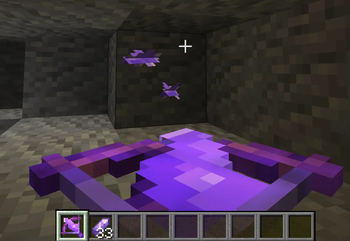
Shatter (Ranged)
- Default max. level: 4
- Allows the usage of
Amethyst Shardsas projectiles- There is a high chance for them to break on impact which will deal damage in an area (the projectile and area damage are
Magic)- Targets can be blacklisted with the tag
additional_enchantments:shatter_aoe_blacklist(minecraft:villagerandminecraft:iron_golemare added by default)
- Targets can be blacklisted with the tag
- There is a high chance for them to break on impact which will deal damage in an area (the projectile and area damage are
- Enchantment level increases the shatter area of effect and damage
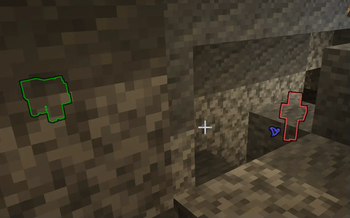
Perception (Helmet)
- Default max. level: 4
- Outlines nearby entities and distinguishes them by color
- DARK_PURPLE:
forge:bosses, RED: Monsters, DARK_GREEN: Tamable Animals, GREEN: Animals, BLUE: Other - Items are colored depending on the color of their display name (GOLD if none is available)
- DARK_PURPLE:
- Enchantment level increases the range
- It's possible to switch between different modes (ALL, NO_ITEMS and NONE) with the keybind (default being
U)- If
Shiftis pressed it will cycle through options for items, filtering them by rarity (COMMON, UNCOMMON, RARE, EPIC) - Entities can be blacklisted with the tag
additional_enchantments:perception_blacklist - It's configurable whether invisible entities are outlined or not (
trueby default)
- If
- Not compatible with the
Ore SightorTreasure Finderenchantment
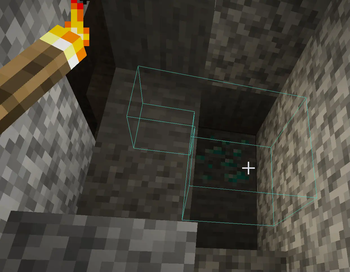
Ore Sight (Helmet)
- Default max. level: 4
- Outlines nearby ore blocks (even through walls) with different colors
- Blocks, required enchantment level, range and color are handled by the server configuration
- Not compatible with the
PerceptionorTreasure Finderenchantment
Note: The required enchantment level is an explicit check
- This means if you only configure up to enchantment level 4 and have some mod that increases the level to 5, it won't highlight anything anymore
- This allows you to hide common ores at a higher enchantment level
Treasure Finder (Helmet)
- Default max. level: 4
- Spawns particle at the position of nearby blocks
- Has extra logic to also spawn particles around treasure blocks - meaning containers with loot tables that have yet to generate said loot
- Blocks, required enchantment level, range and color are handled by the server configuration
- Not compatible with the
PerceptionorOre Sightenchantment
Note: The required enchantment level is an explicit check
- This means if you only configure up to enchantment level 4 and have some mod that increases the level to 5, it won't highlight anything anymore
- This allows you to hide common ores at a higher enchantment level
Bracewalk (Legs)
- Default max. level: 4
- Reduces the effectiveness of knock back while also breaking certain blocks which slow you down (specified by the tag
additional_enchantments:bracewalk) (e.g. Cobwebs) - Enchantment level scales the knock back reduction
Hunter (Boots)
- Default max. level: 6
- Causes you to become invisible (gaining hunter stacks) when you're walking on plant related blocks (or while you're inside them)
- Once you walk outside of those blocks you will slowly start to become visible again (losing hunter stacks)
- Becoming fully invisible will cause mobs to drop their focus on you, and they will no longer target you
- Attacking while being fully invisible will deal a critical strike - this will use up all of your hunter stacks
- The blocks are based on plant related material and the block tag
additional_enchantments:hunter_relevant(e.g. flowers, crops or leaves)
- Enchantment level increases the critical damage, the rate at which you gain hunter stacks and reduces the rate at which you lose them
- It will also reduce the amount of stacks needed to be considered at full stacks
Misc

Available Versions
How to Install Additional Enchantments on Your Server
Order Server
Order a Minecraft Java server with at least 3 GB RAM (4 GB recommended).
Set forge Loader
In the panel under "Egg", select the forge loader and matching Minecraft version (1.20.1).
Install Mod
Open the mod browser in the dashboard and search for "Additional Enchantments". Click "Install" – done! Alternatively, upload the .jar via SFTP to the /mods folder.
Compatibility
Mod Loaders
Minecraft Versions
1.20.1, 1.20, 1.19.2
Server-side
✓ RequiredRecommended RAM
4 GB(min. 3 GB)Frequently Asked Questions
Additional Enchantments server crashes on startup – what to do?
Most common cause: wrong forge version or insufficient RAM. Check the server log (latest.log) for "OutOfMemoryError" or "Mixin" errors. With Mado Hosting: ensure at least 3 GB RAM is allocated and the loader matches the mod version (1.20.1). You can switch loaders with one click in the panel.
Is Additional Enchantments compatible with forge and neoforge?
Additional Enchantments officially supports forge, neoforge for Minecraft 1.20.1, 1.20, 1.19.2. The Mado dashboard automatically detects incompatible loader combinations.
Server lagging with Additional Enchantments – how to optimize performance?
Recommended RAM: 4 GB (per 8 players). Use /spark profiler to check if Additional Enchantments consumes the most tick time. Common fixes: reduce server view-distance to 8-10, install "performant" or "starlight" as supplementary mods on Forge. With Mado Hosting, your server runs on NVMe SSDs with dedicated CPU cores for minimal latency.
Similar Mods




Rent Modded Server
Install Additional Enchantments with just one click on your server.