
Addoners Optimizers
High-performance Minecraft optimization mod that dynamically improves FPS and system efficiency while maintaining visual quality.
Screenshots



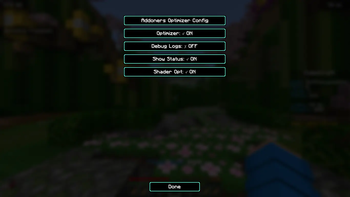
About this Mod
Addoners Optimizer
Addoners Optimizer is a client-side performance mod for Minecraft 1.26.1.2 (Fabric) that dynamically adjusts selected video settings based on real-time FPS measurements to help maintain smoother and more stable gameplay performance.
How it works
The mod samples the player's FPS every second using a rolling average and applies one of three optimization levels:
- LOW (≥80 FPS) — minimal adjustments, prioritizing visual quality
- MEDIUM (50–79 FPS) — moderate reductions to selected graphics settings
- AGGRESSIVE (<50 FPS) — stronger reductions intended to improve frame stability on lower performance systems
A 3-second cooldown between changes helps prevent rapid setting fluctuations.
Features
Automatically adjusts:
- Render distance
- Particle settings
- Smooth lighting
- Shader quality settings
Optional status HUD displaying:
- Current FPS
- Active optimization level
- Shader detection state
Shader-aware mode:
- Reduces optimization aggressiveness when Iris or Canvas shaders are detected
.addonersprofile system:- JSON-based profiles for hardware tiers or shader packs
- User-customizable optimization rules
Built-in profiles for:
- Quartzglow Shaderpack
- Skygleam Shaderpack
In-game configuration support through Mod Menu
Structured debug logging to
logs/latest.log
Adjustable settings
Depending on the active optimization profile, the mod can dynamically modify:
- Render distance (2–32 chunks)
- Particle settings
- Smooth lighting
- Shadow quality levels
- Shader toggles through profile rules
Requirements
- Minecraft 1.26.1.2
- Fabric Loader 0.18.6 or newer
- Fabric API
- Java 25+
- Mod Menu (optional)
Configuration
Config location:
%appdata%/.minecraft/config/teamaddoners/modconfig.json
Profiles folder:
%appdata%/.minecraft/config/teamaddoners/profiles/
No manual setup is required. The optimizer starts automatically when Minecraft launches.
Performance notes
Performance impact and effectiveness may vary depending on:
- Hardware specifications
- Installed mods
- Shader packs
- World complexity
- Render resolution
- Server load
Testing was primarily performed on systems using Fabric with Sodium-based rendering environments under varying render distances and shader configurations.
Available Versions
How to Install Addoners Optimizers on Your Server
Order Server
Order a Minecraft Java server with at least 3 GB RAM (4 GB recommended).
Set fabric Loader
In the panel under "Egg", select the fabric loader and matching Minecraft version (26.1.2).
Install Mod
Open the mod browser in the dashboard and search for "Addoners Optimizers". Click "Install" – done! Alternatively, upload the .jar via SFTP to the /mods folder.
Compatibility
Mod Loaders
Minecraft Versions
26.1.2
Server-side
✗ UnsupportedRecommended RAM
4 GB(min. 3 GB)Frequently Asked Questions
Addoners Optimizers server crashes on startup – what to do?
Most common cause: wrong fabric version or insufficient RAM. Check the server log (latest.log) for "OutOfMemoryError" or "Mixin" errors. With Mado Hosting: ensure at least 3 GB RAM is allocated and the loader matches the mod version (26.1.2). You can switch loaders with one click in the panel.
Is Addoners Optimizers compatible with fabric?
Addoners Optimizers officially supports fabric for Minecraft 26.1.2. The Mado dashboard automatically detects incompatible loader combinations.
Server lagging with Addoners Optimizers – how to optimize performance?
Recommended RAM: 4 GB (per 8 players). Use /spark profiler to check if Addoners Optimizers consumes the most tick time. Common fixes: reduce server view-distance to 8-10, install "performant" or "starlight" as supplementary mods on Forge. With Mado Hosting, your server runs on NVMe SSDs with dedicated CPU cores for minimal latency.
Similar Mods




Rent Modded Server
Install Addoners Optimizers with just one click on your server.