
About this Mod
AdiCrafter
This mod adds only one block: the automated crafter.
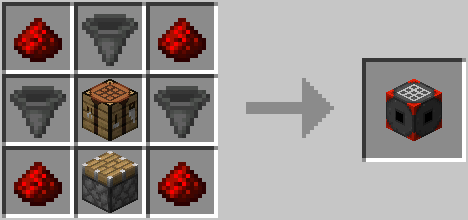
The automated crafter pulls ingredients from neighboring containers and inventories, including chests, hopper and other
automated crafters, and any other blocks that implements the Fabric transfer API.
Crafter configuration
You can select the recipe to craft by opening the configuration screen. Simply right-click (use) the block.
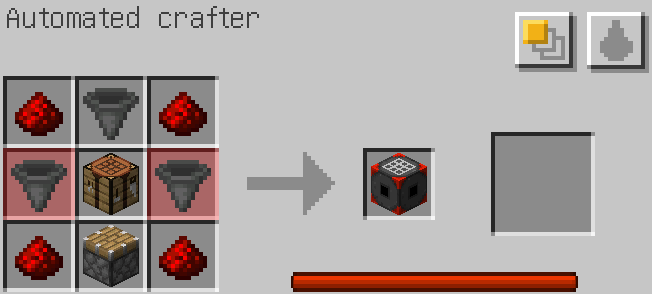
Recipe
Edit the crafting grid on the left. The result of any valid recipe will show on the middle slot, and the right slot can
be used to manually craft the recipe.
Note that the right slot will not show anything if there is no enough ingredients available. Missing ingredients are
highlighted in the crafting grid.
Fuzzy mode
By default, the automated crafter tries to find the exact items used in its crafting grid, but the "fuzzy" option allows
to use any compatible items, e.g. using any kind of plank to craft a chest.
Fluid substitution
There is also an option to replace anything fluid container items (buckets, bottles, ...) by pulling fluids from
neighboring tanks, like cauldrons.
This is of limited use with vanilla minecraft, but it can become handy with third-party mods that add a lot of new
fluids and recipe.
Internal power
The automated crafter has an internal storage of power that steadily refills over time. Crafting an object consumes some
of this power. With the default configuration, a fully-loaded crafter can craft 10 items in a row.
This can be disabled or tweaked in the configuration file.
Activation
The automated crafter will not craft anything unless you try to pull some items from it. You can do so manually, or by
using other item extracting blocks, like the hopper.
Mod configuration
The mod reads its configuration from the file config/adicrafter.json. It creates it if it does not exist.
Available Versions
How to Install AdiCrafter on Your Server
Order Server
Order a Minecraft Java server with at least 3 GB RAM (4 GB recommended).
Set fabric Loader
In the panel under "Egg", select the fabric loader and matching Minecraft version (1.18.1).
Install Mod
Open the mod browser in the dashboard and search for "AdiCrafter". Click "Install" – done! Alternatively, upload the .jar via SFTP to the /mods folder.
Compatibility
Mod Loaders
Minecraft Versions
1.18.1
Server-side
✓ RequiredRecommended RAM
4 GB(min. 3 GB)Frequently Asked Questions
AdiCrafter server crashes on startup – what to do?
Most common cause: wrong fabric version or insufficient RAM. Check the server log (latest.log) for "OutOfMemoryError" or "Mixin" errors. With Mado Hosting: ensure at least 3 GB RAM is allocated and the loader matches the mod version (1.18.1). You can switch loaders with one click in the panel.
Is AdiCrafter compatible with fabric?
AdiCrafter officially supports fabric for Minecraft 1.18.1. The Mado dashboard automatically detects incompatible loader combinations.
Server lagging with AdiCrafter – how to optimize performance?
Recommended RAM: 4 GB (per 8 players). Use /spark profiler to check if AdiCrafter consumes the most tick time. Common fixes: reduce server view-distance to 8-10, install "performant" or "starlight" as supplementary mods on Forge. With Mado Hosting, your server runs on NVMe SSDs with dedicated CPU cores for minimal latency.
Similar Mods




![[ETF] Entity Texture Features](https://cdn.modrinth.com/data/BVzZfTc1/af683d206d50b05258d865b0d6e4aa2f2cee12f2_96.webp)
![[EMF] Entity Model Features](https://cdn.modrinth.com/data/4I1XuqiY/6e5bbd0d06b1741bfdab6c0cfab6de8fdaf0064c_96.webp)
Rent Modded Server
Install AdiCrafter with just one click on your server.