
Admin Commands
The ultimate server-side utility mod for NeoForge. Manage your players, chat, and teleports with zero TPS impact and zero client-side downloads!
Screenshots

About this Mod
Admin Commands
The ultimate server-side utility and essentials replacement for NeoForge.


⚡ What is Admin Commands?
Admin Commands is a highly optimized, fully-featured, server-side-only administration mod for NeoForge. It replaces bloated, laggy essential plugins with a single, tightly-integrated solution built directly into the game's command dispatcher.
Whether you're running a small private server or a massive SMP network, Admin Commands gives you the tools to moderate, customize, and control your server with zero client-side installation required.
🚀 Key Features
⏱️ Built for TPS Performance
Unlike many server-side mods, Admin Commands is engineered from the ground up to have zero impact on your server's TPS (Ticks Per Second).
- In-Memory Caching: Heavy operations like Jail rubber-banding and Display Name formatting are cached in
ConcurrentHashMaps. - Zero Disk I/O on Tick: Does not perform disk lookups during critical game loops.
- Fast-Path Events: Cancels unauthorized interactions instantaneously.
🛡️ Complete Jail System (/jail)
A robust, inescapable jail system designed for serious moderation.
- Create up to 10 persistent jails.
- Automatically strips and stores the jailed player's inventory.
- Disables commands, block breaking/placing, item pickups, dropping, and PVP/PVE damage for the jailed player.
- Instant rubber-banding if they attempt to escape or glitch out.
/releasesafely restores their original location and fully returns their inventory.
💬 Deep Chat & Vanity Customization
Give your players the identity they deserve without needing a separate chat plugin.
- Set custom Nicknames, Prefixes, and Suffixes.
- Full support for standard Minecraft color formatting codes (
&a,&l,&o, etc.). - Custom formats are instantly reflected in both the Chat and the Tab List.
🌍 Teleportation & Waypoints
- Warps: Create global server warps for community hubs or arenas.
- Homes: Allow players to set personal home points to easily return to their base.
/back: Instantly return to your previous location after teleporting or dying.
👻 Powerful Moderation Tools
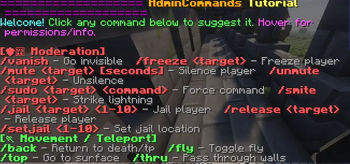
/vanish: Become completely invisible to regular players (hidden from the world and Tab List)./freeze: Stop a player dead in their tracks, preventing all movement./mute: Silence disruptive players temporarily or permanently.
📋 Full Command List
Tip: You can prefix any command with
/ac:(e.g.,/ac:fly) to bypass conflicts with other mods!
| Category | Commands |
|---|---|
| Moderation | /jail, /setjail, /release, /freeze, /mute, /unmute, /vanish, /smite, /sudo |
| Teleportation | /warp, /home, /sethome, /delhome, /homes, /back, /top, /thru, /spawn, /tphere |
| Vanity | /nickname, /prefix, /suffix, /itemname, /itemlore |
| Utility | /fly, /god, /heal, /feed, /repair, /speed, /whois, /dimension, /broadcast, /seeinv, /ec, /kit, /c, /s, /sp, /ad |
(Type /admincommands in-game for an interactive clickable tutorial menu!)
⚙️ Installation & Compatibility
- Server-Side Only: This mod only needs to be installed on the server! Players connecting do not need to download the mod, making it perfect for vanilla clients.
- NeoForge Compatible: Built natively for NeoForge, ensuring deep integration with modern Minecraft servers.
- Permissions: Integrates seamlessly with standard NeoForge permission nodes.
🐛 Support & Feedback
If you encounter any bugs, have a feature request, or just want to see the source code, please visit our Github.
Available Versions
How to Install Admin Commands on Your Server
Order Server
Order a Minecraft Java server with at least 3 GB RAM (4 GB recommended).
Set neoforge Loader
In the panel under "Egg", select the neoforge loader and matching Minecraft version (26.1.2).
Install Mod
Open the mod browser in the dashboard and search for "Admin Commands". Click "Install" – done! Alternatively, upload the .jar via SFTP to the /mods folder.
Compatibility
Mod Loaders
Minecraft Versions
26.1.2
Server-side
✓ RequiredRecommended RAM
4 GB(min. 3 GB)Frequently Asked Questions
Admin Commands server crashes on startup – what to do?
Most common cause: wrong neoforge version or insufficient RAM. Check the server log (latest.log) for "OutOfMemoryError" or "Mixin" errors. With Mado Hosting: ensure at least 3 GB RAM is allocated and the loader matches the mod version (26.1.2). You can switch loaders with one click in the panel.
Is Admin Commands compatible with neoforge?
Admin Commands officially supports neoforge for Minecraft 26.1.2. The Mado dashboard automatically detects incompatible loader combinations.
Server lagging with Admin Commands – how to optimize performance?
Recommended RAM: 4 GB (per 8 players). Use /spark profiler to check if Admin Commands consumes the most tick time. Common fixes: reduce server view-distance to 8-10, install "performant" or "starlight" as supplementary mods on Forge. With Mado Hosting, your server runs on NVMe SSDs with dedicated CPU cores for minimal latency.
Similar Mods




Rent Modded Server
Install Admin Commands with just one click on your server.