
Advanced Ender Dragon
Addressing the issue that most existing Minecraft mods rely on "adding powerful new mobs" or "modifying vanilla values to be overpowered," resulting in simplistic gameplay and limited replayability, this mod innovatively adopts a "mechanic overhaul" approa
Screenshots
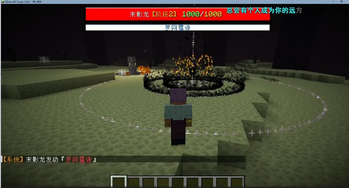
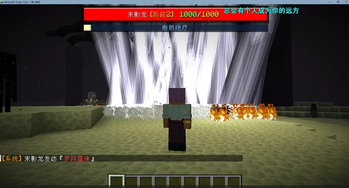
About this Mod
This is a very interesting mod! I’m sure you’ve beaten Minecraft countless times. Today, modpacks and mods are blooming everywhere, but they mostly boil down to two things: first, adding other powerful mobs; second, modifying vanilla values to make them extremely overpowered. For example, the "Minecraft Is Too Easy" series—while it’s indeed harder to beat, it doesn’t have much replay value. That’s why I came up with a better idea: instead of tweaking numbers, let’s change the mechanics. And the mod below is what I’m bringing to you—it overhauls the Ender Dragon’s mechanics to make it even more formidable. I’ve upgraded it to have a two-phase health system. Defeating its first phase is not too different from the vanilla version, but after entering the second phase, its attacks will be enhanced, and it can absorb health from nearby Endermen. This means you’ll need teamwork with other players, making the game much more challenging!
Available Versions
How to Install Advanced Ender Dragon on Your Server
Order Server
Order a Minecraft Java server with at least 3 GB RAM (4 GB recommended).
Set forge Loader
In the panel under "Egg", select the forge loader and matching Minecraft version (1.20.1).
Install Mod
Open the mod browser in the dashboard and search for "Advanced Ender Dragon". Click "Install" – done! Alternatively, upload the .jar via SFTP to the /mods folder.
Compatibility
Mod Loaders
Minecraft Versions
1.20.1
Server-side
✓ RequiredRecommended RAM
4 GB(min. 3 GB)Frequently Asked Questions
Advanced Ender Dragon server crashes on startup – what to do?
Most common cause: wrong forge version or insufficient RAM. Check the server log (latest.log) for "OutOfMemoryError" or "Mixin" errors. With Mado Hosting: ensure at least 3 GB RAM is allocated and the loader matches the mod version (1.20.1). You can switch loaders with one click in the panel.
Is Advanced Ender Dragon compatible with forge?
Advanced Ender Dragon officially supports forge for Minecraft 1.20.1. The Mado dashboard automatically detects incompatible loader combinations.
Server lagging with Advanced Ender Dragon – how to optimize performance?
Recommended RAM: 4 GB (per 8 players). Use /spark profiler to check if Advanced Ender Dragon consumes the most tick time. Common fixes: reduce server view-distance to 8-10, install "performant" or "starlight" as supplementary mods on Forge. With Mado Hosting, your server runs on NVMe SSDs with dedicated CPU cores for minimal latency.
Similar Mods




Rent Modded Server
Install Advanced Ender Dragon with just one click on your server.