
Advanced TFC Blueprint
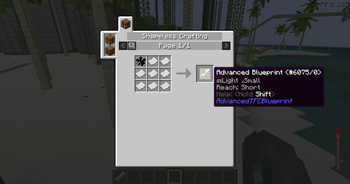
The Advanced Blueprint aims to enhance the functionality of TFC blueprints. This mod is a reconstruction of the Advanced Blueprint. Since the original mod's files or code were unavailable, a similar mod was developed independently.
Screenshots
About this Mod
Advanced Blueprint
The Advanced Blueprint aims to enhance the functionality of TFC blueprints. This mod is a reconstruction of the Advanced Blueprint. Since the original mod's files or code were unavailable, a similar mod was developed independently.
Item Usage
- Import Schematic: Use the new blueprint, hold
Shiftand right-click on a detailed block to import the block's schematic into the blueprint. You can also right-click in the air to edit the blueprint directly. - Apply Schematic: Once the blueprint stores a schematic, right-click on a detailed block to apply the blueprint's schematic. Similar to TFC blueprints, a hammer and chisel are required in the hotbar to apply the schematic.
- Edit Schematic: Right-click in the air to open the Advanced Blueprint GUI for schematic editing.
GUI Usage
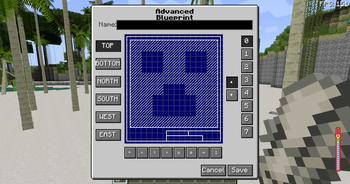
- GUI Title: The top section is the GUI title, which can be ignored.
- Blueprint Naming: Below the title, you can input any string as the blueprint's name. After saving, this name will be used as the item's name.
- Blueprint Controls:
- Left-click to toggle whether the current position is carved. The default state is uncarved, displayed as a slashed grid.
- Right-click to toggle the state of all blocks on the current layer and below.
- Left-click and drag to carve a continuous area.
- Operation Buttons:
- Below the blueprint controls, there are 8 buttons that allow you to perform the following operations on the carved schematic:
- Move left
- Move right
- Move up
- Move down
- Rotate 90° clockwise
- Rotate 90° counterclockwise
- Mirror left-right
- Mirror up-down
- Below the blueprint controls, there are 8 buttons that allow you to perform the following operations on the carved schematic:
- View Direction:
- On the left side of the blueprint controls, there are 6 buttons to select the viewing direction. The default is
TOP(viewing the blueprint from above).
- On the left side of the blueprint controls, there are 6 buttons to select the viewing direction. The default is
- View Layer:
- On the right side of the blueprint controls, buttons allow you to select the current viewing layer. The layer closest to you is
0, and the farthest is7.
- On the right side of the blueprint controls, buttons allow you to select the current viewing layer. The layer closest to you is
- Save and Cancel:
- The two buttons at the bottom right are used to either cancel the current changes or save the blueprint:
- Cancel: Reads data from NBT and overwrites the current changes.
- Save: Stores the current data into NBT.
- The two buttons at the bottom right are used to either cancel the current changes or save the blueprint:
Notes
- The blueprint can be edited and used infinitely without being consumed, making its recipe relatively expensive.
- This mod is an addon of both terrafirmacraft and terrafirmacraftplus, download the correct version to play.
- This mod needs ModularUI and ModularUI2, developed by GTNH team.
Planned Features
- Save and load blueprints to and from files.
- Share blueprints with other players on the server.
- Add a block to upload and download blueprints to and from the server.
Available Versions
How to Install Advanced TFC Blueprint on Your Server
Order Server
Order a Minecraft Java server with at least 3 GB RAM (4 GB recommended).
Set forge Loader
In the panel under "Egg", select the forge loader and matching Minecraft version (1.7.10).
Install Mod
Open the mod browser in the dashboard and search for "Advanced TFC Blueprint". Click "Install" – done! Alternatively, upload the .jar via SFTP to the /mods folder.
Compatibility
Mod Loaders
Minecraft Versions
1.7.10
Server-side
✓ RequiredRecommended RAM
4 GB(min. 3 GB)Frequently Asked Questions
Advanced TFC Blueprint server crashes on startup – what to do?
Most common cause: wrong forge version or insufficient RAM. Check the server log (latest.log) for "OutOfMemoryError" or "Mixin" errors. With Mado Hosting: ensure at least 3 GB RAM is allocated and the loader matches the mod version (1.7.10). You can switch loaders with one click in the panel.
Is Advanced TFC Blueprint compatible with forge?
Advanced TFC Blueprint officially supports forge for Minecraft 1.7.10. The Mado dashboard automatically detects incompatible loader combinations.
Server lagging with Advanced TFC Blueprint – how to optimize performance?
Recommended RAM: 4 GB (per 8 players). Use /spark profiler to check if Advanced TFC Blueprint consumes the most tick time. Common fixes: reduce server view-distance to 8-10, install "performant" or "starlight" as supplementary mods on Forge. With Mado Hosting, your server runs on NVMe SSDs with dedicated CPU cores for minimal latency.
Similar Mods




![[ETF] Entity Texture Features](https://cdn.modrinth.com/data/BVzZfTc1/af683d206d50b05258d865b0d6e4aa2f2cee12f2_96.webp)

Rent Modded Server
Install Advanced TFC Blueprint with just one click on your server.